Tidy Start Menu lets you organize your Windows start menu with ease, If you do install a lot of applications on your computer, navigating and finding the application shortcut of choice in the multi-page start menu becomes quite difficult, Tidy Start Menu solves the problem by letting you categories application shortcuts under different folders like Games, Multimedia, Internet etc. making the whole thing more logical and easier to use.
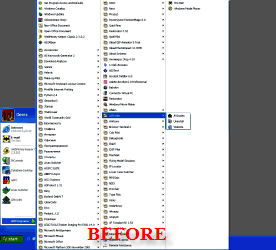
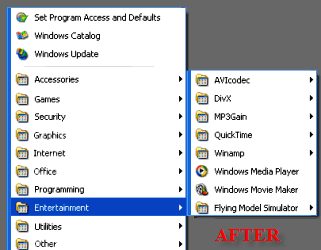
Tidy Start Menu lets you manage different menus for different users on your PC, letting you hide unnecessary programs from your children or employees, you can also use the obsolete shortcut search functionality to remove unnecessary shorctuts.
The software is available in two versions Free and Paid, for most users the free version will be sufficient, Visit site for details.
Add new comment