Submitted by Deepesh Agarwal on Sun, 07/20/2008 - 09:32
 If you upgraded to the latest iPhone firmware version 2.0 by mistake and bricked your iPhone or don't like the new upgrade here are simple to follow step by step instructions to restore iPhone or iPod Touch to an earlier firmware of your choice.
- Uninstall iTunes 7.7 and Install iTunes 7.5.
- Connect your phone to computer via USB.
- Turn off the phone.
- Place your phone in DFU mode (Device Firmware Upgrade) as described below:
- Push and hold Home and Power buttons on your phone simultaneously for 10 seconds.
- Release the Power button but keep holding Home until the computers beeps recognizing the USB device.
- You should be in DFU mode now.
- Download and save your desired iPhone and iPod Firmware Version Files.
- Now go ahead with the restore to your desired iPhone firmware using iTunes 7.5, to do so simply Hold down Shift key and press the Restore button in iTunes.
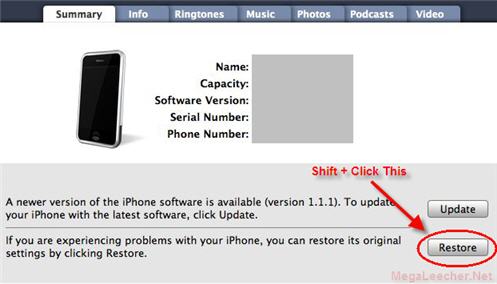
- Select your iPhone restore file to continue.
- Once restored you can Jailbreak and Unlock your iPhone using various other methods.

Here are the video instructions for the steps above.
Video Instructions:
To follow the method described in the video above you will need to download files below:
Note: The above procedure is meant for advanced users only and might render your hardware useless if done incorrectly, Please follow the above advice at your own risk.
Comments
Wont work
This method would only downgrade the basic software, you will also need to downgrade the baseband and the firmware on some chips.
help
says itunes.itl was created by newer version of itunes...wat do i do
just do a search in my
just do a search in my computer, make sure you check *search hidden and system files. then the file will pop up then delete it.
RE: help
delete all ur itunes files on ur my music folder
Advertising on 'Megaleecher.net'
Dear webmaster of 'Megaleecher',
Is it possible to advertise on your website? I work for an online advertising firm with offices in Switzerland and Germany.
Yours sincerely,
Maria
Pls, use the contact form http://www.megaleecher.net/contact to send your detailed proposal.
I got it to work!!
Iphone 2g got it from Apple today since my last one was still under hardware warranty and I cracked the screen.
any case the fat cow behind the apple genius bar already gave me my phone upgraded to 2.2 I just download QuickPWN2.2 and boom done no need to downgrade I think the problem comes in if you have a 3G phone with 2G you are good!
not workin
hey
i am trying to downgrade my iphone using this technique but its been stuck or wateva maybe at the Restoring iPhone Firmware for more than 30minutes as of now....any suggestions...did i do sumthing wrong???please help me
Add new comment