Submitted by Deepesh Agarwal on Sun, 04/01/2012 - 03:53
 For a limited time, Raxco Software is offering a special edition of their popular disk-defragmentation utility PerfectDisk Free Defrag at no cost. With time and usage your computer data storage disk gets fragmented and thus needs defragmentation, a defragmented computer will not only work at best possible speeds but also boot quicker. PerfectDisk is the world's leading disk defragmentation and optimization utility, PerfectDisk software's are used not only used in homes but at enterprise level for their safety and reliability. Unlike other disk defrgemteation utilities PerfectDisk uses there patented file placement strategy called SMARTPlacement for best results.
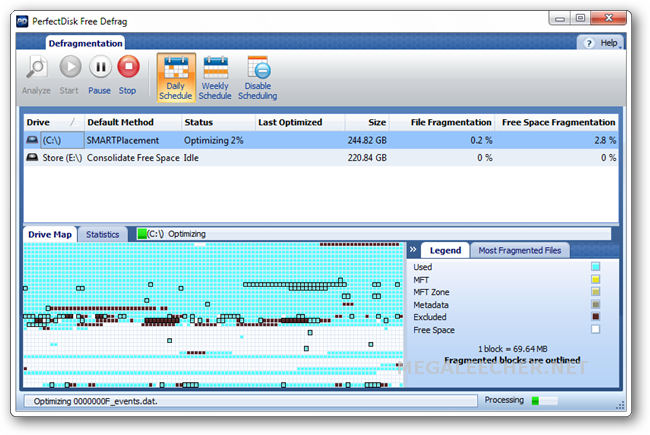
PerfectDisk Free Defrag launches with a Quick Defrag scan and optimization, then defaults to the patented exclusive SMARTPlacement intelligent optimization method.
- SMARTPlacement is PerfectDisk’s patented default method that defragments all your files, consolidates free space, and optimizes the drive according to file usage. It provides the most complete defragmentation possible and slows down refragmentation of your drive.
- Quick Defrag only defragments fragmented files without attempting to place files according to usage patterns or attempting to consolidate free space. It provides the fastest defragmentation pass but is not the most thorough and it should only be used if you have lots of free space.
- SSD Optimize consolidates free space on a Solid State Drive to improve SSD write performance. SSDs are not affected by file fragmentation like traditional electromechanical disk drives and defragmentation can shorten the lifespan of the SSD. SSD Optimize improves SSD performance without unnecessarily and harmfully defragmenting the drive. *This option only appears if PerfectDisk detects a Solid State Drive on your system.
Download Full-version of PerfectDisk Free Defrag:
Comments
dont install
when i click to install, the software say:
This installation supports does not support your processor type
i have a AMD Phenom X6
Worked for me
I got the same message as you did - I have AMD too. But I tried to install it again and it worked. Maybe you should give it another shot.
The same happens with
The same happens with me...Intel core i5
Add new comment