Inserting pictures in Microsoft Office applications is an easy job, but extracting and saving images from MS-Office files can be a tricky task as Microsoft office does not provide any easy to use option to perform such action, Today I will be sharing some tips to get images out of Microsoft Office documents.
Method #1
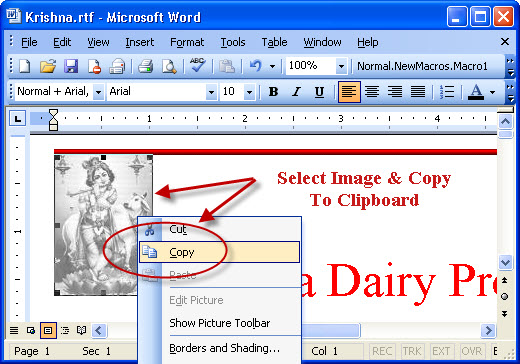
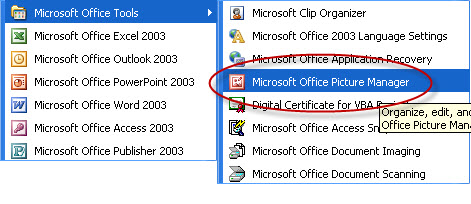
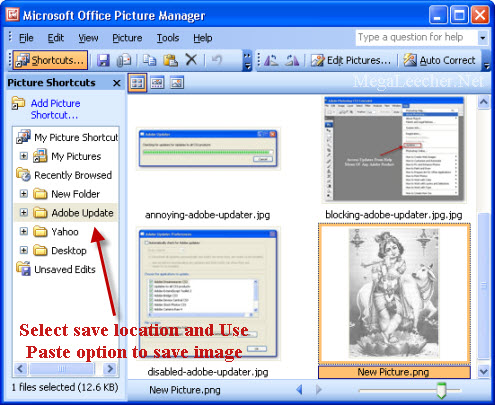
The most simple method would be to select and copy the image into clipboard, and then pasting into your favorite image editor which can then be saved to your image format of choice, alternatively, you can also paste the image directly as an image-file via Microsoft Office Picture Manager as shown below:
- Copy the image into clipboard.
- Launch Microsoft Office Picture Manager.
- Browse to the folder of your choice, and use Paste command to save the clipboard content as an image.
Method #2
If you have quite a few images the best option would be to save your document as an Webpage and then collect images from the resulting folder, If the document is in Microsoft Word 2007 format having .docx extension you can simply unzip the file and get the images.
Comments
THANKS A LOT!
THANKS A LOT!
thaks but
i need to save it into a file so i can use thepic on you tube how i do that?
striving hard to know how to do this
THANKS A LOT
Thanks.
Thanks but its not in JPEG image, I cannot upload it to other site.
Thanks. I had been trying to
Thanks. I had been trying to follow the method suggested by Microsoft in Help and Support but that didn't work at all.
Add new comment