Submitted by Deepesh Agarwal on Sun, 06/14/2009 - 07:57
 Tab overload and its performance impact on system is a big annoyance most Firefox users experience, While there have been Firefox extensions like TooManyTabs to get rid of this tab-overload but none actually addressed the problem in a more practical way then the brand new Firefox addon Cluster Tabs for Firefox does, the addon allows users to easily create and save group of Firefox tabs as clusters unloading them from memory allowing easy retrieval later-on.
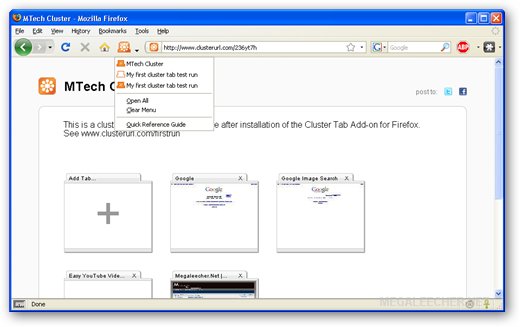
The best part is that every cluster has a unique anonymous cluster URL which can be shared with friends and published on internet like this.
Cluster Tabs for Firefox Features :
- Tabs held within a cluster tab stop using memory resulting in faster performance.
- Tabs within a cluster tab retain history which means that you can carry on from where you left off. Close any tab and it will return to the cluster tab it came from.
- Your history is private.??History in tabs within Cluster URLs is retained in your browser only. No one sees anyone else’s history.
- When you add or remove tabs from a cluster you did not create yourself, a copy is made for you and a new clusterURL is spun out into the web.
- No sign up, simply install and go. Cluster tabs for Firefox and clusterurl.com are anonymous and free.
You can install Cluster Tabs from our Power User firefox addon collection here.
Comments
Thanks for sharing this link
it is a great program
From the Cluster Team
Cluster Tabs for Firefox update available, includes posting to Friendfeed and Mozillaca - http://bit.ly/uQlXk - 3000+ humans can't be wrong!
Add new comment