 If you use Adobe Creative Suite 3 and if it stops working asking you to uninstall and then reinstall the application citing some license issue as shown below:
---------------------------
Licensing for this product has stopped working.
---------------------------
You cannot use this product at this time. You must repair the problem by uninstalling and then reinstalling this product or contacting your IT administrator or Adobe customer support for help.
---------------------------
OK
---------------------------
Don't panic as you won't necessarily need to re-install the application suite as suggested by the error, it could be a simple FLEXNet Licensing Service issue, which can easily be resolved as described next.
Fixing Adobe CS2/CS3 Licensing Issue:
- Goto Start -> Run, type in services.msc in Run box and press Enter.
- Navigate to FLEXnet Licensing Service and enable it as shown below:
- Restart computer and launch any Adobe CS3 application, The error should be fixed now.
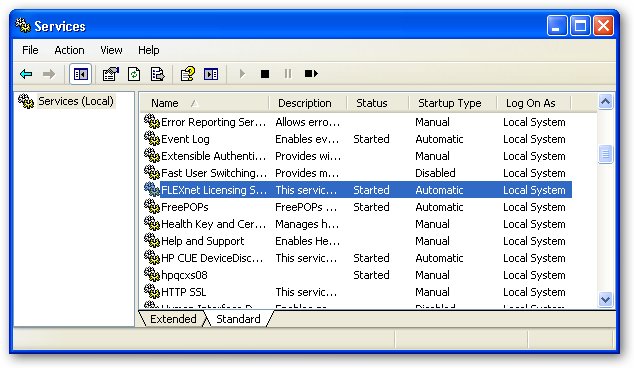
UPDATE: As pointed out in comments if you are unable to find FLEXnet Licensing Service, try this patch from Adobe.
Comments
missing
What if it's missing from Services window?
I have a problem, can't open photoshop after installation. Tried all, trying to install it in simplified mode but can't find Flexnet to enable it before Rebooting.
What might be the cause?
viktor
vnagornyy@viktorix.com
i have the same problem.
i have the same problem. can't find flexnet anywhere on pc...
Thanks
It worked for me, somehow it was set to manual and not started :/ But now everything works okay, thank you :)
THANKSSSS
Thanks alot it solved the problem super fast.
Thanks a lot!
This solves my problem.
It's missing.
Yeah the FLEXnet licensing is missing from the services window.
Adobe CS4
I was receiving the following using Adobe CS4 products and the above fix worked well, Thanks.
---------------------------

Licensing for this product has stopped working.

---------------------------

This product has has encountered a problem which requires that you restart your computer before it can be launched.
If you continue to see this message after restarting your computer, please contact either your IT administrator or Adobe technical support for help, and mention the error code shown at the bottom of this screen.
Error: 148:3
http://www.adobe.com/support/
---------------------------
OK
---------------------------
can someone please answer as
can someone please answer as to why FlexNet might not be in the services window ?!?!
Thanks
Yes, it works!!!! Great, Thank´s a Lot!!!
What if you are using it off
What if you are using it off an external hard drive?
Mac
Would like the way to solve this problem on a Mac...
reply
if you are facing the issues with mac, please navigate to library>preferences
you'll find the FLEXnet publisher folder. trash it and empty the trash bin
( Keep a backup of the folder on another drive if in case something goes wrong)
that should fix the issue
Thanks! I have used your
Thanks! I have used your solution of trashing the FLEXnet folder several times now and it works well.
Thank you so much. Very
Thank you so much.
Very simple to follow.
thank you so much
your tip is very help full.
thanks
It works.
For that error, it should work. Also check your firewall, it might not be letting adobe make a certain connection that it needs to in order to verify license.
Enable Flexnet by going to
Start > Control Panel > Administrative Tools > Services
Navigate to FLEXnet Licensing Service, right click, click properties, set startup type to manual, or automatic, click Start the service.
You saved the day.
if the buttons are not enabled to restart. make you click apply first.
This was a huge time saver. I install cs4 and had errors at the very end. so I uninstalled the whole thing. it took all night.
So then when I went to us cs3 I got this error.
Thankfully this worked, but I wonder if this is why cs4 failed. it takes forever with 4 disks and you cannot touch the machine.
I will check back if this solves the cs4 install error.
Thankz
thankz i loveeee uuuu ^^ hahaha
problem persists
I did try to do what is been directed...but still my problem continues..
.tried with FlexNet service properties
.firewall properties
please help me
Missing FLEXnet Licensing Service
After Photoshop CS3 by software download I also had a similar problem with this license missing from the 'Services profile'. The company I purchsed it from tried to help with various troubleshooting methods but nothing worked.
In the end I took a gamble and after backing up files and copying all essential software I re-installed Windows Vista. After completing the installation I was dissapointed to find the license was still missing from the 'Services profile' but decided to extract the Photoshop software anyway, this time when set-up appeared to my surprise it continued the process instead of disappearing after a couple of seconds and then nothing else happening. Photoshop is now working fine and the license has miraculously appeared in the 'Service profile'. Unfortunately it is a painstaking process, which took me about 3 to 4 evenings to get my computer totally up and running again. I'm not saying it will work for you or anyone else, but it is an option. Good luck.
thx
thx
Thank You
May I please Have Your Name?
Thank you so much!
Yay!
Thank you so much!
thank you so much
thank you so much friend.............
hi
i followed ur instruction, restarted the computer.. but its still d same.. tnx anywei!
Just kill the process FNPLicensingService.exe
You can sort this out by ending the process called FNPLicensingService.exe using your Windows Task Manager - Processes tab.
Then kill the program that gets stuck if you started it too and restart that.
I've tried to do what you
I've tried to do what you have instructed but the error still the same.
Can you pls. help?
Removed CS3 to re-install - it doesn't want to
"You cannot use this product at this time. You must repair the problem by uninstalling and then reinstalling this product or contacting your IT administrator or Adobe customer support for help."
I didn't read these posts and I 'panicked'. Removed CS3. Now it doesn't allow me to re-install the software again. It installs Adobe Acrobat 8 reader only. It says 'installation error'after a while and lists everything from illustrator, dreamweaver, etc...
How can I install it back? Any idea plz?
Thankyou
Thanks so much for solving this problem - it worked, and was quick and easy to do. I was beside myself when mine stopped working and now it's back. Thanks so much for such clear instructions.
You have saved me.
After days of frustration not being able to use Photoshop and many £££,s in phone calls, I accidentally came across your site.
3 minutes later I was up and running.
Thanks a lot.
Rex
Thanks so much it worked!
Thanks so much it worked!
ADOBE LICENSING
Great tip! Also works for CS4
Works!
Thanks! I was playing around earlier trying to tweak bootup settings via msconfig and I guess I got a little carried away 'cause then CS3 wouldn't work, and I was about to just give up and reinstall. Then I found this, tried it, and voila, instant success. Thanks much! :D
Help for MAC USERS!!!
Any tips for Mac users????
if you are facing the issues
if you are facing the issues with mac, please navigate to library>preferences
you'll find the FLEXnet publisher folder. trash it and empty the trash bin
( Keep a backup of the folder on another drive if in case something goes wrong)
that should fix the issue
Thank you so much.
Such an easy fix. Thanks a lot for the tip.
Can't find folder: "FLEXnet"
Hi there.
I have this problem and I am using a Mac. I've used the search function to locate the folder, when that didn't work, I manually went searching for this folder.
I can't find this folder in either Library folder (Hard drive or personal account)
Spot light cannot find content with the words FLEXnet. I tried "Flex Net" and files where found, but no folder.
Any advice as to what to look for?
Thanks!
no flexnet folder
hi. Can anyone tell me where this elusive flexnet folder is? I am using snow leopard.
Doug
Click on your hdd name>
Click on your hdd name> library> preferences. Its there I am using snow leopard too.
Tried everything
Hello all,
I have tried everything going so far..
The services fix...
The folder options fix...
A Hammer..
I still get the :-
_________________________________________________
Licensing for this product has stopped working.
---------------------------
This product has has encountered a problem which requires that you restart your computer before it can be launched.
If you continue to see this message after restarting your computer, please contact either your IT administrator or Adobe technical support for help, and mention the error code shown at the bottom of this screen.
Error: 148:3
http://www.adobe.com/support/
__________________________________________________
Also, when in CS4 and i try and open camera raw it says that there is an AMT failure, also the program will not connect to the internet..
HELP!!!
It works great
Great it solved my cs3 problem.
It not only solve "Fixing Adobe Photoshop CS3 FLEXNet Licensing Issue!"
but also another problem which i had. my cs3 crashed each time at start up and loading.
After this trick, it works like a charm.
thank you
it works!!!! Great, Thank´s
it works!!!! Great, Thank´s a Lot!!!
thank you
Great, Thank´s Great, Thank´s Great, Thank´s Great, Thank´s Great, Thank´s Great, Thank´s Great, Thank´s Great, Thank´s Great, Thank´s Great, Thank´s Great, Thank´s Great, Thank´s Great, Thank´s Great, Thank´s Great, Thank´s
thank youuuuuuuuuuuuuuuuuuuuuuuuuuuuuuuuu
Great tip - thanks!
It also works as indicated for Photoshop CS4 by others who posted above! I have CS4 and this did the trick.
It works, Thanks
Great tip!
It solved my cs3 problem.
It works!
So easy, thank you very much
Thank You So much
Thank You So much
It solved my Adoby Acrobat Reader 9 problem.{(148:3)Error msg}
Thank You So much
:-(
I did it but nothing changed after the restart... any other idea??
Thanks anyway!
Licensing Service Update
I had the same problem and 2 reinstalls didn't fix it - WinXP.
Try the Adobe Licensing Service Update:
http://kb2.adobe.com/cps/401/kb401528.html#sol1
Worked for me!
good
thanks
you are superb
Thanks that worked for me.
downloaded and run the fix from adobe http://kb2.adobe.com/cps/401/kb401528.html#sol1
started the Flex service by setting it to manual
and works
thanks
Awesome fix, thanks man. I
Awesome fix, thanks man. I disabled all of my non-MS services this week to get WarHammer II to work. Forgot to re-enable them all.
-GC
Desperately need help!
My Photoshop CS3 has been installed on my comp with no issues until 2 days ago when I received the licensing error.
After attempting to open again I received the message "AMT Subsystem Failure. The licensing subsystem has failed catastrophically. You must reinstall or call customer support."
I uninstalled the program & tried to install but receive the message that some components failed to install. I have tried for 2 days to get the program installed again with no luck. When I reviewed my FLEXNet file but it is already set to manual and started. Is there something I’m missing?! I’ve tried everything to fix this issue and nothing has worked, I’m at my wits end…. Can anyone help with the details of what I am supposed to do???
Licensing has stopped working for Premiere Pro CS3
It works for photoshop but not for premiere????
thx!! an "easy" fix!! just
thx!! an "easy" fix!! just had to follow that simple tutorial xD
ty
cheers
Thank you so much.
Thank you
Cheers dude worked first time whoohooo!!!!!!!!!
Thanks So Much
My problem is 100% resolved by using this technique in Adobe Photoshop CS3...
Thanks So So Much!
Yeah it is working on windows
Yeah it is working on windows 7 32 bit. You don't need to restart the PC. Just enable and start the flex service.
Thank you
It worked for me.. I didn't have to re-install PS. Didnt even have to restart and it just worked.. Thanks so much!!!!!
It worked!!!
Thanks for your advise on "Fixing Adobe Photoshop CS3 FLEXNet Licensing Issue !". It worked just fine and I did not have to restart my computer!!!
Not responding to start request
I tried to start the FLEXnet Licensing Service on both Manual and Automatic but this error keeps appearing:
Error 1053: The service did not respond to the start or control request in a timely fashion.
What does this mean? Please help. D:
Thank you!`
I almost re-formatted my computer for this error! It worked like charm -- thank you!
Delete Cache.db
After trying all of the above (including those mentioned in the comments), I searched on another site and this worked for me:
"I renamed the file \Program Files\Common Files\Adobe\Adobe PCD\cache\cache.db (in my case it was \Program Files (x86)\Common Files\Adobe\Adobe PCD\cache\cache.db) to something else. Then I started a CS3 app, input the license key and the error went away. "
Note: this is for Windows users. Since I first went here to find the answers, I figured I'd post the solution that worked for me.
This is the ONLY thing that
This is the ONLY thing that worked for me! I was panicking because I have several photo shoots this weekend and nothing else worked, thanks so much for getting me back up and running!!!
This is the only thing that
This is the only thing that worked for me, and the issue has now happened twice and fixed twice with the above. Thank you!
thank you to whoever thouht of common files
After deleting all my Adobe folders, I wasn't able to reinstall cs3 on my win vista. Then someone here said common files in the program files folder. I remembered not deleting those. So I did. Then started the installation, went to services and started flexnet, VOILA
So thanks to everybody posting their solution, I hope mine will help someone too :)
Thanks
It's great idea.
Thanks a lot...
i have disabled flex service
i have disabled flex service in services by mistake...2 first comments remainded me wtf is goin on cheers:)
This just saved me literally
This just saved me literally a whole days word reinstalling my system. Thanks!
Tahnk you so much!
I did the Common Files thing.
Program Files>Common Files> AdobePCD> Cache>
and renamed "cache.db" to something else. Thank you! BIG HELP!!!!
Perfect, Thank you
I tried all of the above solutions to no avail. Then came across yours and it put me exactly on the right path to fixing it. To be honest this entire thread is absolute gold.
Run as administrator
Funny how I did all the instructions but failed to open photoshop cs3 until i right clicked it, and clicked run as administrator.
Thank you!
Anyways, Thank you! It really helps!
License Recovery Tool and Success!
First thank you for the tip. Though it didn't directly get me to the solution, it led me down the right path.
For others, here's another vote for the Adobe License Recovery tool (LicenseRecovery109.zip): http://kb2.adobe.com/cps/405/kb405970.html#products
My problem started with an inability to view *.pdf files although I had a licensed copy of acrobat (not just the reader). Acrobat reported EPIC_APP failures. More recently my entire set of CS3 master collection apps failed to run claiming a damaged license requiring repair or reinstall. Lightroom 3 and Photoshop CS5 Extended both continued to perform without apparent issue.
Fortunately I searched and stumbled here.
I had followed several posts including one here regarding a conflict w/ FlexNet & ESET's NOD32 antivirus (http://forums.adobe.com/thread/377145) as well as looking at the FlexNet service. Curiously I found that if I turned ON the service (restarted it) and attempted to run a previously working (before all this started) CS3 app like dreamweaver, the service would turn OFF after the app closed due to the licensing failure. Cache.db renaming was also unsuccessful for me although looking at the data in this SQLlite database journal was interesting.
My system setup includes Vista Ultimate OS and CS3 Master Suite including acrobat 8, CS5 Extended Photoshop, and Lightroom 3.
After downloading and unzipping the license recovery tool (licenserecovery109.exe), I checked task manager for any open Adobe apps and terminated any services I knew were adobe (for insurance though the instructions said "applications" not "services"). With trepidation I ran the tool and sat, hands away from the keyboard waiting for (and hoping for) a positive result.
A few minutes later, the process reported it had been successful at recovering the license. Before dismissing the command prompt screen, I attempted to launch acrobat. Again it failed with an EPIC_APP failure notice. Having read somewhere that acrobat doesn't have a full fledged licensing but instead uses other adobe application licensing, I decided to try dreamweaver. It opened to a temporary activation screen, giving me the option to try to reactivate the application which I did. This did not require me to input serial numbers (though I collected them to be ready) but instead required internet access so that the licenses could be verified with adobe. This was successful and I was offered the opportunity to enter in registration information (I declined for now) and allowed to use the program. After closing the app, I tried acrobat again. It worked. No EPIC_APP alert. So far I've checked my PS CS5 Ext and LR 3 and both also function properly.
Now time to get back to work! Thanks again for the contributors here.
Thanks LLester
...for mentioning right-clicking and choosing "Run as Administrator". I've tried ALL the tips above as well as nearly everything on the Adobe help site (except for uninstalling and reinstalling), and it looks like that works! I've entered my license # and re-activated the suite!
It worked for cs4 Thnx
It worked for cs4 Thnx
Worked for CS4/Windows Vista 32-bit
Thanks! Had to right-click and select "Properties" then change the dropdown that said "Disabled" to "Automatic."
CS3 license stopped working...FIXED!!!
I had the same problem as it sounds like a number of others have had. I received a message stating that, “Licensing for this product has stopped working. You cannot use this product at this time. You can repair the problem by uninstalling then re-installing your software”. I poked around for a solution but nothing I tried helped. I uninstalled the entire suite, cleaned out all registry entries pertaining to Adobe and attempted a re-install but this time the only programs that would install was Acrobat Professional 8.0. I literally had 53 programs that failed to install. I then tried the Flexnet Licensing Service idea. I am on a Win7 based computer and found the Flexnet file located as follows; clicked on the Windows Start Menu\Control Panel\System and Security\Administrative Tools\Services then navigated to FLEXnet Licensing Service (R) click, click on properties, set startup type to manual, or automatic, and lastly click “Start” the service.
I also went a step further. I went to C:\Program Files (x86)\Common Files\Adobe\Adobe PCD\cache\cache.db “. I then renamed “Cache.db” to “Cache.old”. I reinstalled the missing components by going to the “Control Panel\Programs\Uninstall a Program\click on “Add or Remove Adobe Creative Suite 3 Master Collection”, then click on “Uninstall/Change” then “Re-install elements” then I chose all of the remaining CS programs that had failed during my last installation attempt and everything installed beautifully. The installation program did ask me for my licensing information (Name, e-mail etc.) I input my registration information, clicked o.k. and that was the end of the installation process. I kept wondering if I would have to re-input the serial # and or activation code but it never asked for either. It just so happened that, as I was installing the remaining elements, I was also watching the folder that contained the “Cache.old” file on my 2nd monitor. The installation file apparently re-created the “Cache.db” file from scratch (this might have been integral in solving this issue). After the installation finished, I booted Photoshop and it eventually just went right in to the program.
I hope this helps!
D
Seriously!!!
THANKS A LOT it saved me a lot of time well i had to say thanks!! :D really :D <3
a Very simple Solution for adobe cs3 licensing error
A Very Simple steps for solving CS3 licencing error
1. Goto "c:\Program Files\Common Files\Adobe\Adobe PCD\cache\"
2. Rename cache.db
3. And Done!
now open your Cs3 softwares and error is gone!!!!
BratSid...
uniqueandcreative.com
Thanks
Your solution is AMAZING!
I just renamed at and the problem has gone.
You are my GOD for this day!
Thanks a million.
Worked!!
The old cache.db thing worked like a charm!!
cache.db renaming worked for me
I did the Common Files thing.
Program Files>Common Files> AdobePCD> Cache>
and renamed "cache.db" to something else then started one of the products. it asked for the serial number and then started. WHEW!
thank goodness this worked because the other advice didn't.
Thanks for that. Spent
Thanks for that. Spent several hours messing about until I found this thread and this cured it no problem.
The same file is also used to register FrameMaker 8.0
Thanks.......
worked
Hi, thanks a lot. This is worked for me. Many thankgsssssss
Thank you So Much...... I
Thank you So Much...... I LOVE YOUUU.......... Thank's.................
Pffffff ! After two days of
Pffffff ! After two days of cursing at my mac, I simply followed these simple instructions and now my world is a much happier place... Thank you !
Nothing works for me
I've tried all of these suggestions as well as those found here - http://helpx.adobe.com/creative-suite/kb/error-licensing-stopped-windows.html - and nothing works. Trying to run PS CS3 for Windows on a MacBook using Parallels and Windows 7. Everything else I've installed works great. Anyone want to buy this legal copy of CS3? I'll make you a good deal and put the money towards PS for Mac. 8-)
Thanks Dude....!!! It's Work
Thanks Dude....!!!
It's Work
Hi, I've got the same
Hi, I've got the same licensing cs3 problem on my iMac (Os ver 10.12). Tried locating flexnet as suggested in library preferences and using spotlight and still can't locate the file. Also can't find cache.db file. It may be that I'm not searching correctly. Any other iMac suggestions would be fab.
Add new comment