Submitted by Deepesh Agarwal on Tue, 02/03/2009 - 15:20
Few days ago I shared a cool free laptop battery power monitor for Windows, here is yet another similar power monitoring utility allowing users to keep an eye on power status with ease providing as much details as possible.
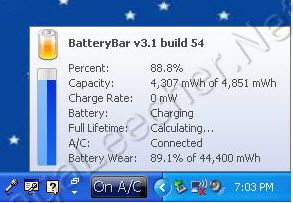
BatteryBar is an simple and useful battery power-meter for Windows, the free utility displays the current battery power-status in the taskbar, the software is smart and calculates the total time-remaining using your battery historical data.

The utility is available in two flavors Free and Pro, I tried the recently released BatteryBar v 3.1 Beta and it worked fine, However, if you don't want to use the BETA version you can download the current final version here.
Comments
BatteryBar 3
Where is the Crack? XDXDXD
battery bar3
what? not needed, only go to tool bar and select
NVJHV
FGTTV GYUTF UUYGUY
I cant see the time!
I already set the settings to view percent and time remaining alternately but it doesnt change >< I;m using the beta version
Add new comment