iTunes 8 is here and is still a memory hogger like previous versions, instead of decreasing the bloat Apple seems to be adding more and more supporting services to the player further increasing the memory consumption.
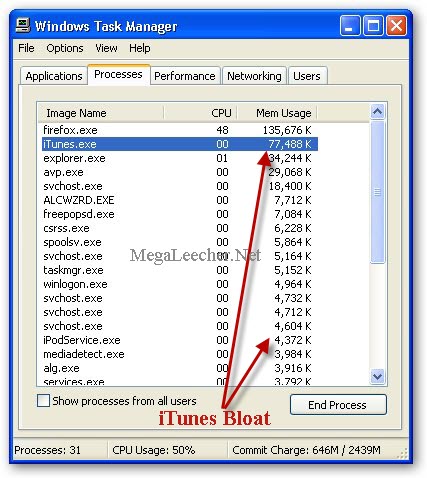
Today, I will be sharing two free iTunes alternative's for managing your Apple devices with ease without consuming resources like iTunes.
Floola is a free utility for simple and efficient management of your iPod and Motorola devices, the small, fast and portable application does not require any installation and can be launched from your iPod under Linux, Mac OS X, Windows XP and Vista.
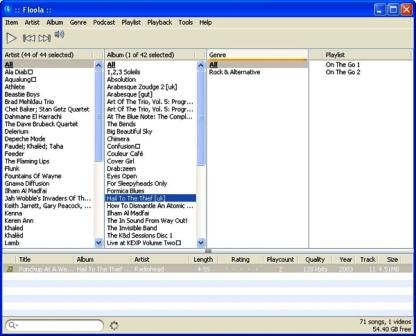
Floola lets you manage music, photos, artworks, podcasts, and smart playlists on your iPod using a very simple user interface, the software also supports automatic conversion of incompatible audio and video files into iPod compatible formats, even allows adding YouTube and MySpace videos with a single click.
Floola Features:
- Works on Windows (98 and above), Mac or Linux distribution.
- Put the application on iPod and launch it on any PC, immediately.
- Lets users add and extract songs to and from iPod with ease.
- Support for Last.fm, YouTube, MySpace Videos.
- Lyric support even on older iPods (3G and above).
- Easily search duplicate songs on iPod.
- Fix iPod database corruption.
- Support for HTML export of iPod file list.
The software is updated often and the latest version can always be downloaded from here.
 However, if you own an iPhone, iPhone PC Suite would be the perfect iPhone manager, the powerful free iPhone data management software lets you manage music, images, Camera, Calendar, Contacts, SMS, Notes, eBooks, Call Logs, Bookmark, Ringtones and Themes on your iPhone via a iPhone styled friendly interface.
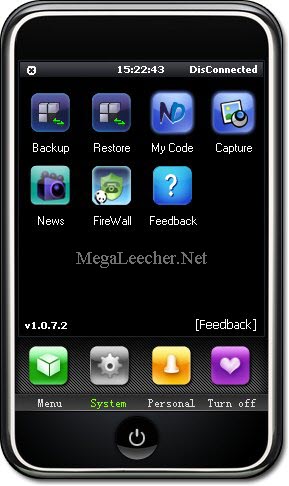
iPhone PC Suite Features:
- SMS Chat, send SMS to someone from PC through iPhone
- iPhone Backup and Restore functionality.
- Full Music and Video support with playlist creation and PC to iPhone and iPhone to PC transfers with drag and drop.
- Support for creating custom Ringtones and Wallpapers.
- Install and preview SummerBoard themes (SMB Themes) on iPhone.
- Automatic Ringtone conversion.
The software is in its early developmental evolution stage, still the amount of powerful features this software provides is simply amazing, The only drawback of this superb free utility is that it needs iTunes, with an Jailbroken iPhone and Microsoft .NET Framework 2.0 to work.
Comments
An other alternative soft
What about Songbird : http://getsongbird.com, iPhone and Ipod touch not supported yet but very easy to use and lot of add-ons like firefox.
You are right
I've got it
Just simply good
Engrish
"alternative's"? Please fix that bit of Engrish, if you can.
I find it harder to trust recommendations from people who can't or won't take the time and write properly. Why should I waste my time if they will not?
Grammar Police........
English is not my mother tongue and nobody is forcing you to act upon provided information or to trust it, neither you are being asked for money, take it or leave its your choice.
Calm down Faggot
This guy is being nice enough to post a couple great alternatives that I was unaware about.
People like you are the reason why us American's think you're douchebags.
haha, "American's" more like
haha, "American's" more like americant's or americunts...
U.S.A. is not America
Por favor, más respeto con el resto de los americanos.
BTW, I´ll give Floola a try. Thanks!
Blame Canada!
I think that little flag down there shows he is posting from Canada.
We Chinese are the super power of this planet.
You American had nothing except big mouth and bully.small country. Whole world know 9 11 is a not what u called terriost. If I can't pay things I can't effort them u threat and occupy that country. Your stupid American dream. How many innocent people will die?your government don't care about they die in war. Which your government. Don't really give a shit. Except some empty ear soothing. U American are very good with cleaning up. Reality and government always will make a good lie story. Through they media tool. We Chinese had complish.only took 20 years. Which took america toook 2 centuruy. Your government even dont take cate of your people. Without health insurance rven u ate going to die. You government will wont care. Obama is your pupit we ask him act like monkey he will we can make you presidentdance like a ckocken. Dont belive. Our government ask obama to say tibet is part of china and he did. You u american idiot getting the picture. Uou american work for us . U american are our slave. Your government take command from us. Now who is the idiot? In next 20 years china will take over whole world. America is a dying dynisty. Actually we dont have to eait 20 years to ne the super power. We already are. We can ask any countru to dance like a chicken. to your government own as much money that we can buy whole America. U American can't bully as like middle east. Coz we got money we got tech. And we are biggest population in the whole world. We will rise our currency value at the right moment. When that time comes which will you will pay 50 for 1 ¥ now who is laughing you American can't effort to go to war with as coz u know the odd already. You American. Got nick name that is white trush lol. U American is nothing good but trouble. You American don't get what u want for free then u come up with some word like tarriost. U you heart knows well they are freedom fighter for god sake. Revenge is in human nature. Example if a nation try to occupy yor country then of course u will fight till you last breath to protect yor country. Is that make u terrorist ? Think American people. Government always lie and convineance u to vote for them go for war. Watch some clips on wiki leaks. Then you know. What the real fuck is going on when some one tells the truth . Your government will make sure he is dead or humiliate him and u will never know the real truth and your tax money is contributing to create weapon to kill innocent people. U have the power don't give to much power to your government coz u can . For Chinese like my self dont have that right coz we ate communist. And our leader are really hard to change they mind coz . Our chair man think white people is the virus of this planet. So only way to make western country is we become the absulate super power. We can live in harmony we want to.if non government don't think so. Then start world war3 death is not scary. It will happen to any one. I feather die the. Live alive in pain.
Brilliantly Written
Such wisdom and foresight into world politics!
Wow - how did you get the big picture so clear and correct?
I sure hope the masses don't read it or our cover is blown!
Just when we thought we had everyone fooled too. Oh No!
:(
grammar
The world is full of people that do not command english very well, we cannot all afford the best education.. don't be to hard on people..
pcsuite
that software doesnt work,pc suite tells me it cant find itunes..i have it installed,i have iphone 3g...
PCsuite
Same issues for me trying iPhone PCSuite. Impossible to launch it correctly.
Floola, not compatible with the new iPhone OS 3 (or is it just me having errors???)
Ended up using CopyTrans Manager: http://www.copytrans.net/copytransmanager.php
Compatible iPhone OS 3, free.
RE: iPhone PC Suite
Is iPhone PC Suite compatible to iPhone 3G 0S 3 Apple, and how to use it after installed to PC ?
Thanks
iPhone PC Suite
Is there any way to get the "English" version? Mine comes up in all Japanese, and I see no option to install in English.
"that software doesnt work,pc suite tells me it cant find itunes..i have it installed,i have iphone 3g..."
You have to download itunes first, then run this to get the drivers. You're free to delete iTunes afterwards.
"alternative's? Please fix that bit of Engrish, if you can. I find it harder to trust recommendations from people who can't or won't take the time and write properly. Why should I waste my time if they will not?"
You're a douchebag.
pc suite good my ass
i must say i am disapointed with it first i see it is in japanese took me a while to get it to english and after connecting it says it isnt jailbroken while it is lame
how did you get it to run in
how did you get it to run in english.
?
Is there anything to manage iphone with lunix?
how did you get it to run english
ok after you install and it finish install go to the task bar and right click on the icon that looks like a iphone then you go to select luanguage and thats it!
I agree that it is awesome
I agree that it is awesome that people spend their time writing reviews for software like this, and making it available to unappreciative people. BUT I'll have to agree with the "grammar police" that when someone doesn't take the time to proofread their own article it makes you wonder how much weight you should put into their words. That being said, this is not an international news story but someone telling me about a program might not know of otherwise. Thanks to the author!
My issue with searching for
My issue with searching for apps comes when you try & search from a web browser rather than a mobile device. iPhone for example has a very limited approach because you have to download the iTunes Store (hate that). I have come to the conclusion that if I want to search apps on my laptop, I should use other marketplaces.
i like this blog
Apple devices with ease without consuming resources like iTunes.Floola is a free utility for simple and efficient management of your iPod and Motorola devices, the small, fast and portable application does not require any installation and can be launched from your iPod under Linux, Mac OS X, Windows XP and Vista.
Please give me a limk for transfer many photos from PC to iPod
Many many so very many tools to transfer music, photos etc etc from iPod to PC but...NONE a tool to transfer photos, video from PC to iPod easily without iTunes. So, please give me a link to download this free tools for me ? Thanks very ,uch and we hope your help seriously.
another good tool for iPhone
There is another really good tool for the transfer of pictures, music, ringtones and videos. It's called ImToo. You can find it here: http://www.imtoo.com/download.html
Re: Free Alternatives For Managing iPod And iPhone Without iTune
perhaps over the net but this is difficult and no one will take responsibility if something goes wrong, best to seek the help of experts, there are dedicated forums over the but nothing is 100% since depends also on the state of your iPhone hardware. Once going on this direction no coming back to Apple.
For more information: http://www.techyv.com/questions/can-i-flash-apple-device-without-itunes
Thanks
Thanks for taking the time to write this up, really appreciate it.
Now here's hoping Pcsuite works for me >.<
PS - don't worry about the haters, you will NEVER be able to make everyone happy, but you will ALWAYS have people who see it your way :)
Wonderful software
I read all the comments and was taken aback by a lot of the selfishness. I think this is a wonderful program. Yes, the Chinese (not Japanese) was distracting and there are times I wish I could read Chinese, but once one has worked around this, the program does as it promises.
I had issues at first with photo management. But found out it was me, not the software. The Contact Management is just a wee bit strange in its design, but that too was an easy obstacle. I find the files management a pleasure. I used to use iExplorer for iPhone, but it would crash on start up. This application has not crashed.
If not, again, for all the Chinese screens this application would be a wonderful tool. I have no idea if there is an update because it too is in Chinese.
I would ask the author to consider changing the screens to English. Not that it is really a requirement, but I think the author would reach a broader audience.
Thank you for this application. This is truly a viable alternative to iTunes.
Nice Program..
It works great, like mentioned above: right click the iPhone in the hidden taskbar and select language, also for your iPhone, make sure you install afc2add so the program can recognise your phone better with the usb, you can do this in cydia from the ModMyi Source.
Add new comment