Submitted by Deepesh Agarwal on Wed, 09/03/2008 - 07:00
Google Chrome Beta is finally available for public downloading, overall the browser seems quite impressive and has potential to become the Firefox killer, One of the most interesting feature not found in any other web-browser is its multi-threading capabilities with inbuilt Google Chrome Task Manager utility letting developers check memory, cpu and bandwidth usage of their webpages.
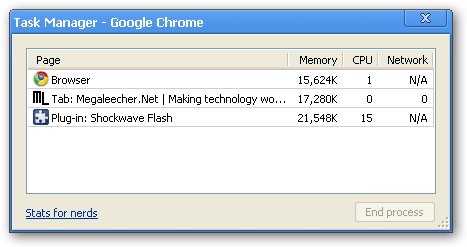
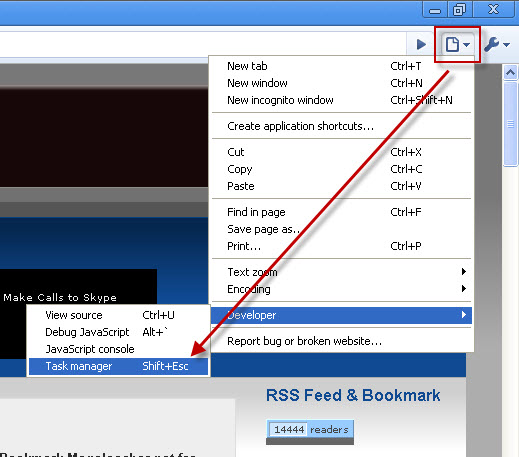
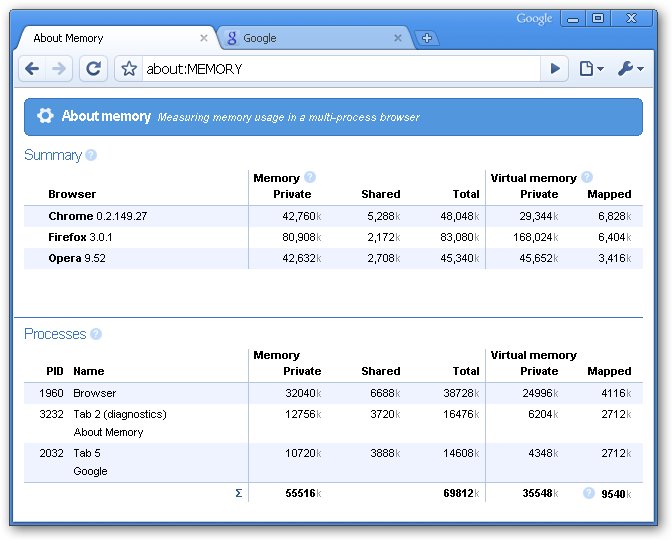
Another cool extension to the Chrome Task Manager is comparison of memory usage by different web-browsers currently loaded in memory accessible via typing
about:memory in the Google Chrome address bar.
Comments
Well I have heard a lot
Well I have heard a lot about Google Chrome in many blog sites, but all those were how to articles explaining the processes of doing this or that using Google Chrome. But I really don’t know about it, in details- like what it is and what it is used for. I expect more details from you.
Convinced
Here is a chrome task manager that convinced me completely and I decided to try it. I don't think it will be Mozilla killer but surely it good.
Add new comment