Submitted by Deepesh Agarwal on Mon, 09/07/2009 - 06:29
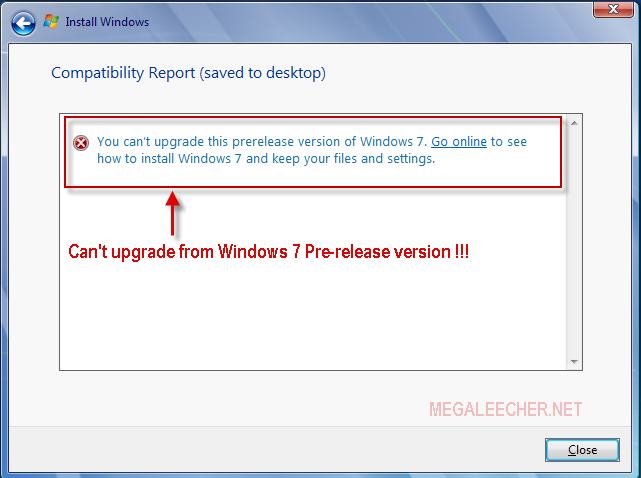
 If you jumped onto Microsoft Windows 7 pre-release version (Beta or RC) you can't upgrade to the final RTM version and need to do an clean install loosing all your settings and installed application as Windows 7 setup won't let you upgrade from a pre-release version to final build displaying error as below.
Luckily there is a simple config-file hack which allows you to do an in-place upgrade from Windows 7 pre-release to final version keeping your files, settings and applications intact.
Bypassing Windows 7 RTM setup pre-release check and update :
- Download the Windows 7 RTM ISO and extract the contents to a folder.
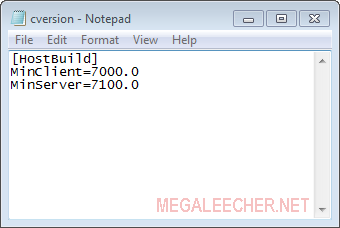
- Now navigate to sources directory in extracted folder and open cversion.ini in notepad for editing, also don't forget to remove the read-only flag from the file.
- Now change MinClient value in this file to 7000 or lower and save it as shown below.
- Launch the setup and if will allow you to upgrade.
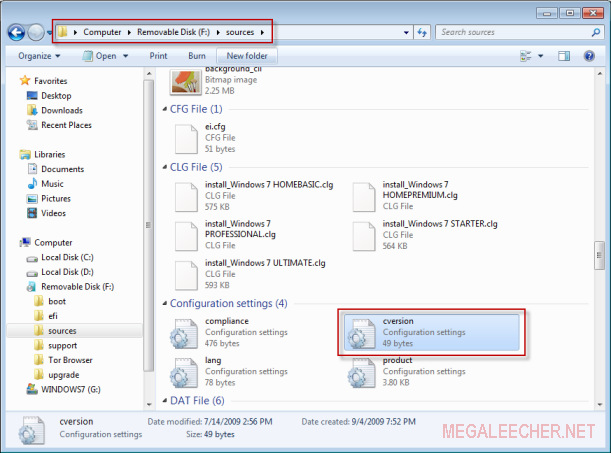
Before Editing
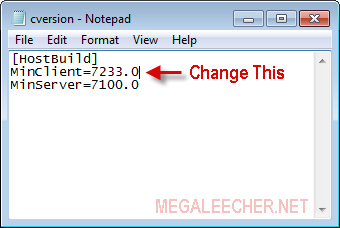

After Editing
Comments
Upgrading Windows 7 From Pre-Release To Final Version
Thank you very much.Trick shown by you for upgrading Windows 7
has worked very nicely.I copied the contents from DVD to harddrive.
Then made the suggested corrections and saved on HD copy.After I copied
the contents[whole installation files to USB drive] and upgraded
Windows 7 without any hassel and losing any of previous data
Thanks again
Where and how to move
So insanely well done. Great use of 3D and transitions.
How to get Full windows7
Hello all,
I'm using win-XP now. i would like to use WINDOWS-7 version. can anybody guide me how to install and get the full & final version of windows-7.
i cant install it now
it says it cant make a setup file
what do i do? i need help
It worked!
Yes, it worked! I installed Windows 7 build 7600 over build 7100.
One minor issue, though, is that the watermark (Test Mode. Windows 7. Build 7600) is still visible in the bottom-right corner on the desktop.
NICE!!!!!!!!!!!!!!!!!!!!!
Cool, it worked like a charm!!..,,
awesome. gr8 work man.
awesome. gr8 work man.
It worked
Thanks, but im unable to upgrade to SP1
getting message
"Service Pack 1 setup can't identify the version of windows on this computer
If you're running a pre-release of windows 7, you need to instal the final release version before installing service pack"
original cversion.ini value are:
[HostBuild]
MinClient=7077.0
MinServer=7000.0
setup file version 6.1.7100.0
kindly help
Thanks.
Add new comment