 Many iTunes alternatives have been shared on this blog but what else can be better then managing and syncing music on your portable devices from popular multimedia player Winamp, the good news is that the latest version of Winamp comes with built-in support for importing iTunes database and playlists with full featured portable device management and synchronization functionality offering seamless integration with iPod (Shuffle, Video, Nano & Classic), Creative Nomad/Zen/MuVo, PlaysForSure (P4S), USB Thumbdrive and ActiveSync devices, for enabling iTunes support simply check the Import iTunes Tool option while installing Winamp and follow the guide ahead to work with iTunes and iPod from within Winamp.

Using Winamp to sync your iPod devices ensures that you don't need to worry about losing songs when syncing on different computers.
Importing iTunes library and syncing iPod from Winamp :
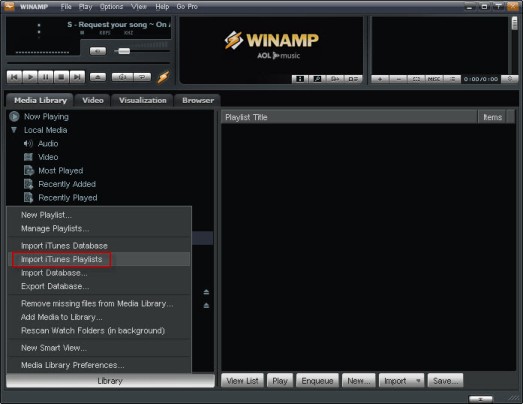
- To import iTunes music library and playlist click the Library button located at the bottom and select import iTunes Playlist or import iTunes Database options.
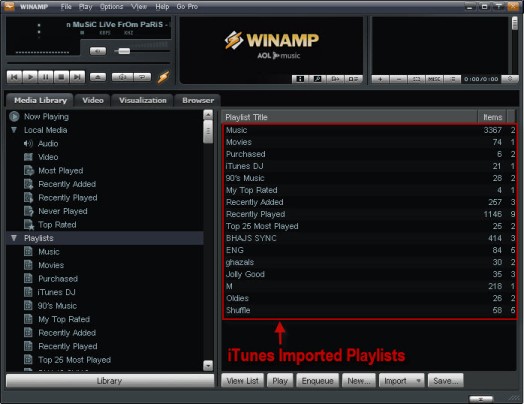
- Now all the imported playlists should be visible.
- Now connect your iPod and click the Portables option to see if your device is detected, for some unknown reason my iPod was not recognized and I had to install mliPod plugin to get this working.
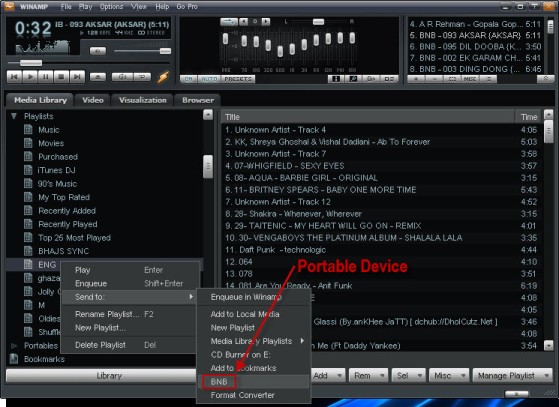
- Once your portable device is detected you can simply drag-n-drop songs from explorer or right-click and select your device from Send To list provided by Winamp.
- You can now sync your iTunes playlists without worrying about loosing your existing songs, you can also checkout the video demonstration below.

Comments
Best alternative to iTunes
This is indeed an awesome tips, i enjoyed this article that i wished it never ended. I like to sync my iPod with Winamp that way i can be able to sync with multiple computers without losing my songs. This is indeed awesome. Thanks
Add new comment