Submitted by Deepesh Agarwal on Fri, 10/19/2012 - 02:18
While Microsoft Windows 7 is the mainstream Windows OS in use now, people still prefer and use Windows XP. I recently came across an Windows XP specific issue, where the computer detected security enabled WiFi networks but failed to connect with them as shown below.
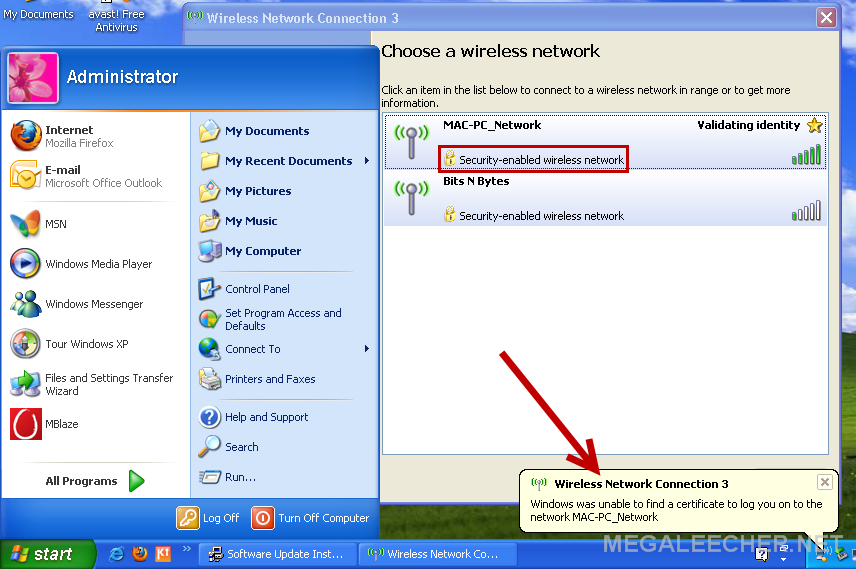
As evident from the error message above and pretty descriptive error-icon shown below, Windows XP SP2 is having issues trying to negotiate security certificate. To fix this, enabling WPA and WPA2 encryption support on Windows XP in Wireless Group Policy (WGP) we need to install KB917021 update from Microsoft.
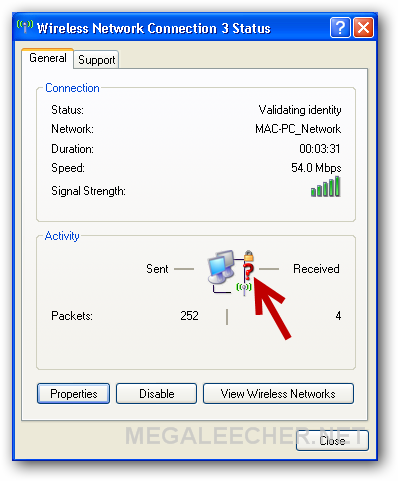
Downloading and installing the Microsoft KB917021 patch , solves the issue and letting users connect to WPA/WPA2 encrypted wireless networks.

Comments
i just install Service Pack
i just install Service Pack third ;-)
wow thanks
Wow, good to knw thier is a patch. Older gentalman who is a client of mine refuses to use window7 prefer window xp had this same issue. I was not able to fix it for him but now I can go back and be able to pull up this page on my laptop and download the patch and install for his window xp. He has professional and is on SP2 He cames SP3 will not allow him to work on creating programs.
That's an update from 2006,
That's an update from 2006, if you still didn't get that one, maybe you're doing something wrong.. or illegal.
I sure never had any problems with WiFi under XP, with WPA2 connections.
hack reaver wpa2
Hi Guys, I've found this interesting!
Add new comment