SpeedUp Firefox Browsing:
Type “about:config” in the address bar and press ENTER key.
Scroll down and look for the entries below and alter entries as follows:
- Set “network.http.pipelining” To “true”
- Set “network.http.proxy.pipelining” To “true”
- Set “network.http.pipelining.maxrequests” to any number say 25. This settings decides how many concurrent requests/connections the browser can make to a server, Please keep in mind that using a high value can trigger flood control limits on some servers and you can be denied access to the website.
-
- Right-click and select New-> Integer. Name the new value “nglayout.initialpaint.delay” and set value to “0?. This value decides the amount of time the firefox waits before it acts on information it receives and displays it.
Without this tweak the browser will make one request to a web page at a time, When you enable pipelining it will make several requests at once, which speeds up page loading time.
SpeedUp Internet Explorer Browsing:
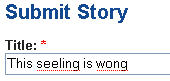 By default Firefox's in-line spell checker does not work in all text-boxes and forms and you need to right-click and select “Spell check this field” to manually start spell-check, however this behavior can be automatically activated by following the steps provided below.