Like This Post, Get Updates By Email:

Enter your email address:

Delivered by : FeedBurner

Megaupload

FreeRapid - Best Multi-Service, Multi-Platform Automated File Downloader

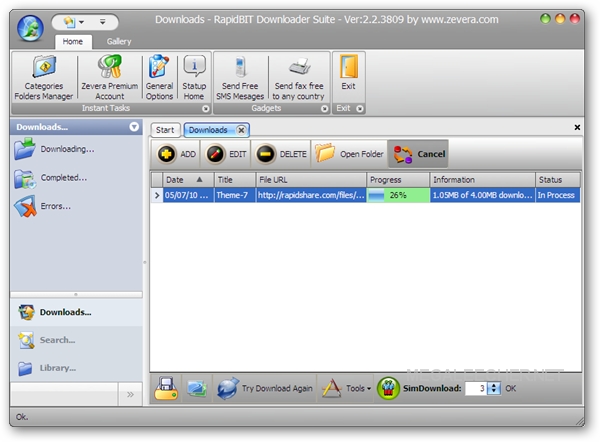
Vitys FreeRapid DownloaderThere are quite a few decent automated downloaders supporting simultaneous downloads from various file-sharing services like RDesc and Tucan, but all new Java based multi-platform FreeRapid Downloader would be one of the best multi-service downloader we have ever came across, supporting fully automated downloads from 87 file-sharing services like Rapidshare, Megaupload, Mediafire and Hotfile to name a few.

Automated File Downloads

The utility supports plugin based architecture allowing easy expansion of supported file-hosters and comes equipped with features like support for proxy lists, download history, smart clipboard monitoring, simple CAPTCHA recognition, automated plugin updates, multi-language support and interface skins.

Simple Trick To Skip Megaupload Timer And Download Instantly Without Waiting

MegauploadFile-sharing service Megaupload imposes a 45 second wait-timer for free users but here is a simple hack to download files from megaupload instantly without waiting, the hack is pretty simple and you just need to install and click the bookmarklet provided at the end of the post to skip the wait-timer and auto-start the download.

After entering the CAPTCHA image-code and clicking the download file button, you can simply navigate to View -> Page Style -> No style in Firefox and the Regular download button will get visible instantly, to automate the whole process and auto-start downloading I have created a handy bookmarklet, simply right-click the bookmarklet provided at the end of the post and bookmark it, now after entering the CAPTCHA code click the bookmarklet and your download will start immediately.

Automatic Rapidshare, Megaupload and MediaFire Download Manager For Linux, FreeBSD and Windows

Tucan LogoThere are numerous automated download managers for Windows supporting major file-hosters like Rapidshare, Megaupload and Mediafire, but if you are looking for something which gets the job done on other platforms like Linux, open-source utility "Tucan Manager" would be the answer, developed in Phython the cross-platform utility lets users upload and download files on Rapidshare, Megaupload, Gigasize and Mediafire supporting both free and premium account functionality.

Tucan Download Manager

The fast and simple to use utility supports plugins making it easily extensible with other services, the application is in ALPHA stages and definitely posses a lot of potential considering its open-source multi-platform nature.

Best MegaUpload Search Engines To Search Files Hosted On Megaupload.Com

File SearchDespite being the third most popular one-click file-hoster after Rapidshare and MediaFire Megaupload does not have many file-search engines meant to search files hosted on their network, compared to the vast amount of dedicated third-party Rapidshare Search Engines there exist only a few meant for Megaupload, most of these file search-engines work on similar scripts which scrap results from specially crafted Google search queries, We can use the same Google search queries directly as discussed earlier to search files on Mediafire changing the query from site:mediafire.com to site:megaupload.com gets the job done, if you are looking for something automating this process here is a list of some of the best free megaupload search engines.

RapidSpread - Upload, Share, and Create File Mirror in One Step With Ease

RapidspreadRapidSpread is another free file mirror service similar to Uploadjockey but supporting even more file-mirrors, while Uploadjockey supports Rapidshare, Badongo, Easy-share, Zshare, Megaupload and Depositfiles, RapidSpread also supports Uploaded.to,Mediafire, Zippyshare, Sendspace, FileFactory and Imageshack.

Mass File Mirror Service

Easily Grab Rapidshare Links From A Webpage

RSFindRSFind is a handy Firefox extension to grab file-sharing links like Rapidshare and Megaupload from a webpage, RSFind lets you scan a webpage for links and then let you manage (open, copy etc.) some or all of them altogether.


You can copy all or selected links to clipboard for using with your favorite downloader or make them open in new tabs, this comes very handy when links are not clickable or are scattered through

Syndicate content
This is just one of the many helpful tips we have posted, You can find more stories here,
Do subscribe to updates using your favorite RSS feed reader or using the secure FeedBurner email update form on top of this post.