Submitted by Deepesh Agarwal on Mon, 03/16/2009 - 08:06
If you have an older Apple iPod Touch (First Generation) having firmware version 1.x.x upgrading to the latest iPod Touch Firmware 2.x.x requires paying Apple a one time $9.95 fee through the iTunes Store, but here is simple trick to upgrade to the latest available firmware version without paying anything.
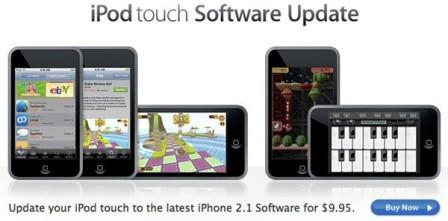
Follow the simple steps as follows and upgrade your Apple iPod Touch to the latest operating system without paying.
Upgrading iPod Touch OS 1.x.x To iPod Touch OS 2.2.1 :
- Download and install the latest version of iTunes (iTunes 8.1 used for this demo).
- Download and save iPod Touch Firmware .IPSW Restore file - iPod1,1_2.2.1_5H11_Restore.ipsw [248 MB], Alternate Torrent Direct Link, VIPeers Link.
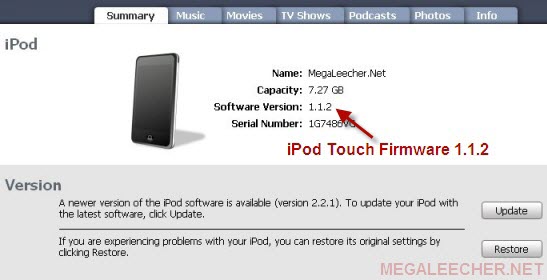
- Connect your iPod Touch to computer and launch iTunes, Your firmware version will get displayed in the iTunes windows as shown below.
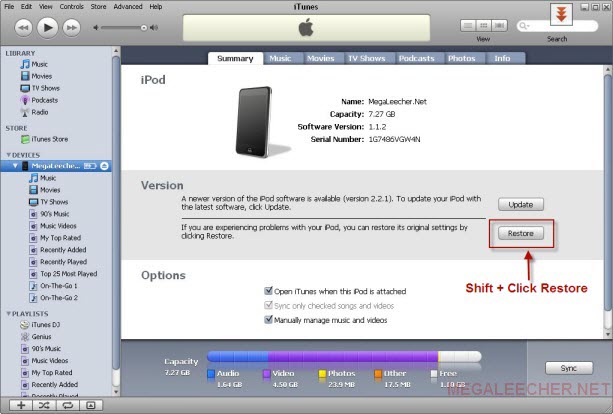
- Hold down the Shift Key and Click the Restore button in iTunes as shown below.
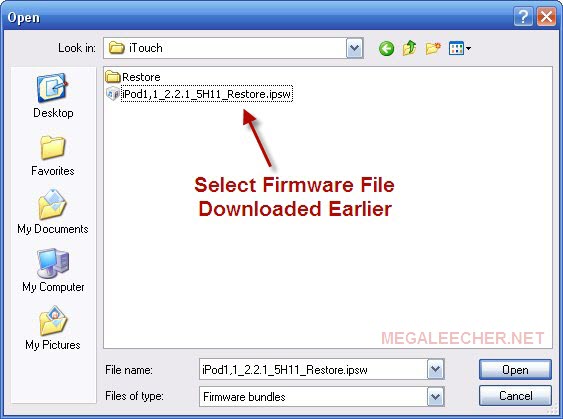
- Now select the firmware restore file "iPod1,1_2.2.1_5H11_Restore.ipsw" downloaded earlier and click open.
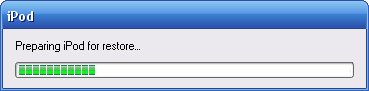
- iTunes will start the restore process.
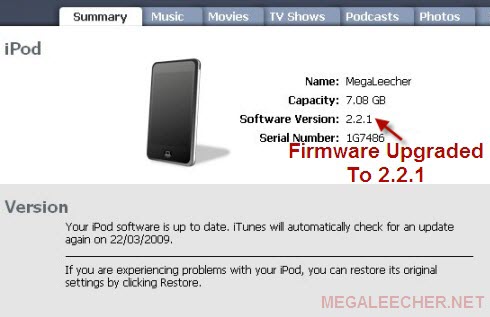
- Do not disconnect while iTunes is restoring your device, once completed iTunes will reboot your device and the new firmware version will be displayed in iTunes.
Warning : Restoring your iPod Touch will result in data loss and it is advised to backup your iPod before proceeding.
Comments
Interesting
Interesting Trick your introducing.
However doesn't 'Restoring' mean going backwards?
Restoring iPod Touch
Restoring means going to the original state, in this case we are actually upgrading to the original state of the latest OS version.
Hmmm
Will this process damage your Ipod
1403 error
When I do this I get the Unknown error 1403. Does anyone have any idea what the problem is?
Help
When you download this you have to save then run it & wait for it to finish loading then you click the restore thing.
i got it too
i got that error message too. it was an error in the software I downloaded, but I payed for it.
to 1403 error: I got this
to 1403 error: I got this too. I fix it I put my iPod in dfu mode. I don't remember how but google it and it should come up! :)
Capacity??
according to the pictures you lose about 200mb of capacity throughout this operation.
look on the first picture. "Capacity: 7.27gb"
Now look on the second picture. "Capacity: 7.08GB"
does anyone know whats going on here?
Thats because the firware
Thats because the firware update has more to it packed in the file. So when it updates and the files are extracted and installed on your ipod, they take up more space which then gives you less room on the ipod itself to place your music and videos and everything else.
Thats because the firware
Thats because the firware update has more to it packed in the file. So when it updates and the files are extracted and installed on your ipod, they take up more space which then gives you less room on the ipod itself to place your music and videos and everything else.
i cant get it to work, am i
i cant get it to work, am i doing something wrong?
it worked
i have broken my ipod so many times jailbreaking it and this worked perfectly for me! thank you so much
i have done it
dear frndz i have done it if u want link of file mail me AT noortelecom22@gmail.com
HMMMMMMMMMMMMMMMM.....Need Help
Hi
Does this in any way damage my iPod or is it the original version?
Pls Reply.
what
what do u do after this to get apps
YEEEEHAAAA !!!
Holy SHIT !!! Works like a charm !!!
Virus
The radipshare link to the firmware download is an exe file and contains up to three trojan virus's. Thought I'd warn some of you b4 u download tht one, because there are safer downloads of the file elsewhere. Look for .ipsw at the end not .exe
Don't be silly......
The alternative file link is tested for viruses before posting, the file is just an exe wrapper to automatically download firmware file from torrent link without using any torrent client made via popular Torrent2Exe service, here is a VirusToal scan result scoring 11/40 (with major AV flagging it safe), if you still feel unsafe use the first link.
Actually..
Whether thats true or not, I tried downloading it and my anti virus software reported about 3 or 4 viruses which I had to delete, and the download stopped when I deleted them. and the file is supposed to be 250 mb or 248 somewhere around there but that download is only a few hundred kb, and sadly the first link doesnt work for me so if anyone could help me out on that? because the third takes like a day to download, after 15 minutes I've only downloaded 1.47 mb on that one O.O out of 250
Yeah, it should be an .ipsw
Yeah, it should be an .ipsw file not an .exe. No need for it to be an .exe.
Hi
Read the reply above, if not satisfied use the first link or go fetch the torrent directly without the .exe wrapper.
window vista
how to get this to work on window vista i downloaded the files but when i try to restore i can't find the files. from any of the folder or document.
The first link doesnt work
The first link doesnt work for me, I tried it from other people too and it's always the pdf.apple.com/protected.... blah link for everyone that posts the 2.2.1 restore, except for the alternate links but the second is a virus and the third could take a day or 3 to download, with the computer on the whole time
HELP
I tried to do it, but now I cannot access to the Ipod anymore. Itunes doesnt recognize him anymore...what cani I do plz help me!!!!!!!!!!!!!!!!!!!!
an error called 0xE800005D
djdonfelipe@live.de
HEEEEEELP!!!!!!!!!!!!!
I cannot connect my Ipod anymore to Itunes...comes message that cannot connect to the Ipod...
0xE800005D
Plz HELP ME!!!!!!!!!!!!!
djdonfelipe@live.de
iPod touch not connecting to itunes
I had this problem after updating my ipod touch a while ago. I forget what version. Anyways, I found a post somewhere that allowed you to boot the touch in safemode and that basically forced itunes to see it. Startup itunes, plug in your touch, then just hold down the home and power button at the same time. when you see the apple icon, let go of the power button and keep holding the home button until you see a USB cable icon on you touch screen. itunes then was able to recognize the touch and I could restore back to the original firmware version (1.1.1) you will lose all your stuff, but I got it working again - just did it last night!
time?
how long does it take to let it restore and stuff?
like im doing it rite now and i guess by the time you answer, is gonna be too late,
oh well:]
more information for later veiwers:]
my touch is restoring rite now and it shows the apple, and a bar(partialy filled) is that the loading bar for when its finished?
No 'iTouch' folder!
In the 3rd picture were you select the new firmware you are looking in a folder named iTouch. When i tried to go through this process there doesnt seem to be an iTouch folder anywhere on my computer! Any advice?
iTouch Folder
I created that folder, you need to navigate to the location where you saved the downloaded IPSW file.
help
when i try to update it says not cmpatible version. how come it prompt me that msg.
yeah
i got the exact same message.....anyone help?
damn
Dude, why didn't you tell us that this would completely erase anything stored on the ipod ?
Didn't He?
he did.
Potato
"Warning : Restoring your iPod Touch will result in data loss and it is advised to backup your iPod before proceeding."
Yah, he did...
restoring
how can retrieve my previous files on my ipod, because u said backup all files but all my music and videos are all gone!!!!
this makes no sense
i tried the restore and the 1403 message popped up then i tried to do the dfu thing and that wouldnt work. what am i doing wrong?
makes no sense
i tried this but the 1403 message showed up and whe i tried to run the file after saving it, it said the torrent was downloading already. when i tried putting the ipod into dfu mode, it wouldnt work. whats going on?
firmware
i tried this and it is saying firmware not compatible.... any ideas?
i have the touch 1g running 1.1.5. 4b1 software right now and the onyl way to jailbreak it is to get it 2.0 or higher.
thx loaaaaaaaaaads i
thx loaaaaaaaaaads i was gna dye
link is protected
link is protected : apple.pdf/protected thats unfair and annoying plz help and u need to pay to download quick pwn yyyyyyyyyyyyyyyyyyyyyyyyyyyyyyyy
plzzz help :)
i upgraded my ipod touch software to 3.0 but after that some applications don`t appear on the desktop of the ipod but other appear!
i mean that i can`t find some applications on my ipod after upgrade to 3.0
can you help me guys?
download firmware 2.2.1
how can i download iPod1,1_2.2.1_5H11_Restore.ipsw ??????????????
more problem
my ipod touch 1g froze on my randomly and i tried putting it in dfu mode, and restoring it, i have done it before on another ipod touch, and this one keeps saying unknown error (20). I am using the iPod1,1_2.2.1_5H11_Restore.ipsw but it is still not working, it doesn't go far in the process all it does is says it starts to prepare ipod and stops., please help!!
Pay For a Real Solution
So, isn't this just stealing?
All you folks having problems with this download--why don't you just plunk down the cash and do it the right way? How much time are you wasting trying to get this illegal method to work?
Error while trying to upgrade
When i try to shift click restore it opens a window allowing me to choose the firmware file .. but when i try to open it it always show an error saying that couldnt restore my ipod because the file was broken.. ps: already tried tons of firmware files from many websites.. help me plz
Updating Ipod 1g
i've downloaded the update but it says that it's uncompatable..
What is the problem?
cant find it
vista
downloaded it a bunch of times, as a file and application. i cant find the file ,it doesnt show up anywhere when i go to restore.
firewall file
it says it cant restore because the firewall file is not compatible . What should i do?
Please Help
I have a 1gen ipod touch and i want to jailbrake it, so should i just download this "iPod1,1_2.2.1_5H11_Restore.ipsw" firmware and put it in my ipod touch by clicking shift in my itune, or i have to download other software like Quickpwn.exe and do it with the help of that software, because i want cydea installer & i want to put downloaded api also which you cant do it in original firmware.. please help
whenever i try to go into
whenever i try to go into the link " iPod1,1_2.2.1_5H11_Restore.ipsw [248 MB] " to download it, it wont let me... it says the problem might be because i have to log in? whats that about?!
i tried to go into the
i tried to go into the link
"iPod1,1_2.2.1_5H11_Restore.ipsw [248 MB]"
to download it, but it wouldnt let me, it says most causes would be that the site reguires a log in....
whats that about?!
it says not compatibal i got
it says not compatibal i got the 1 ituch but where is the tric for it
i can't find the file D:
how the hell do i find the file? i tried many things but i can't find it... HELP ME D:
boohyah!
Thanks a lot dude!!!! been looking for a way to upgrade my ipod touch so i can download apps....this really helped me a lot!!!
ERROR 1604
I HAVE A PROBLEM.HOW CAN I FIX THIS, I DID LIKE AT PICURE AND I HAD ERROR 0X8OO005D I HOLD HOME BUTTON AND I RESTORE SYSTEM AND I GOT MESSAGE
The ipod could not be restoren . An unknown error occurred (1604)
WHAT I CAN DO TO FIX THIS
hmm i wonder why theres 2
hmm i wonder why theres 2 different serial numberss!
thankyou!
the only problem i has was with the computer not able to find the file when you [shift+restore] it kept coming up with an error saying the software is not available for the ipod when i typed in the directory name, so eventually i put the whole shortcut icon in the pop up box after you [shift+restore} after that it worked instantly!
thankyou!!
Someone help Please
Please can someone help I can't find this file iPod1,1_2.2.1_5H11_Restore.ipsw [248 MB] for download.
Thanks:)
HELP!!
i tried it but itunes said it could not be restored because the firmware file was not compatible.
Dude mine does that too! WTF!
Dude mine does that too! WTF! Do you have the app store on your Home Screen?
NEED HELP!
Look ive had my iPod Touch 1G for some time now! The version its on is on 1.1.5! So ive tried what you said right now and its says "The iPod iPodOfSins could not be restored because the firmware file is not compatible." What is your best suggestion? I dont even have the App Store! PLZ HELP ME!
Thanks and Working ... :)
Thanks and Working ... :)
THE DOWNLOAD IS TAKING MORE
THE DOWNLOAD IS TAKING MORE THAN 3 HOURS AND ITS BLOCKED AT 43.3 MB
Not working?
I tried this with itunes 9.1 and my itouch version is 1.15, i tried it and i got the error message "the ipod could not be restored because the firmware is uncombatible" or something close to that. and I wam runnign window 7 ultimate with itunes 9.1
thank you!!!!!!!!!!!!!!!
it worked for me!:)
Thanks a lot.I upgraded my
Thanks a lot.I upgraded my iPod 1st generation.At last I can have app in my iPod. THanks a lottttttttttt
this is not true haha
it won't work if you try to do this to simply it's nearly impossible to upgrade from 1.1.2 to 2.2.1 via itunes like this.there is an image tricking.don't take a fool of people;it's a shame:both the images shown above are not for the same device,the first one has a different serial number,different to that of the second one in the second image.....
rabish
This didn't work for me. All
This didn't work for me. All mine does is say that it's the right version, but when I got to add apps or music, it says that I need to update it. It's pissing me off.
NEED PEERS
i wanna download the firmware but there's like one guy whos seeding it ... plz seed if u can thnx
if my iPod is the old version
if my iPod is the old version touch and i upgrade it with a newer version wont that damage my iPod in any way/ slow it down?.....i dnt knw or have some negative effect on my pod?...........PS: im just concerned.
thanks uesd it and worked to
thanks uesd it and worked to the concerned ones its ok
Works
THanks so much it took a couple of tries and one 2009 error but I finally got it to work.
thanks!
id found the firmware 3.1.2 elsewhere but no idea on how the f to get it on my husbands newly aquired ipod 1g, your instructions helped and now he can play angry birds on his OWN ipod insted of my 4g... that is if i can get it on the internet... ><
where did you get the firmware for 3.1.2 ?
I have v 2.2.1 so i don't need the firmware on this page. could you provide the firmware to where you found v 3.1.2????
thanks!!!
firmwares...
Here you go - http://www.felixbruns.de/iPod/firmware/
Add new comment