Submitted by Deepesh Agarwal on Mon, 02/25/2008 - 15:37
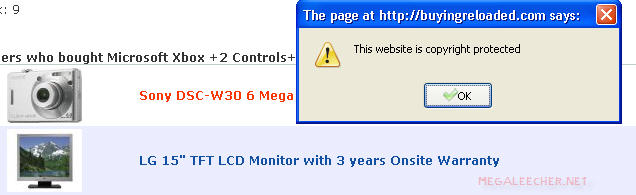
If you are a regular web surfer you must have encountered annoying webpages disabling right-click menu, moving and resizing windows, hiding status bar and having all sorts of fancy scrolling status bar texts, However, Firefox provides users an easy way to stop these common javascript annoyances.
Just Follow the simple steps below to enhance you web-browsing experience:
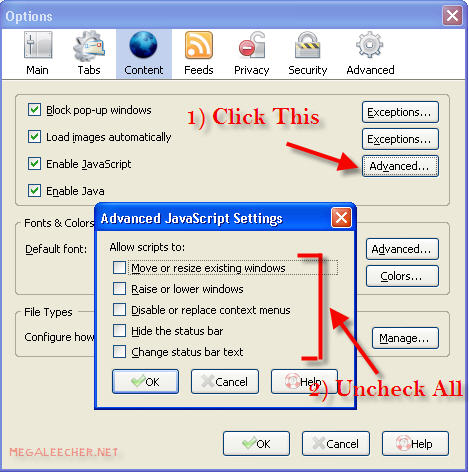
- In Firefox, Goto Tools -> Options.
- Click Advanced button right next to the Enable Javascript chekbox (See image below).
- Uncheck all options as shown below.
- Click OK to exit.
Comments
Nice one!
Thanks for this has already saved me a few 'print screen' clicks today
Thanks
Thanks man, it really works!
Breaks Google Maps
Not allowing scripts to replace the right click context menu breaks google maps. Google maps provides its own context menu with options such as "directions to here" if the normal context menu is not disabled, google's context menu will be hidden.
It's the user's choice, but there are costs in disabling elements of javascript.
RE: Breaks Google Maps
There are no costs. What you said about Google Maps is not true. The context menu you describe is not the browsers context menu. If you actually tested what the author describes, you will find that the Google Maps menu still shows up fine.
Nice one
Works great. Love how I can see title bar on all pages!
only people who are content
only people who are content and image thieves have a problem with the right click being disabled.
Silly opinion. For example
Silly opinion. For example opening links to new tabs in right click disabling pages becomes hard as one can't simply right click on the link and choose 'open in new tab'.
@Anonymous on Tue, 11/10/2009
@Anonymous on Tue, 11/10/2009 - 09:01
Thats not true im afraid. I like to open some pictures in a seperate window so that I can zoom in.
Also I like the ability to right click open tab/window as others have expressed.
And sometimes i might like to print a page or image for directions, information etc...
If you dont want your webpage content downloaded, DONT UPLOAD IT IN THE FIRST PLACE!!! Watermark it etc...
So dont accuse people of stealing when these functions have been there since day one.
You are very arrogant and small minded.
Disabling "active scripting" is a security feature
Disabling "active scripting" is a security feature that can be utilized per PC user. To ENABLE active scripting in your browser is to allow PERMISSION for web page owners to run such script on YOUR PC. There is a reason this Disable/Enable feature is in the "security" tab of YOUR Internet options. There is absolutely nothing unethical or illegal about disabling active scripting in order to save web pages or save images that have ALREADY been downloaded to your PC from a server regardless of the wishes of the web page owner/writer. Once a web page owner uploads a page to their server for world wide access, it is no longer their choice. If a web page owner doesn't want an image copied for personal use by the end user PC that it gets downloaded to, then they need to water mark it or upload a very bad low res image that cant' be used for much of anything. If a web page owner doesn't want someone copying their page to an end user PC for personal reference, then they should not upload the page for world wide access. Period.
Disabling active scripting to allow right click options, or to save web pages can also been done through the menu options in Internet Explorer. In Internet Explorer, go to Tools/Interent Options/Security Tab/Custom Level../ then scroll down to Scripting/Active Scripting where you can either enable or disable active scripting. Then you must hit the refresh button on your browser for it to take effect. Active scripting is enabled by default.
Note: While disabling active scripting makes web pages load MUCH faster, as all the active scripting for the motion banner ads and all the junk web page like to flash at you is disabled, it also disables great functions on web pages like picture slide slow functions, video links and anything that requires active scripting. Videos (YouTube) will not load if you disable active scripting. However, you PC will be incredibly safer from virus attacks!! :-)
You can subsequently enable or disable active scripting according to your needs.
He should not post it anyway
If the owner doesn't want his content to be stolen he should not post it anyway. Since the content is downloaded to your computer you have the right to do whatever you want with it (in term of storing, editing and manipulating for personal use - but not claim it as yours). He has no right to disable functions of your browser.
BRILLIANT !! Thank You!!!
Thank you for taking the time to share this Firefox Tip
I agree with the previous commenter, silly yes, ridiculous, fallacious.
Like the previous commenter, I habitually use the "open in new tab/window" feature. I find the ability to open in new tab/window Invaluable in keeping track of what I'm viewing.
The idea that an strange webpage can disable software running on an individuals computer under the thin argument of "copyright" or "censorship" is offensive to any reasonable human being.
I applaud Firefox for the inclusion of an interface which allows more freedom of choice
Just one more reason Firefox is superior to "IE"
under "IE" you have to
SHIFT left then right click = blocked link in new window
CTRL left then right click = blocked link in new Tab
Hi, I found a no right click
Hi,
I found a no right click code to insert on my photography site, it works great in IE8. Wonder if anyone here knows of one that will work in Chrome?
Uh... you know the images are
Uh... you know the images are in ones browser cache? Reguardless what you do -- if the user can see the image, it was "downloaded" and is in the cache. Otherwise how do you think folks can see images in a web page??
So you "copyright protected" folks are fools if you think you prevented anyone from having a copy of your images. You've just made yourself an annoyance instead.
Add new comment