Submitted by Deepesh Agarwal on Sun, 02/17/2008 - 09:45
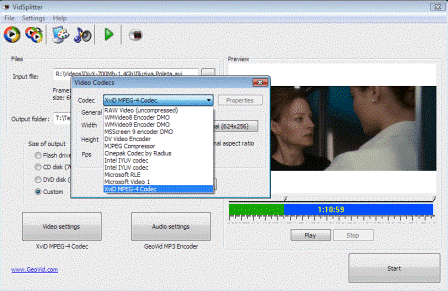
 Many times we need to split large video files into smaller pieces in order to copy them on several CD's or DVD's, you don't need a full-fledged video editor to do this, VidSplitter is a free, easy to use complete Video splitting tool that lets you to split large AVI, mpeg, WMV, ASF files into smaller video clips in various formats quick and easy.
VCDCut Pro (or VCDCutter) is another professional software with advanced features for achieving the same result, but it is not free.
If you are looking for a full-featured professional grade free video editing software do read our previous article.
Comments
Thanks
I was looking for a free alternative and Google search took me here and the solution works.
Thank You
I rarely comment, but I find it very useful for users that references are left as to how credible some freewares are. This freeware works 100% fine, very rare, ebcause i downloaded a bunch of splitters before this wic just annoys / bug ur comp, and mind u, it works on my Vista, so it practically compatible with any windows. Thanks again for sharing such useful freeware! :D
Another good option
Another good free option for splitting large video files would be ezSplitter here :
Only 1.4 MB - http://www.doeasier.org/splitter/ezsplitter.exe
good
good
good
thanks
Not really
it is not freeware
Its Free
Its free, what makes you think it is not.
thanks
thanks
THANKSSSSSSSSSSSS!
THANKSSSSSSSSSSSS!
Good programme, but...
there's always a but lol... no it is a good basic splitter, just doesn't have the features I was hopping for. I would like to be able to set the split point myself.
Not Free
This is not at all freeware...unless you like having an advertisement bounce around in the output video.
THIS SUCK ffs
they re a bunch of gay freeware releaser , it is supposed to be free so i started the job right ? then after splitting a 3.90Gb into over 20 pieces of 450Mo i found that fuc**ng advert on teh screen of the files i just done ! fu** sake it took over 4h to do for this result so ADMIN wondering why we say NO FREEWARE here s the answer ; bloody advert all over screen .
Ridiculous to do that , worst is that i send 150.000 times my email adress to get that bloddy serial AND IT NEVER CAME ! f**k em damn bunch of gay releaser of no freeware GO TO HELL with your way of fù**ing people .
get that sh!t off ur computer JUST FOR THE FACT ! yes it did a good job but NOT with an advert on the SCREEN !!!
aaaaaaaaaaarrrrrrrrrrrrrrrggggggglllllllllllllllllllll
go to heeeeeeeeeeeellllllllllllllllllllllll
i wont even p!ss on u if u were on fire :)
hahaha cheers. Now I wont
hahaha cheers. Now I wont download this
Thanks! Now I won't download
Thanks! Now I won't download this crap!!
Thank you for the provided
Thank you for the provided info! I almost downloaded this SH*T, but thanks to all your trouble (and I am sorry for it) I am now black-marking this stupid software and the "company" (which is a Monkey Business) who built it...
And I suggest ALL OF YOU to spread the word and let everyone knows about those suckers... They MUST bankrupt and vanish from the face of the Internet forever...
One of the things I most HATE today are software which are "downloadable" free but are NOT "usage" free. We should start a movement about that!!!! If it says FREE, it MUST BE FREE!!!!
VidSplitter
It'a pity.
This is a good program ,really. But doesn't work with video files originally encoded "A52 Audio-Aka Ac3".That's:audio is absent (in preview). In fact , if I split them i get good video-parts but without audio.
(The same files work very well if i open them by all my players).
May you help me?Thanks a lot.
[WIN7 Professional x64)
this's a chet of software and
this's a chet of software and the owner is an ass holde
Nice tool but it is only used
Nice tool but it is only used for video splitting. I use this to split my videos and I can edit them at the same time. It works great and it is very easy to use.
Add new comment