 Country specific internet censorship is very common to block users of other countries from accessing online content - popular examples of such censorship would be Youtube, Hulu, Pandora and BBC Player, We have shared many anonymous surfing tricks to bypass these limitations but they were mostly limited to act as a USA or UK proxy.
Today's trick allows you to use popular anonymity network TOR providing you an IP address from country of your choice, we will be configuring TOR to have an exit node of our choice so that we can control our IP's country as required.
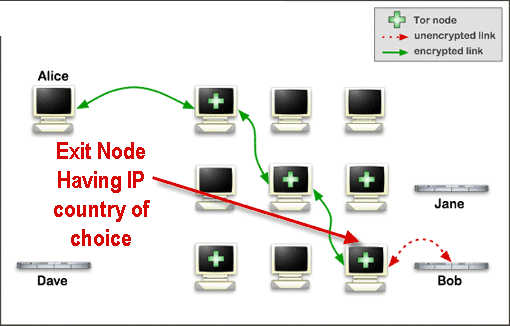
Configuring TOR to use an IP of choice :
- Download TOR + Vidalia bundle from here, I prefer the all-in-one Portable version which comes with Firefox.
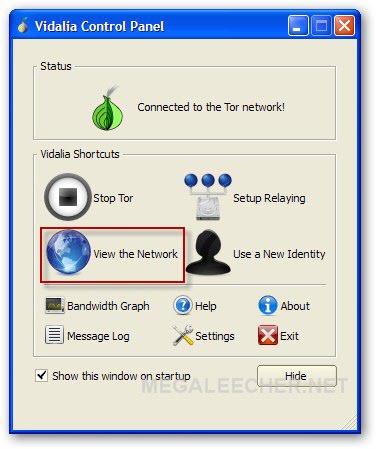
- Launch Vidalia control panel and click View the network button.
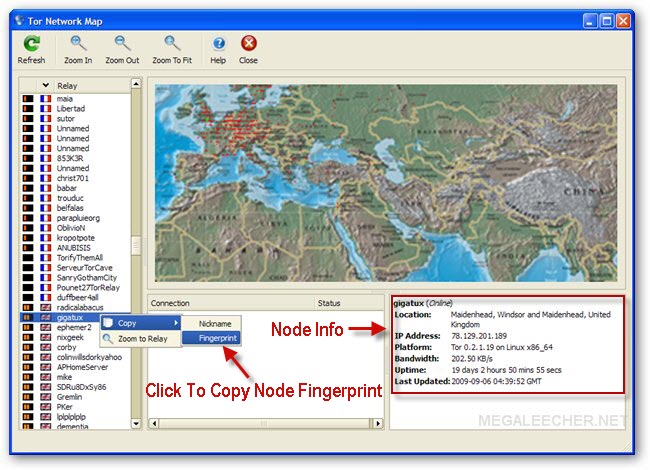
- Now navigate to node having country you want to have IP for, right click it and copy the Fingerprint as shown below, you must copy and save fingerprints of three nodes having good bandwidth for best results.
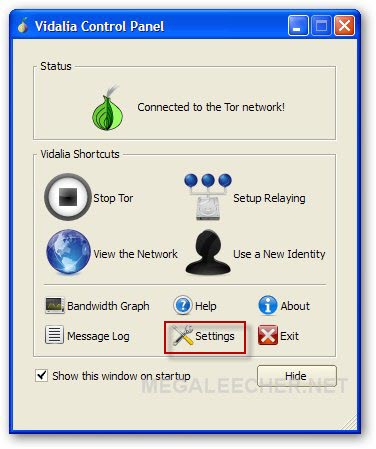
- Close Tor Network Map window and click Settings button from Vidalia Control Panel.
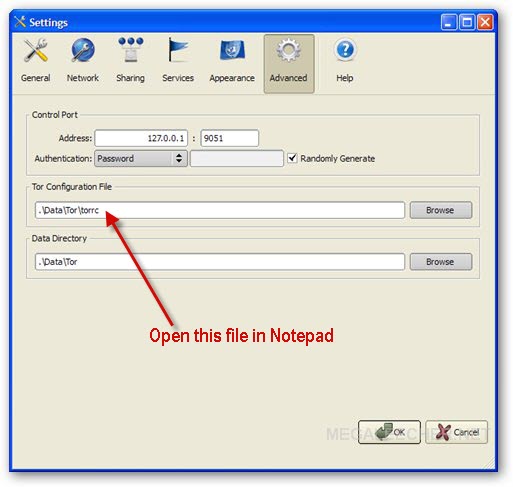
- Now use the TOR configuration file-path value shown to open TOR config file in notepad.
- Now we need to paste the node fingerprint code copied in Step 3 above as shown below :
- Restart TOR and you will have an IP from one of the three nodes selected.
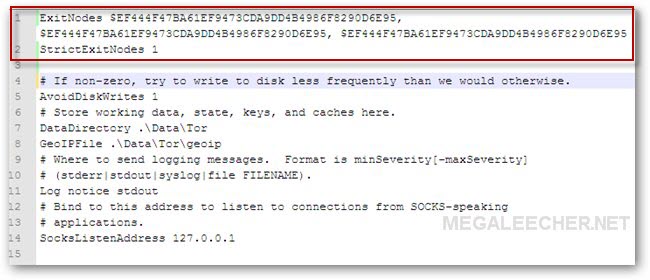
ExitNodes fingerprint-code-1, fingerprint-code-2, fingerprint-code-3
StrictExitNodes 1
substitute fingerprint-code-1, fingerprint-code-2, fingerprint-code-3 with codes of your choice.
Using this trick you are now able to have an IP from country of your choice and no-more need to go hunting for country specific proxies when needed.
Comments
FYI
The first time you edit the config file for TOR (.Data\Tor\torcc) it renames it to torrc.orig.1 and replaces the original torrc file. If you open it, you will find: (only the first two lines are pertinent to us).
# This file was generated by Tor; if you edit it, comments will not be preserved
# The old torrc file was renamed to torrc.orig.1 or similar, and Tor will ignore it
# If non-zero, try to write to disk less frequently than we would otherwise.
AvoidDiskWrites 1
# If set, Tor will accept connections from the same machine (localhost only)
# on this port, and allow those connections to control the Tor process using
# the Tor Control Protocol (described in control-spec.txt).
8<---------- blah blah blah, snipt for the sake of brevity
Cheeky, eh. :)
Well, simply paste in your exit codes again and it will work just fine: (
ExitNodes fingerprint-code-1, fingerprint-code-2, fingerprint-code-3
StrictExitNodes 1
(Ensure that you hit enter after fingerprint-code-3)
Cheers,
Don't Fidget
I hvent tried it but thanks
I hvent tried it but thanks for share.
I got tor does its job
got tor doing its job and its fine
Thanks, It work
Thanks, It work
plzz write the way that how it works in a text file and send it
plzz write the way that how it works in a text file and send it jabirkhankhan@yahoo.com
som issue
I am using xp i do not see the option copy, can any one help me with that.
copy fingerprint not working
I don't know if the version I have is different but I haven't the option of copying the fingerprint and therefore I can't contrl which node I connect to. Any ideas how to solve?
tor setup
hi my comp do not give the option of copy and fingerprint if i right click, if any one can help me with this.
oh god
its not easy
its very lenghty
its not connecting to
its not connecting to tor!!!plz help i installed it but the View The Networks list is empty!!Help me!!! my id is rohitdas1996@gmail.com
and my ip is 122.*62.***.94 i will giv u the full ip uf u reply!!!
Can't get fingerprint
When I right click on the relay in the network map, I only see "Zoom to Relay" but no "copy" menu. Any idea? Thanks
vidalia 0.1.15
Tor 0.2.19
QT 4.5.1
Error
I followed the details exactly but it didn't work for me :(
Any suggestions?? Plz help!
Too Slow
Well the browser version lets you copy the finger prints. But Tor is wayyyyyyyyyyyyyy too slow. I have to wait about 10 seconds to browse each page. My speed is 10Mb/s.
I agree, I have the same
I agree, I have the same problem!
I followed the details step
I followed the details step by step but i didnt get anything, Its not changing...Any ideas!!
The 'Copy' Function
[QUOTE]Download TOR + Vidalia bundle from here, I prefer the all-in-one Portable version which comes with Firefox.[/QUOTE]
Downloading TOR + Vidalia bundle and using Internet Explorer does not give you the 'Copy' function. Instead download the AIO Portable version, this comes with Portable Firefox as said and the 'Copy' function is there!
not working
the page came up but cant load anything..waited for eternity...
NOT WORKING
NOTHING HAPPENS...
can't connect to nw
how to use&set these three tools--jap,privoxy,tor?
mean what?
my VIDALIA GUI show me this,the processbar just running about 60%,then stopping there,so...what should i do ?
works just fine, Instructions
works just fine, Instructions are clear and easy to follow. Downside is that d/load speed goes down significantly, but thanks for the tutorial anyway.
You need to configure browser and help with Dragon Nest plz!
If its not working is cause you have to edit your browser config too... if you running firefox go to options>>>advance networking>>>Configuration>>> Check: Proxy Manual configuration >>>> Proxy HTTP: localhost, Port: 8118.
Now my problem:
I changed my ip to play Dragon Nest online, since i'm not from the USA, Australia or Canada(As this game dont allows other countries Ip's), I had to change my ip so it could be unblocked, and now it is from the USA.
You log in from the website to the game, so theres no problem there, it is using that american ip im getting from Tor, but the problem is when the game is loading, im guessing it like rechecks the ip or something, cause im still having an issue of IP block.
And now the question: Is there a way to change the ip of all your machine to an american Ip and not just the one inside the Mozilla firefox with tor or another program??, and I know Im not getting the same ip on Mozilla as I do on Google Chrome cause I went to http://www.whatsmyip.org/ to check it, and it's different from browser to browser, plz help and tyvm.
If you could replay to my email would be greatly appreciated.
pacoron43@hotmail.com
Error at line 3: ""
When I tried to save the "torrc" file, I got the following message "Error at line 3:""'. Can anyone help me out. Thanks.
Specific IP address?
Hi, could you please tell me: is it possible to set up the Tor to exit at a specific node? I need my data to go through Tor, THEN through a specific proxy server (I would like to enter the IP address), and then to website I would like to visit. I know how to set up a country-specific exit nodes, but is it possible to set up an exit node by IP address (and port)?
Add new comment