Submitted by Deepesh Agarwal on Thu, 11/13/2008 - 05:34
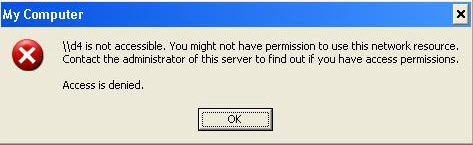
 If you are using Windows XP or Vista and the network machine running Windows XP is refusing your attempt for access via network displaying "Access is denied" or "You might not have permission to use this network resource. Contact the administrator of this server to find out if you have access permissions." error as shown below, just follow the simple registry hack to fix it.
- Goto Windows Start Menu -> Run, typin regedit and press Enter key to launch Windows Registry Editor.
- Navigate to - HKEY_LOCAL_MACHINE/SYSTEM/CurrentControlSet/Control/Lsa
- Change value of key restrictanonymous to 0.
- Reboot computer to apply change.

You can also use the Registry files below to apply and undo the hack, simply download and double-click to apply.
- Enable anonymous access from network.
- Disable anonymous access from network (recommended from security point of view).
Comments
Good Very Good
Very Good Trick Lot's of My Office PC Allowed Network Security :D
But Now i Managed with this ;)
Good One Keep It Up :D
Bob
It was already on 0 but still having the problem :S
I'm not as bright as most.
I'm not as bright as most. Just wanted to try to figure out something before I get someone to format everything and start all over again. Thank you.
Throglokan
A lot of thaks... We had this problem due to a virus.. now, I know the solution, thanks!!!
Having same problem its on 0
can someone help us thank you Ron
Another way...
Try using this instead:
net use \\(computer name here) /u:(remote user name here)
Then open the network again.
cant really make any sense of that...
could u plz give an example?
access
restrictananymous is already o... still it giving problem.. so if u have any other hackers.. plz let me know!
Bad post for security
Jai Hind
belive me this thing i also developed once myself but...i changed this becoz its an security flaw too
better thing is you use the tricks we uses to increase out internet speed ;-) that doesnt increase internet speed but the LAN browsing of PCs
It worked for me
I changed value of key restrictanonymous to 0 and it worked
I had previously also used Windows Resource Kit Tools. Download, install and then run. Copy and paste the following into the cmd shell
net user guest /active:yes
ntrights +r SeNetworkLogonRight -u Guest
ntrights -r SeDenyNetworkLogonRight -u Guest
Good luck
Unklelol
i worked it out to 0 not funtioning properly
i worked it to 0 & downloaded that registry files . but i got only big 0 , i think this bcoz of my college zywall filter page if u have solution pls send to me at
adamgopi@gmail.com........
Thanks for this info i was
Thanks for this info i was haveing troubles today and now i can aceess my network again> Thank you
network access denied
same problem
Network acces denied
Thank you very much. You made my day.
Harjeet
thank you for your tips // junpal tagum city phiippines
the virus
changed restrictanonymous value to 1..
im figuring it out how to access network resource for about two weeks , until i found this link.. thanks a lot
im using windows 7 and my
im using windows 7 and my guest account doesn't have access to the internet, it says in the network and sharing center that it is "unknown" "access is denied", but the internet works perfectly on the admin account.
Thanks in advance.
network access
hi
i have same problem but i can share printer and some files between my desktop and labtop but some files i cant and it says Network acces denied
i hope u can help me
Thanks!
Have been looking all over the internet for a solution. Though I'd rather uncheck some options that were supposed to be unchecked, this works for me too.
To anyone saying their key value already was 0 and that this didn't work: try the computer you want to enter.
It worked!
Thanks! This solution worked for me!
Worked a treat
The registry change to the restrictanonymous key worked well and solved a problem between and Windows7 and XP computer.
Thanks for this.
Setting Security and Sharing Properties from Win7 to WinXP
Leave it to microsoft to screw up network communications that has worked for over 15 years. Win 7 (Home Edition and perhaps other versions) allow you to
map and access WIN XP PC hard drives and folders but not vice versa. When you try to access a Win 7 PC root drive or folder you get the message "access
denied". I have seen a number of so called fixes for this problem on this site and others, but NONE OF THEM WORKED! Many of these fixes involve changes
to the WIN 7 PC's registry that have nothing to do with the problem. I spent about 6 hours to figure out the fix for this problem. I posted a simple tutorial on U TUBE at http://www.youtube.com/watch?v=JPRpkDDl1hc that will show you exactly how to fix this problem in less than 20 mouse clicks....Kim
Thank you.
That was the answer. I should note that this works with individual folders, which is what I needed.
Thanks a lot
Hey, man...thank you very much for helping me...God bless you
See you
Major Headache Removed
I have No1 & No2 PC's (XP-Pro) etherneted & one netbook (Win-7 Starter) wifi'd to a modem/router.....all communicating with each other but denied access/file sharing to No1 PC, although oddly the printer could be accessed from No2 PC only.
Now all fully sharing thanks to the 'restrictanonymous' hack.
Thanks a million-billion-zillion to whoever it may concern :-)
Vince
Fukeneh!!!!!!!!!! IT WORKED
thank you, thank you,thank you......... been trying for friggin months to fix this $#@%&* problem. Your the man!!!!!!!!
You're a genius
IT WORKED!!! I've been messing around for hours over years trying to get this particular machine to communicate with just about anything.
MICROSOFT -- question what's the point of a network connection that doesn't allow you to connect to anything?? I shouldn't have to spend half my life tying to get the network to do what it's supposed to do. If there are people out there that want Fort Knox Security then make it so that they spend hours figuring out how to turn it on. The rest of us (I expect) would like just to plug the machine in and share! ARE YOU LISTENING You fascist b***!
MegaLeecher you deserve an OBE. Thanks a million times!
Already 0. This XP access Windows 8, but W8 does not access XP.
Key already set to zero, but W8 has access denied to this XP. XP can access freely W8. Note, I am not using a Home Network, but a plain Microsoft netework through a router. Help needed!
Add new comment