Submitted by Deepesh Agarwal on Sat, 10/11/2008 - 14:32
 Internet Explorer 8 Beta 2 introduced the InPrivate invisible browsing mode also called as "Porn Browsing Mode", allowing users to surf internet without leaving any browsing traces, all the cache files, Browsing History and Cookie information is automatically deleted after end of private browsing session.
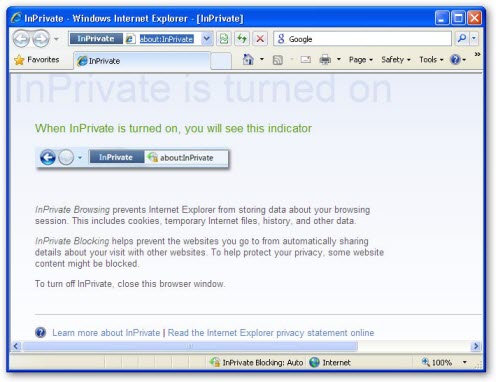
For faster and easy access to IE8 private browsing mode we will be creating a shortcut to launch the browser InPrivate mode by default, simply follow the instructions below:
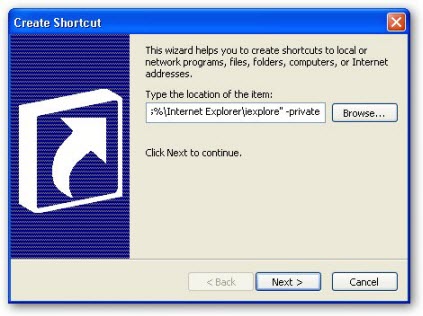
- Right-click on Desktop, Click New -> Shortcut
- Type - "%ProgramFiles%\Internet Explorer\iexplore" -private and click Next.
- Type in a name of your choice for the shortcut, eg. "Internet Explorer Private" and click Finish.
- Using this shortcut will launch the browser InPrivate mode, allowing you to surf the web without worrying about your privacy.
Comments
not really helpful because...
this also makes it easier for kids to look at porn and parents be totally unaware.
Because kids are dumb?
As if teens who want to look at porn aren't going to figure out how to do it anyway.
If you're relying on software to control what your teens do you should come to terms with the fact that you're a bad and/or lazy parent!
If your teen wants to look at porn he or she WILL -- it's that simple. If you don't want them looking at porn you need to provide them with compelling reasons not to.
this is working perfect
really
Helpfull
would like to know the reg key, to deault on all instances of ie launch
Thanks!
Great stuff. Thanks a lot for the information. Now, I am going to go look at porn and my parents won't know.
I am 27 by the way.
Opening up a site in private mode
"%ProgramFiles%\Internet Explorer\iexplore" -private www.google.com
That way the site of your choice on the end of the launch command will open.
Thanks very much
I can now launch IE in inprivate mode.
So easy
Thanks for this tip.
I have been looking around the IE settings thinking MS would have put an option in to allow IE to start in privacy mode.
I then started looking on the net. One suggestion required going into the registry.
Your suggestion is so easy. Thanks very much.
Also thanks to whoever added the 'site of choice start up' addition.
Graham - UK
yeah that was sweet
yeah that was sweet
Excellent Tip
Marvelous.
Thank you.
I don't use it for porn, it's just handier.
I just like it because I hate having to delete cookies and all that other crap normal mode stores on your computer. (I don't use it for porn) It's a great invention though.
Good reference page
Mom, now i can visit gay porn behind your back. :P
i did this but it is not
i did this but it is not working if you are clicking a link from an e-mail message. can we do it "default" for the clickable links a well.
cheers
yeah that adding homepage
yeah that adding homepage site at the end was pretty cool
It seems like you know what you are talking about
If you value your online anonymity then you need to take precautions. The first step is to become invisible while on the net.
Add new comment