 As your iTunes media collection grows you end-up having lots of duplicate and dead media in your iTunes library, the duplicate remover functionality provided by iTunes is very limited and you have to do everything manually, if you are on a Mac there exist quite a few handy AppleScripts and utilities to get rid of those dead and duplicate tracks, but if you are using iTunes on Windows finding a similar solution is hard, luckily after searching a lot I finally found a working solution for Windows users, enabling them to clean their iTunes Library automatically with ease.
Pretty similar to the popular Doug's AppleScripts for iTunes on Mac, Teridon's iTunes Scripts gets the job done on Windows.
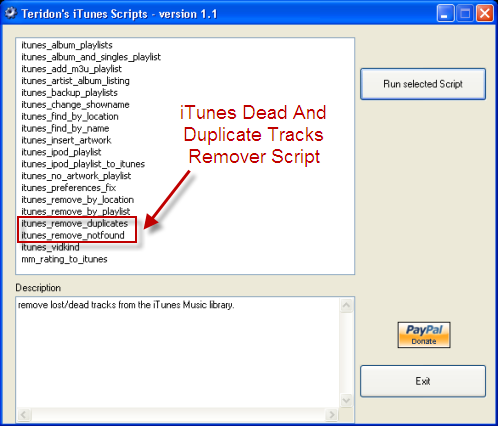
Using Teridon's iTunes Scripts is very easy, all you need to do is to launch the executable and select the desired functionality and click "Run selected Script", a DOS windows will pop-up providing further instructions specific to selected functionality as demonstrated below visually.
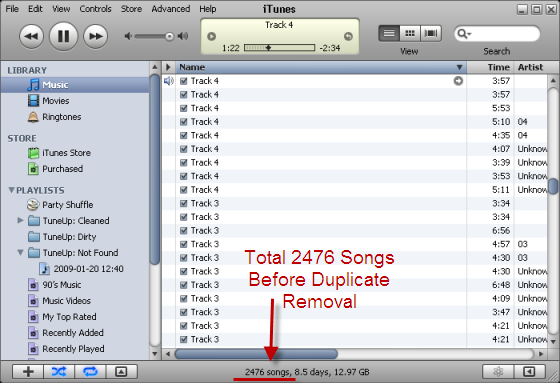
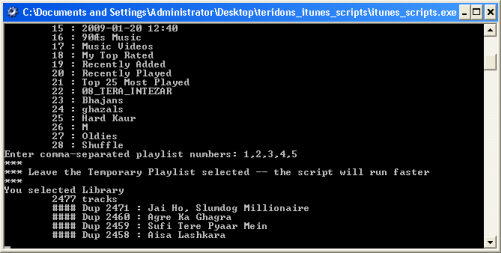
Teridon's Duplicate Removal Script In Action
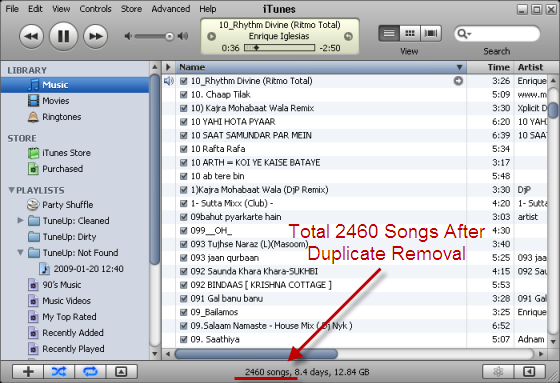
Tracks After Duplicates Removed
I tested these scripts with latest version iTunes 8.0.2 and they worked fine, perl source codes of the script can be found in the src folder, Teridon's iTunes Scripts can be downloaded here for free.
If you are looking for a more professional grade advanced Audio file duplicate remover, do give Duplicate MP3 Finder a try.
Comments
Teridon's iTunes scripts
Looking forward to test driving this. Especially if it can discern the different Tracks without names.
teridons itunes scripts
The script for removing dead tracks doesn't work.
removing dead tracks
I just ran the script for removing dead tracks and it worked perfectly. Something that would have taken me several hours to do manually only took 30 seconds with this script. Thanks!
removing dead tracks - suceess!
I also had great success in removing my dead tracks easily and I had 9000+ files to remove. Thank you!!! I'll be sending a donation!
Amazing Script
Thanks Man!
Worked like a charm, thanks.
Worked like a charm, thanks. be sure to type 1,2,3,4,5 when prompted.
Sucks for removing duplicates with different paths
Didn't work for me... Still have over a thousand duplicates
same here, this program only
same here, this program only works on exact path duplicates. It did nothing for files that share the same name but have different paths.
Works great!
If you make sure to read the prompt and select all of the items your duplicates are in, it works in just a few minutes. Step away, make a cup of coffee, come back and you're done. Free, small file size, and no installation necessary. Great program!
this script doesnt work
its not working I still have duplicates
Nice find...
Tried it - seems to work fine. Thanks for sharing.
Awesome
wow, super easy, purged 4000 dead tracks in like 10 minutes...super easy
THANK YOU!!!
I cannot tell you how any wasted hours I have spent in front of iTunes individually deleting the tracks with an exclamation point. And a different script worked to recover the playlists off of an old iPod, I refused to sync out of fear of losing all of my playlists. This worked perfectly, quickly, easily.
I am so grateful to you for making these scripts!!
Pas evident
On ne comprends rien a ce posst.
Pretty Good Script
I am very grateful for this script as it cut my work down to about 3 or 4% of what it would have been without it. Last night I started the script on my itunes which had quadruplicated itself to 900GB of music in 60,000 files. This script helped me remove 37,000+ duplicates in 5 hours. I had started to remove them manually and I was averaging about 1000/hour, so this really saved my butt. I now only have about 1000 duplicates left and no dead tracks. Thanks so much!
it did okay
can't complain, did not do everything i wanted but it's better than not working at all,or giving me malware or other unwanted program.
Great work!
I still have some duplicates, but it removed 4,707 dead (!) tracks. THANKS and will be making a donation!
your incredible this worked
your incredible this worked perfectly couldn't ask for more
Thanks
THats bleedin class man. good work!
Script does not work
Thanks for the article.
However, the script did not work on my Windows Vista Home. Is it only for XP? What am I doing wrong? Is there a more straight-forward way of getting rid of my iTunes duplicates???
Ted, I have recently started
Ted, I have recently started using a third-party program which is intended to remove duplicates itunes - http://www.copytrans.net/delete-itunes-duplicate.php. I looks decent for what it is + it is offered for free.
Otherwise, use the Display Duplicates function in iTunes - be warned that iTunes itself is not the most "straight forward" way of getting rid of your iTunes duplicates, hence the need for such tools.
Still works
great job stills works as of 03.04.12.
Thank you
Downloaded your itunes script . Love it! works great on Windows... not very fast mind you but does the job!
Thanks!
IT Really Works
Are you ready for this? It removed my Dups....all 24,601...that's right.... Twenty Four Thousand six hundred and one! Damn Apple Itunes on PC. They are like the Death Star to my PC, but like return of the Jedi, I won! Thanks guys....
Oh, how long did it take? Well don't judge a book by its cover, but it took 36 hours to remove. Which is all good because it would have taken me weeks manually.
Thanks guys, I will be making a donation.
This dude should work for CrApple
This script is brilliant
Thanks
Not all versions of iTunes have a built-in function to remove duplicates. I delete duplicates using another program.
Add new comment