 All network adapters have an unique identifier assigned by the manufacturer known as Media Access Control address (MAC address), this MAC address is used to identify a particular device on a network and was intended as a globally unique identification numbering system to trace network activity and implement restrictions and security, MAC address are used by many ISP's worldover for binding network access to a particular modem, however this MAC number can be changed easily via readily available noob friendly MAC spoofing tools, here are few tricks and tools to spoof your MAC address on Windows, Linux and Apple Mac.
Changing the MAC address on Windows is very easy, all you have to do is to use free MAC spoofing utilities like "Technitium MAC Address Changer", "SMAC" or "EtherChange".
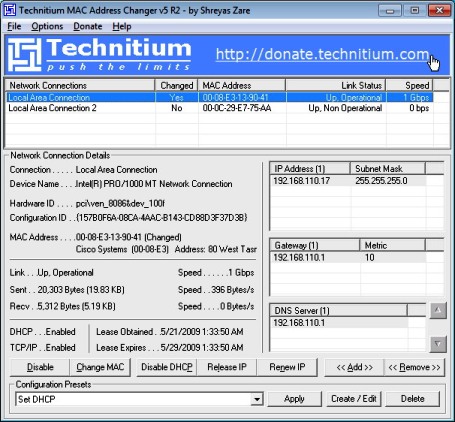
For spoofing MAC Address on Linux computers you will need to use following commands with MAC address of your choice:
# ifconfig eth0 down

# ifconfig eth0 hw ether 00:80:32:AA:c1:40

# ifconfig eth0 up

# ifconfig eth0 |grep HWaddr
For MAC Spoofing on Apple Mac computers follow the instructions provided here.
Download Windows MAC Spoofing Utilities :
Comments
THANKS!
This is an AWESOME program :D :D
THANKS U for this POST :D
thanks
I JUST NEED these types of info
GREAT JOB ADMIN!!!
u just have SUCH A GOOD Articles ;)
thanks again :)
thanks
Very Very Thanks.
very good software.
Nice Post
Thnks my friend...
Keep it up..
nice
goooood tollls
Windows 7 Mac Spoof
This doesn't seem to work on Windows 7.
Explain the Symbol before 'grep HWaddr' on Linux
Hi,
What is that vertical symbol: | grep HWaddr
How do I enter that?
See here - https://www
See here - https://www.computerhope.com/jargon/p/pipe.htm
Add new comment