 The Windows 7 anti-piracy update which pirates were fearing is now live getting distributed as KB971033 via Windows Update, the Windows Activation Technologies (WAT) update is tagged important and features detection of more then 70 known Windows 7 activation hacks and cracks informing users of their genuine copy status taking actions if usage of piracy is detected.
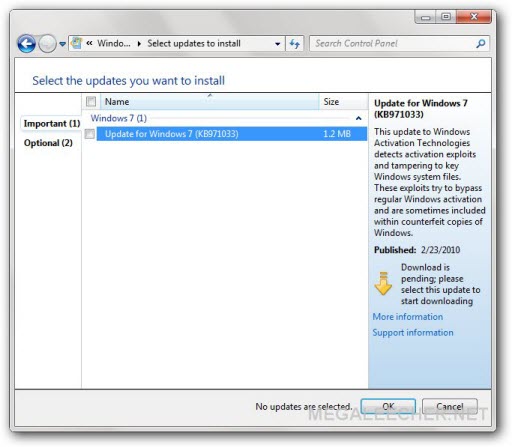
However, pirates can still dodge this update by simply not opting to install it or even uninstalling it from Windows Update -> Installed Updates section, they can even restore to a pre-KB971033-update state as Windows creates an automatic restore point before installing updates (seems not to work from user comment below).
Here is some more official information what KB971033 is capable of doing :
This update for Windows Activation Technologies helps detect validation errors and activation exploits. This update also detects any tampering attempts made to important Windows 7 system files. Be aware that some counterfeit copies of Windows include malware.
When this update is installed, it performs a validation process for the copy of Windows that is running on your computer. However, this validation process does not affect the functionality of Windows. The update process exits silently if it detects no validation errors, activation exploits, or tampered files.
Tampered Files
If the update discovers a tampered file, it tries to restore the file. This restore may require a restart. If this update cannot restore the tampered files, it will direct you more information on the Internet.
Validation Errors or Activation Exploits
Validation errors and activation exploits try to bypass the Windows activation process and are sometimes included with counterfeit copies of Windows. If a validation error or activation exploit is detected, you will be directed to more information on the Internet for resolution of the activation exploit or the validation error. When validation errors or activation exploits are removed, you may be asked to use a valid product key to activate the copy of Windows 7 that is running on your computer. If you decide not to resolve the validation error or the activation exploit at that time, you will be periodically notified that the copy of Windows 7 that is running on your computer is not genuine. Additionally, Windows will provide a link to more information online for resolution.
Comments
Seeing as I couldn't restore
Seeing as I couldn't restore to a point before the update took place, the best I could do was uninstall the update afterward. However, now I am stuck with "windows copy is not genuine" crap. Is there anyway to revert it to the same as before?
Remove WAT 2.2 should clear
Remove WAT 2.2 should clear out the Not Geniune.
Please note that ALL ANTI-VIRUS WILL reconize this as an Trojan.Rozana or Trojane.Rozane. With a discription that it will add a user on your system so the owner can RD you.
I have runned it and checked my net users. nothing came up, only my account.
So if u uninstalled the KB71033 Run the Remove WAT and you are fine. DOnt forget to hide the Update.
My 2 Cents to help
Open the cmd as administrator
Open the cmd as administrator and type SLMGR -REARM :)
Thanks
Worked for me after removing the update
Amazin', such a wizzard. Thak
Amazin', such a wizzard. Thak you!
Slmgr - rearm slmgr /rearm
Shit does not work at all
Yeah, uninstalling ain't
Yeah, uninstalling ain't working with this... Like the previous mate I'm stuck with this... Had been using an OEM version BTW...
Any ideas lads??
Cheers
So...
So then how do I make it all go away? I bought Windows 7 as part of a repair... now bloody this... I am not going to pay for it again...
windows 7 requires activation after update
If removing the update does not resolve the issue, back up your data on a separate drive format and reinstall windows. I always install ALL programs onto a separate drive, if you have Hiren's utility disk, you can partition and use a restoration utility. This way you'll have the windows install without the update that you will return to. Pretty easy to do. Here is a video with links to install Hiren's utilities. Best of luck, and good wishes!
http://www.NO-LINKS.Com
Search Google For Windows Genuine Remover
if you look up windows genuine remover, they is software that removes it. i would put a link but the website i used is down for maintenance
Possible fix
Not sure if it will work after the OS has been broken I'm yet to test that part.
C:\Windows\System32\Wat\WatAdminSvc
C:\Windows\System32\Wat\WatUX
Your are done.
KB971033 fix
A fix has been available since the beginning of the month (March), and I have validated that it works fine. Available via a small torrent on Piratebay.
Remember, however, before running the fix to turn of Windows Update, and only install updates manually from now on, or KB971033 will re-install itself.
Could i have the link of the
Could i have the link of the fix please
KB971033 Fix
This fix did work for me and I also uninstalled KB971033 in Control Panel/Programs and Features folder. Just click on View Installed Updates on the left hand side and uninstall KB971033 and made sure you have your updates turned off.
System cannot find the file selected
It says that when i type in the watux and the watadminsvc line help
my laptop restarts
i hav windows7 ultimate installed on my laptop. i observed dat it restarts automatically after every 2 hrs. dis prob has started in dis month. m using OEm version.
i hv stopped automatic updates. but still prob persists...wat 2 do?
you are running the test
you are running the test version. upgrade
does this affect other pirated software?
I did buy my MS windows 7, but it seems that as of today i cant run any of my pirated software, this includes all of adobe cs4, 3ds max, and autodesk maya. Does this update affect those things too? Or just pirated windows 7 copies? help would be MUCH appreciated as i use those programs for school.
ms windows 7
hey guys
i have a crack copy of windows 7 i was just reading that you can't install cracked software
i haven't had that problem
if you have try this
http://www.microsoft.com/windows/virtual-pc/download.aspx?runGenuineCheck=true&system=9&lang=1&buttonClicked=winXpMode
every program that you install on it you can run on windows 7
how to crack windows 7 ultimate
morning can somebody help me to crack my windows 7 ultimate build 7100
cracking windows 7 ultimate
If antipiracy update kb971033 is on, and it reports copy as non-genuine try using activation crack by someone called daz program windows 7 loader v 2.0.8 via any torrent site making sure its exe form once downloaded. Make sure antivirus dont throw wobbly, by disabling it run program buy opening folder created and click on little ball with windows 7 loader. When loaded click install, if error throws up ignore restart click install again if it says it has installed and asks to either close shutdown or restart click restart wait till windows 7 ultimate has loaded and if antipiracy update kb971033 is installed go to internet explorer type www.microsoft/genuine/validate then hit return key wait for it to go to site and if it give option of install kb971033 if allready installed and loaded click continue and if box on bottom of screen comes up options for this site click allow for all click return then should go to validation process.
If activation crack windows 7 loader buy daz v 2.0.8 or higher has worked windows should validate genuine after that you should be done save to favorites if you want and reload same save site 2 or 3 times just to make sure windows has validated genuine if same answer happens 2 or 3 times in a row saying copy passed validation then your done ok.
back up all of ur files and
back up all of ur files and programs to an external harddrive and re-install windows 7 this time when installed for update make sure u select the option where it asks u to download and install instead of automatic..... i did this and installed all but the update above and its problem solved for me guys!
can't you just save your
can't you just save your files on a different hard drive on your pc rather than OS. then re-install windows seven and avoid this specific update. I have multiple partitions on my hard drive so can't i just save everything to the other ones that do not have the OS installed on it.
all the things here
dear sir all the things here in your site its still not working for my windows 7 ultimate. every thing i boot up the pc i keeps on popping the prompt your windows is not genuine. what shall i do?
it is very hard for me to do this things, what shall possible solutions are there? or how can i remove this popping prompts every time i boot the pc. thanks and more power Gobless po
LINUX
Do not be stupid, use Linux, is a great "piece" of software.
the guy is right, linux wont
the guy is right, linux wont ever ask you to buy his software loll
just reinstall windows 7 ultimate
I just reinstalled Dub7 Ultimate. Now, if I manually download and install all updates EXCEPT KB971033 I'll be ok? Should I avoid any others?
Can I remove KB971033?
I only heard recently about this update which I have already installed on my pc. However I haven't got any problems yet concerning the authenticity of my windows 7 ultimate x64. Do you think I can just uninstall it before I get any? Will it work?
KB971033 and 'Build 7600 This is not a ......'
For those of you that are running pirated Windows 7 and are being plagued with pop-ups from Microsoft repeatedly reminding you of the fact. Download and run WAT remover 2.2.5. This is freeware by Hazar. This will remove the Build 7600 This is not ....etc' crap from your home screen and prevent the pop-ups that spoil streaming TV. You will still need to untick KB971033 every time before you shut down or alternatively turn off windows updates completely.
KB971033
This particular update does not take no for an answer. If like me you have 'Windows update' set to advise before installing and if you then un-tick the update box windows will acknowledge your instruction and then proceed to install it anyway!
I have now set my windows updates to 'advise before downloading' so that I can cut it off at the canyon!
You can easily uninstall KB971033 so no great problem but it's the obstinacy of Microsoft and their principle that they must be the final arbitrator of what must be installed that irritates.
Microsoft corp can b anoyin as hell,atleast u can hide WATupdate
that's the same thing that happened to me :-/ I had my win updater service completely stopped but then an alarm clock program I wanted to install said I needed a framework update before it would install/work so I turn on my update service selected 3 of the many updates that were available and the next thing I know I have the build 7061 error. When I checked my installed updates in the control panel there were like 15-20 of them instead of 3-4. It's really annoying cuz now I've spent hrs tryin to remove invalid op crap with no luck so far but the 1 cool thing I found was that u can go to the WAT update in win update and hind it using the right click on ur mouse so u won't have to worry about it ever installing again.....I've been thinking since I might have to redo my operating system anyway I might try out Windows 8 and c how I like it....any thoughts on that? Has any1 here tried Win8? I did hear from 1 person it was annoying and far worse than 7 but I like to hear more than 1 opinion not that it would stop me from testing it out anyway lol So Btw i uninstalled the WAT update and ran win loader but cant seem to fix my op sys...is it possible I cant fix it cuz I used a different crack program during original install? And if that is the case how do I go about uninstalling it? I think it may have been WAT Remover if that helps....
you can hide the update and
you can hide the update and it wont install it at all.
Win 7 Ultimate Activator
Just activated mine and the loader doesn't even touch the WAT...still activated and fully updated. This was not a free tool and for those who want it can contact me at deathshead1022@yahoo.com for purchasing details.
can someone please post what
can someone please post what update adds red bars to microsoft office 2010 when you don't want to waste time calling in every time you do a recovery & have to re-install it, it gets frustrating for ppl who actually bought the software. It just says "microsoft activation failed" Note though that it was already activated & working fine until some update installed from windows update.
Easy steps 1. Remove
Easy steps
1. Remove KB971033
2. Download and run removeWAT
3. Change Windows Update settings to "Check for updates but let me choose whether to download and install them". This option actually downloads the updates but doesn't install them. Also untick recommended updates in the same dialogue box.
The other option is a LIE "Download updates and let me choose whether to install them". It seems to reinstall KB971033 automatically.
4. Whenever you're ready just untick KB971033 from the update list and install the rest of your updates.
Never had a problem with this method.
WAT 2.2
Here is the link to WAT 2.2:
-- LINK REMOVED, NO ILLEGAL HACK/CRACK/SERIAL POSTING ALLOWED --
I used it on my windows 7 ultimate and it worked!
I had windows popping up and saying "you may be a victim of counterfeiting software". After i ran WAT it worked the window stopped showing.
This update can destroy your laptop...
I downloaded this installation yesterday after being told by Windows it was a "Critical update" Didn't even consider it would cause so many problems.
First sign something was wrong was when Windows refused to work any more (no warnings, no errors, no problems detected) in normal mode. Only in Safe mode would it boot up. System Restore failed to work consistently, and loading up windows in normal mode only resulted in a black screen or windows loading and then semi-freezing when I clicked on anything until I was told that "Microsoft had an error".
Went online on my mothers computer and found out about this update. Went to uninstall all updates in case they were causing problems. Uninstalling the one above is the only one that would not allow. The left click on it refused to work and uninstalling the others only resulted in my computer telling me "Updating windows please do not close your computer" and semi-freezing there (mouse worked fine, little dots by the do not close computer moving happily, no sound or sign of
activity from the actual laptop), for both normal mode -and- safe mode.
Only solution was to reset the laptop to it's factory settings and thank the Lord that Toshiba had installed that option as when I bought the laptop it did not come with it's own Original Operating System disc.
Problems however are not completely over. now for some reason my laptop won't allow me to update my Wireless LAN driver telling me that it's "not supported by this operating system"...
Can this update cause problems? Yes.
I'm actually a little jealous of the people who are only stating they get an annoying popup now and again....
Reb.
broken windows
Doesn't anyone back up their systems? I'm talking about a DR backup, not just copying your files to the internet. This is a no-brainer, people, and this is one of the best reasons for it.
Windows breaks? Spent more than 5 minutes trying to fix it? Pop in the CD, restore the OS image, restart, and you're back in business 30 minutes later
UPDATES!!!!!
I have a PC of LENOVO and a PIRATED version of Windows 7,when switch on my PC it always Shows UPDATES.... i dont know how to get rid off it and when i click on it it starts updating and my windows get cracked....if u know how to get rid off this then please help me!!!
Why not just upgrade to a
Why not just upgrade to a new, improved version of windows?
;)
Yeah, that or Linux. =P
Yeah, that or Linux. =P
windows 7 ver1.9.1 loader user
can i install this update without detecting that my copy of windows is fake? or do i need this update? thanks
its not the KB971033
http://imageshack.us/photo/my-images/20/capture08252012094329.jpg/
and this
http://imageshack.us/photo/my-images/31/capture08252012094316.jpg/
Win7 WAT removal and hassle-free Windowing.
There are loads of sneaky ways I have found Win7 uses to cause problems with the KB...033 update. Im sure there must be another update similar to 033 lurking in the wings waiting for a chance to get online and play.
Anyway, my advice to anyone installing a genuine online version of W7...Be very wary of going near any Microsoft site or site affiliated with MS. Also avoid asking microsoft for anything or consulting any online help pages or stuff like that for drivers, patches, etc. Info is much more available on forums and you are less likely to be tricked by microsoft into revealing something about your OS that they can piss around with and ruin.
***Make sure that 033 update isn't waiting to run/update right after you do a fresh install. Go to update history and/or view installed updates. Remove the 033 update from the list and make sure it doesn't come back if you reboot.
Then run WAT and then it will reboot.
BUT... It also has a sneaky update option in the security centre, especially if you don't have any AV or IS software installed. It will complain that the default windoze firewall should be in operation... there is a check box to confirm that you will allow the security Center to "check for windows updates" at the same time as checking for security updates.
I didn't allow any updating of any kind from the security center and installed a copy of KIS13.
Get a decent firewall and update manually. Maybe try one at a time and see if its ok after reboot.
Watch out for the 033 update because it absolutely will not give up.
THanks.
KB9155597
Another suspicious update I have avoided. Says it is updates for the Win Defender definitions.
Says once installed it cannot be removed.
I think it's dodgy so I am not installing it. Have absolutely no use for Windows Defender whatsoever so anything like that I will avoid like the plague.
Especially if it says it is indelible.
Thanks
how to avoid updates
I ve pirated version of windows 7,every time i boot up system slows down showing a message "Windows configuring dont turn off your computer" how to stop this and speed up my pc?
Updates
Avoid all windows updates in the first place. Then you will never have a problem. The updates are now needed at all in your lifetime - trust me. As long as you system is working fine, why do you need to get logged on to a Microsoft server.Once you're there, your dead. Further than this if your so concerned about the software you use and the messages that pop up, by the original and stop cribbing. One good investment solves all the problems you might face in the long run, unless your planning on countless installations and formats and so on.
Have a great day guys.
updates can b usefull sometimes man
well sum programs wot work with out one or another of the updates plus I kept wondering y i didn't have an adjustment for the display brightness till I updated my win 7 ultimate and now I finally have it.....then again I also got the fake Op/sys message now too :-/ but I'm just saying there r reason u would want to update.....just be careful and read everything u decide to install plus remember to go back into services and stop the updater or it'll install all kinds a B/S when u fall asleep....tricky little bastards at microsoft lol
comment
its super
update
Noob here can i install this updates? using a fake 1.
http://imageshack.us/photo/my-images/818/ztw5.png/
The only one you will not
The only one you will not update is when it says WINDOWS DEFENDER. By the look of your pic that you posted you can update all of them without any problem.
thanks for the reply! I'm
thanks for the reply! I'm really worried about that windows malicious software removal though. just in case i didn't install this updates will it make any problem in the future?
Downloaded the "DAZ loader" to make genuine, now it wont start
Anyways, hey guys! im stuck here and usually i read my way out of a sticky situation, but i dont have time, pther than the little time i did try.
My sistuation: i have wondows 7 ultimate, that was genuine, and the readme file said it would stay genuine. But obviously it didn't, so i went to a trustable torrent site and downloaded "DAZ loader", wich from my faint memory worked great.
Anyways, i ususally just use genereal settings, dont bother messing with it, but since i also have linux mint 15 installed on another partition, i saw in the options of DAZ loader, that i could tick off something like "leave boot as is" or something like that.
Now it wont start at all, i can enter bios, i can run different hardisk and meory tests, wich all get passed, but i cant seem to boot from my windows or my linux.........exactly what i wanted when i ticked that "option" right!
Anyways, im not panicking, im running tails on the computer im talking about, so and i have the win 7 installer. But i like to learn different things for different times. What im wondering is this; there must be a file in the hardisk that has to do with booting ? that i can edit, and maybe make everything back to normal....there must be something to do besides formatting and re-installing, even though its not the worst thing to do in this world, but i have some files here and there that i might forget to move to the other partition.
SO PLEASE, IF SOMEONE OUT THERE THAT KNOWS WHAT IM TALKING ABOUT AND THE SOLUTION, Please reply,
It would be greatly appreaciated!
even if you read this without and anwser to me, thanks!
I gotta run, *hoping for a reply* when i get back, hehe!
OC, The General!
boored? Check out my site, has some cool info and some eye candy (know what i mean) ;)
signing off.......
As it seems that u have dual
As it seems that u have dual boot system on 2 partitions (Windows & Linux or whatever both), you should have a separate boot disk created by the Linux. After installing DAZ Loader, it seems to have been corrupted thats why you are uanable to boot either of the systems. try to repair ur boot sector by googling "repairing dual boot windows" especially in Linux Forums.
regards..
Windows 7 ultimate, pirated edition, tried to make it genuine
With a prog called DAZ LOADED, so i followed instructions, i think i used it before on xp oor something and it worked, anyways, before starting the process i went through customs in the program and ticked "leace bootable as is" or something like that, then started it!
Restarted the computer and now i cant boot either windows nor linux( wich i also have installed obviously), i all i seee when i start the computer is a blinking "_" without the " ofcourse...i can enter bios, i can run memory teststs and hard disk tests and everything loooks fine....but i dont have the choice of choosing linux....and windows doesnt start.......hmmmm ANYBODY outhere who experienced this?
Right now im using the computer through linus TAILS on a USB!.....please help, btw, all files are still there i can enter through tails. Maybe there is a "boot" file i can edit or something?
please help....i would appreaciate even giving it a thought! :)
thanks in advance!
OC, The General!
SAME PROBLEM HERE
Hey, I have the same problem. Have you worked it out? If you did, can you please advise how you did it? Because I am panicking right now. Gee, thanks.
Anyone got advice about what are the ESSENTIAL updates
Does anyone have good advice about what the ESSENTIAL updates are for a pirated copy of windows. Most people dont want to sit and wait for days while it goes through the motions of updates and patches for apps you dont have anyway etc - for the bloated windows prog.
Or can anyone point to a website with this info.
cheers
I think it's just KB971033, no others
I think it is just update KB971011, no others have ever been developed, though I could be wrong. What I do is I manually choose my updates every patch tuesday, no big deal.
For Windows 8 I used kmsnano, works easily enough, it emulates a windows server via a virtual OS! I have to do it every 180 days in order to keep the day count up on my windows activation. It's a very easy 1 click process and also takes care of Office 2013 at the same time. When will Microsoft learn that activation complextion just hurts end users but not pirates?
windows 7 activation
I visited many online store to buy genuine windows 7 online iso link, but they provide windows+license, For which price is too high for a student. So I decided at the last to get product activation key to get license windows for lifetime.
I have used all OS, Beside of
I have used all OS, Beside of Microsoft Provides many Operating systems , But Windows 7 is perfect OS for hd gaming with its all versions like; Starter, Home premium, Professional and Ultimate, Which has been used both for home as well as business purpose.
I suggest all friends to use only a full version of any OS to avoid lost of your backup files and precious time. Last time, I was need a license for Windows 8.1 pro, Which installed at my cousin's PC, So one of my friend recommend me to buy it from Microsoft Store. So I bought it, Activate online and Now its working well.
Going to install Linux until
Going to install Linux until they sort this out. No reason to use windows except for games that I don't even play. Btw, the ms dev's from asscrackistan are posting/trolling on these blogs. I'll enjoy watching their app market share drop like a brick. TTFN.
important
i found the update KB971033 in installed updates in my non -genuine windows and it didnt detect it
does it mean my windows is genuine
i have windows 7 ultimate
After 971033 you run daz once
After 971033 you run daz once more... history shows that genuine systems have more problems with anti-piracy updates than the pirated ones... but this is old story... now you should avoid all Windows X transition updates, since they have created to destroy your sanity... here is a small list:
2952664
2990214/3044374
3021917
3022345
3035583
3050265
3068708
3004394 - blocks Catalyst Omega
3033929 - Causing reboot loop
I have a laptop that comes with a Windows 7, but very soon I'm switching to linux... I 'm tired ot MS bs
Meh
Don't bother with Ultimate, it's full of junk, home basic 64 far better
Ultimate sucks?
LOL what? Ultimate 64-bit is the shizz nick.
Win7Ultimate default install, then DAZ... help
I did default install of Win7Ultimate, network cable was unplugged whole time.
Then installed DAZ.
Then plugged in network cable, ping ok.
Then enable autoupdates and click search for updates...
and NO UPDATES HAPPEN, just sits there with green meter spinning.
What is wrong?
Do I have to let all the updates come in first, current through today, then apply DAZ?
Thanks :)
Thanks! Work for me. I hope will add support Windows 10 Final wh
Thanks! Work for me. I hope will add support Windows 10 Final which released on July 29 soon!
Add new comment