Like This Post, Get Updates By Email:
OpenExpert - Customize Explorer Open With Menu To Use Multiple Applications With A Given File Type
Submitted by admin on Tue, 03/04/2008 - 05:42.


- Add Open With
- Add Program To Open With
- Add To Open With
- Always Open With
- Change Open With
- Custom Open With Menu
- Edit Open With
- Edit Open With Menu
- Open Files With
- Open With Application
- Open With Choose Program
- Open With Command
- Open With Context Menu
- Open With Default
- Open With Dialog
- Open With List
- Open With Missing
- Open With Notepad
- Open With Option
- Open With Program
- Open With Programs
- Open With Registry
- OpenExpert
- Remove Open With
- Windows Open With
- XP Open With

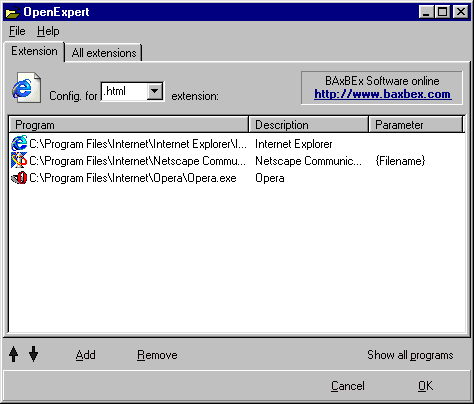
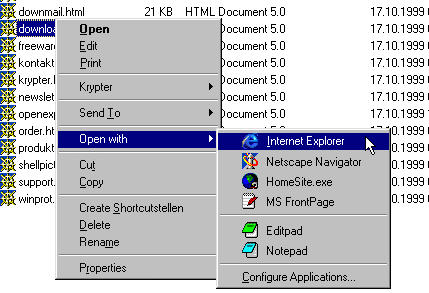
OpenExpert is handy utility letting users specify any number of suitable applications of there choice for each file type, this way, instead of being restricted to using a single pre-determined application, you can now easily choose from a list of suitable applications, this can be very handy at times, for example you want to do simple editing work on an image, instead of loading the default full fledged image editor like Photoshop you can load MS Paint using the Open With menu.
»
- 4746 reads
Similar Stories You Might Be Interested In :
- Direct Folders - Quick, Direct Access To Favorite Folders And Applications
- Add Open Target Folder Option To Windows Explorer Context Menu
- Pimp Up Windows Explorer Context Menu With Advanced Features
- Tidy Start Menu - The Easiest Way To Organize Windows Start Menu
- Easily Rename File-Extension From Shell Menu
Bookmark site
Bookmark page
Make homepage


Post new comment