Submitted by Deepesh Agarwal on Sun, 09/27/2009 - 15:31
 If you don't use user-accounts on your PC and want to get rid of Windows 7 logon prompt here is the simple procedure to enable auto-login feature in Windows 7, its very similar to Windows XP and Windows Vista auto-login method shared earlier with a slight variation in command syntax to launch the special user accounts configuration dialog.
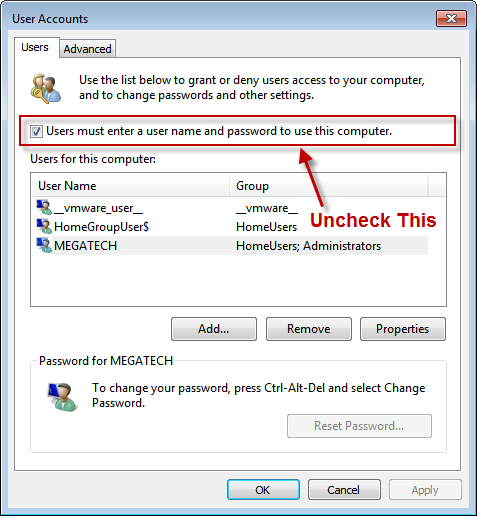
Steps to enable auto-login feature in Windows 7 :
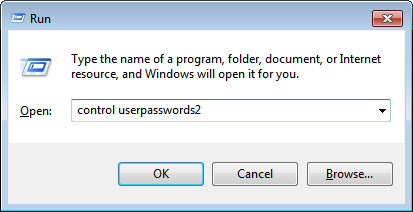
- Use Windows + R key to launch Windows Run window, type in control userpasswords2 and click OK.
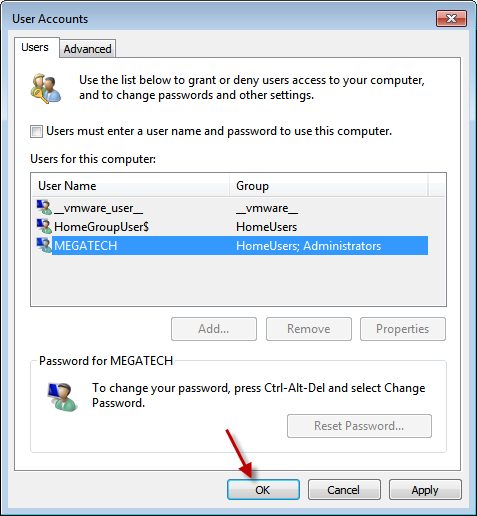
- Windows 7 advanced user accounts dialog will appear, select the user-account you want computer to auto-login into and uncheck "Users must enter a username and password to use this computer" checkbox.
- Click OK to save your choice and close the dialog box.
- From now your computer won't bother you with logon prompt.
Comments
Thank you! I am here. And
Thank you! I am here. And I'm using window 7
great
great.
it was of much help.
keep up.
thnx
thanx
its working
Win 7 Ultimate, Autologin
I'm trying to enable Autologin on a PC running Win 7 Ultimate. All instructions and tips I've found talk about checking/unchecking the "Users must enter a user name and password to use this computer" checkbox (on the User Account/User dialog box) - but my problem is that THERE IS NO SUCH CHECKBOX.
Is there a way to hide/unhide this chkbox?? Is there some other way to enable autologin???
Add new comment