Submitted by Deepesh Agarwal on Mon, 03/31/2008 - 11:43
 If your CD/DVD burner is making coasters failing to write CD's and DVD's, throwing a "Power Calibration Error" or "Medium Speed Error", here are a few solutions you should try.

Their could be several possible reasons and solutions for the above error, basically what is happening is for some reason the CD/DVD burning software is unable to determine the Optimum Power Calibration rate (a small pre-burn test to determine optimal laser power for writing), resulting a disk burn failure. There is no easy way to pinpoint the exact reason, so try all the possible fixes from top to bottom (easy to hard) and see what works:
- Try using different brands of quality blank media, most common reason for such error's is cheap blank media.
- Try burning at lower speeds (Highly effective).
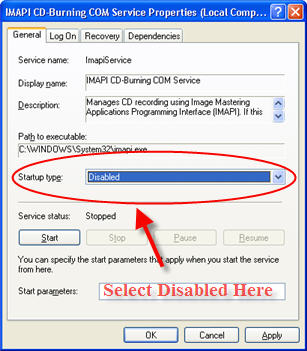
- Disable IMAPI Service (Work's in most cases):
- Launch Control Panel -> Administrative Tools -> Services .
- Browse for "IMAPI CD-Burning COM Service", Right-click on it and select properties.
- Change Startup Type to Disabled.
- Click Apply and Reboot.
- Try updating or changing your CD\DVD burning software to the latest version.
- Try upgrading your writer's firmware.
- If all the above fails the problem is definitely related to hardware and not software, Go ahead and get your burner laser lens cleaned by a professional.
- If all the above fails the drive's laser might have died and you need to get it replaced.
Best Of Luck, do post your results.
Comments
thanks my prb is solved
it has been solved using
3-Change Startup Type to Disabled.
thanks buddy.
power colibration error in nero
i use version 10 but there is same problem after decibale setting as i see in your web site
power calbration errore
asalam alikum plz healp me when i burn cd then ask me power calibration errore i hav e disabled the option some time cd is write sucsses fully an some time power calbration area errore what do
solved by method 3 Disable
solved by method 3
Disable IMAPI Service
thanks!
solved by method
solved by method 3..........thanx buddy....
new fix for Win 7 users
I was having this problem as well but only when i tried to burn dual layer dvd's under windows 7. I contacted memorex the manufacture of my 2 dvd dual layer lightscribe burners and the dvd media i was trying to use and he sent me this:
"Please run this tool to find and repair errors with your drive using Win 7, if you keep having the same problem, we will ask you to please try other DL media from another brand just to verify if the problem is with our media, if the problem is with our media we can offer you a replacement for the complete 50 pack, we apologize for the inconvenience you are experiencing.
You can find the mentioned tool here:
http://support.microsoft.com/mats/?DiagID=100001&EulaAccept=Yes
Best regards
Product Support Specialist"
I ran the tool it found some error fixed it i then tried to burn my memorex 8x dual layer dvd to copy a movie and BAM! it worked just fine now. good luck all.
BlackJack
CD burner Power
This tool you suggest as listed below appears to not be available at MS.
[http://support.microsoft.com/mats/?DiagID=100001&EulaAccept=Yes]
I received the following when I tried to use the above URL you provided. Do you still have a copy of this fix?
[We're sorry, but the diagnostic solution you have requested is not available at this time.]
i cant find imapi cd burning
i cant find imapi cd burning .. in local services
solved by blowing the laser!!!
i just blew out the laser ..... that's all..may be the laser is dusty..
thanks mate!
blowing out the laser helped for me as well!!!
Thanks mate ! I just blew it
Thanks mate ! I just blew it and it worked. Wonderful that hardwares are still like that ! most of the problems in windows can be solved just by restarting :D :D
also just blew the laser ;;
also just blew the laser ;; fixed the problem thanks
Reduced burn speed
Changing the burn speed setting from "Automatic" to a specific setting seems to be working at the moment. I burned 5 DVDs succesfully with it set to Auto, though, very strange...
You've gotten me working again, so thank you for posting this!
Solved with disabling IMAPI service Start-up
Followed the steps as described and problem is gone.
Thank you.
disabled IMAPI and rebooted
disabled IMAPI and rebooted and still getting error. Failed at 4x Burn Speed and it's a 16x SATA SONY NEC Optiarc drive. Going to try drive firmware.
there is no IMAPI CD-Burning
there is no IMAPI CD-Burning COM Service in Xp pro sp3.
Yes there is... And it's
Yes there is... And it's already disabled.
IMAPI is available
checkout the service properly dude,im using XP pro SP3, its there jst below 'human interface device access' goog luck shooting problems!
yes there is!! i use xp sp3
yes there is!! i use xp sp3 black edition and i found it no problem.........not bad for a GIRL
Imapi CD - Burning
Yes it definitely is in XP pro SP 3 but I have disabled mine but still have the problem!
sorry it was there, but
sorry it was there, but different name
-different language, so my mistake
Issue not resolved as yet.
Tried all the given steps, but the issue still persists. Though the Sony burner is burning the Sony DVDs & other media fails to burn.
change Inferior quality media
most probably you are using an inferior quality media, stick to Sony !
sony is just as bad
ive only been getting this error since i started using the sony dvd+r discs
Ditto, I've never had the
Ditto, I've never had the problem until just now when trying to use Sony media
NOT WORKING!
I use TDK DVD+R...is that good?
YES ITS OK
CHANGE YOUR DISK SPEED TO THE LOWEST BUT IT STILL GOES FAST WHEN U CLICK BURN IT SAYS DO YOU WANT TO CHANGE YOUR SETTINGS CLICK SETTINGS AND GO DOWN TO WRITING SPEED AND CLICK THE DOWN ARR0W AND CHANGE IT TO 2. SOMETHING X HOPE THIS HELPS
Disabling IMAPI in VISTA
How to Disabling IMAPI in VISTA?
Vista IMAPI
See this : http://forums.microsoft.com/MSDN/ShowPost.aspx?PostID=1105007&SiteID=1
How to Disabling IMAPI in VISTA?
Please advise on the above.
Regards.
I cant find it in vista so
I cant find it in vista
so solved it by burning dvds in 4x its working so far
fingers crossed
Problem Solved!
I burned 3 DVDs in a row and when burning the fourth one I got this error. So I cleaned my lens with a lens cleaner CD (it is a kind of CD/DVD with a tiny brush fixed somewhere under it). So if you are subsequently getting this error then try cleaning the lens with a lens cleaner CD/DVD. Works for 90% cases. Its worth spending a dollar.
No more coasters!
I had fallen behind in my music transfer since early summer, so 24 hours ago I started to burn ...but ended up making coasters. I tried 2 different fresh TDK packs, and a philips too. It was frustrating, either disc or power calibration errors everytime. This was the first serious burning problem that had ever happened.
I next spent a serious 5 frustrating hours today searching for the right fix. So many possibilities. I had come to the conclusion that my 2 year old Toshiba laptop & its pioneer DVR K-16A burner were getting too old..... that was until I found your advice.
The Disabling of "IMAPI CD-Burning COM Service" was the correct fix for me. What the H*** does this service do anyway?
I am running XP SP3, and I had had some major problems with SP3 crashing my computer back in July, so maybe this IMAPI problem is related to SP3?
Anyways, many thanks for the fix and making my day better!!!
Problem solved!
I got power calibraton error. So I cleaned my lens with a lens cleaner CD (it is a kind of CD/DVD with a tiny brush fixed somewhere under it). So if you are subsequently getting this error then try cleaning the lens with a lens cleaner CD/DVD. Works for 90% cases. Its worth spending a dollar.
Ps. Sory i just copy/pasted this comment, but that same thing happened to me to. Leans cleaner CD/DVD was my solution to the problem!
So i say try this first.. sorry for my english..
running XP sp3 changed imapi
running XP sp3 changed imapi works ok
Solved by writing at 4x &
Solved by writing at 4x & 8x
Thanks very much.....................
Love u buddy
DVD burners need Blow Jobs too.
I was getting the power calibration error so much I thought that my external DVD burner wasn't getting enough power because of everything else I had plugged into the surge protector. Everything was error, error, error, and it was stressing me out really bad.
I tried updating everything... power calibration error(s).
I tried changing the IMAPI thing... power calibration error.
I came here and read the posts so I opened up the tray, blew really hard inside of the external DVD case... what do you know? Works like a charm now.
You are the man... Blow job works !!!!!!!!!!
When i read whole article i tried everything i could.. only thing left was lens cleaning. i went through the comments and i read ur comment .. at first it sounded funny but i was soo desperate to get it working i blowed air twice inside my cd rom over the lens...
and tadaaaaaaaaa its working ....
I will buy a cleaner tomorrow first thing... cant rely on blow jobs.... lol
thanks all
Blow jobs are the best...
I tried this before getting this far in the post and it worked. Just a couple of strong gusts will take the pesky particle off the lens.
Using canned air to blow
Using canned air to blow inside the drive worked for me.
Blow Job
That works for me too. Thanks
WORKED!
Gave the lense more of a handjob, works againnnnnnnn :D
My CD/DVD lightscribe works
My CD/DVD lightscribe works perfectly burning DVDs , but says "Power Calibration Error " when burning CDs !!
Some advice ?? Thanks !!
thnx
#3 worked for me. awesome. thanks man!
my problem solved too
With step 3.So try to disable IMAPI service..Thanks a lot
Fixed my PBDS Dell burner and Pioneer DVR-108 too
it has been solved using
3-Change Startup Type to Disabled.
thanks buddy.
I went through about 15 $1 disks before I found this.
Great Information and directions easily followed...
Paul
John
It worked man. Kudos for this. You're a life saver.
Nero power calibration error solved
Toshiba laptop satellite A105-S2712 with Matshita DVD-RAM UJ-845 CD/DVD. Had power calibration error with Nero. Downloaded and installed DVD-RAM driver from Toshiba website and can now burn CDs with no problem. Problem started after reloading XP. With XP could read CD/DVD but could not burn. The CD/DVD driver from Toshiba website fixed the problem.
http://www.csd.toshiba.com/cgi-bin/tais/support/jsp/home.jsp
Click on download and choose your model :)
solved
Disable IMAPI Service
this work, ty have problems over 1 year with many different media
Thanks
That fixed my problem thanks so much
Thanks
I actually had to turn the IMAPI service back on!
Cheers
I am using vista. So IMAPI couldn't be turned off which I discovered from reading the posts.
I had the power calibration problem which I solved by using a lens cleaner cd(I was skeptical abt it but it did work).
Thanks for all the helpful posts.
Amazing Fix - Thank You
This issue was really weird in my case. I've had this version of XP SP2 on my pc for over a year. I've used Nero to burn DVD images at least 100 times in the last year. Ontop of that it's been the same version of Nero. I always use the same media (Verbatim +R's) as well.
All the sudden I wake up this morning and this issue is present. I did what the guide said and it worked perfectly.
Nothing adds up to why this error just RANDOMLY appeared when nothing has changed in almost a year. Anyway the fix worked wonders. Thanks again!
Amazing Fix - Thank You (part 2)
I forgot to mention I use a Sony DVD burner
Of course it's random if
Of course it's random if dust is the real cause. My case was identical: writing DVD+R (Verbatim, dye type "MCC 004") from the same package began to fail but DVD-R (also Verbatim, dye type "TYG03") was accepted as usual. Disabling IMAPI service didn't help. Then I proceeded to carefully wipe the lens (it's a laptop writer and dust was clearly visible) -- that was enough.
IMAPI CD-Burning COM Service to be "disabled"
in my case, what i did was to follow the given steps right, yet nothing happened. from time to time, i rebooted my computer just to find out the effect but still nothing.
I decided to mess with the given options above and tried to instead "disalbed" it, i went to "automatic" it.
GUESS WHAT!!!?
IT WORKED!! LOL that's strange. .
i wouldnt fix this problem if it wasnt for you giving the idea of IMAPI CD-Burning COM Service.
many thanks man. .
Works!
thanks man, the item 3 really works!!!
BURNING DVD ISSUE
i wont find imapi cd burn option in my laptop which is ACER ASPIRE E1-421
Another cause
Trued all but noting worked
using XP-SP3 Pro Nero 6.6
With a TEAC DV-W516GB
could burn CD's but not DVD's
Using same HP Invent disks (just love that red color Disks)
It turned out to be the fault of the Power Company, as it's winter the Power consumption is up and the company just can't supply a steady 220 V. :@. Can't wait for spring my hdd is filling up
Sony External DL DVD Burner
Been using it for 3 years burned way over 5,000 DVD and started working so didn't have time to burn discs , keeped on getting that error , thought it had to do with program but in the end thoes 3 years of burning all I had to do is to open the drive and blow on the lense to clean it for the very first time and it burns like new again. Go figure eh?
Solved with lens cleaning
Just wanted to add my experience. After reading this post, I tried to solve the Power Calibration Area Error by wiping my lens with a lint-free cloth. That worked!
It seems like there are a lot of different reason you can get this error but I'd encourage you to try to wipe the lens a couple of times with a lint-free cloth and see if the simple fix works for you like it worked for me.
Solved by disabling IMAPI
Solved by disabling IMAPI Service...Thanks :-)
IMAPI Service
I actually solved this same issue by turning the IMAPI service back on!
Solved with home made lens cleaning disk
I tried blowing into the drive with no luck. I then tried using a straw but still no luck. I taped a lint free camera lens cloth over half a clear cover disk from my bulk disk pack so the hole was not covered. Closed the draw and let it spin about a second the pushed the eject button. Problem solved! Now my Sony DRU-500A burns like a champ. Cheers Mate, I owe you one.
thanks for the
thanks for the tutorial,
follow the steps and do some blowing, i also clean the lens by using cotton buds.
thats it. wa'la....
Blowjobs and Vodka
A good hard blow and a bit of vodka on a piece of kitchen towel worked a treat!
Thak you thank you thank you!!
I have been having problems for two weeks!! I started down the list, and the second one did it! Instead of MAX speed for recording - which I assumed the software would know was 4X - I CHOSE 4X. Works great!
Did I say thank you?
can read dvd, but cannot burn dvd
just as state in my subject. my dvd burner can read dvd but cant burn it. is the other have the same problem with me? i have the same problem with power calibration error too and i tried the 3 steps, but it failed. please help me!!!!!!
o yeah...im using MATSHITA DVD-R UJ-857E.
How To Set Speed in Nero 7 Essentials?
???
disabling(IMAPI) didnt work for me.
IMAPI isn't needed for Nero or other apps !
IMAPI isn't needed for Nero or other apps !
http://club.cdfreaks.com/f48/imapi-cd_burning-com-xp-service-needed-nero-6-a-169190/
I have a slimmed down version of WinXP Pro SP3 and it doesn't even include this process. http://g.imagehost.org/0241/untitled_1.png See ? And by the way, this "Image Mastering Applications Programming Interface" (IMAPI) is only needed for Windows Media Player and the "Send to - DVD Drive X:" - which is pretty much useless. Nobody uses these methods. And if they do, they should consider using something else, like ImgBurn or InfraRecorder. Both freeware and bloat-free (unlike that Nero fat cow that it has become)
Also, mine doesn't write DVDs either. Only writes CDs (but reads anything you can possibly feed it). NEC ND-3550A. I'll try again tomorrow. I'm thinking of buying a cleaning disc from Carrefour. It's a disc with fur (or a piece cloth) attached to where the shiny side is supposed to be. Hope it works.
how do i find Imapi for vista
the link up there is not opening.
This error has nothing to do the IMAPI
It's your DVD writer. Your writer is likely too old with outdated firmware, you're using new media to burn information too.
I was getting this error through Nero, ImgBurn, because I was using a generic branded dual layer burner released in Dec. 2004 to write to 8X Memorex and Verbatim DL blanks that were recently released.
My generic burner does not have information about the latest DL blank write speeds so it would create a coaster with the 8X Memorex discs, only writing at 2.4x speed.
It would error out instantly when I tried burning to 8X Verbatim which it could detect only 2X burns.
Bought a Pioneer DVR Lightscribe writer. It has resolved my problem.
I have problem with DVD burning
Still now iam fasing calibration error so plz tell me any one how to solve this problem.iam using nero6
mine was already disabled..
i too was facing d same prob..
i chekd my IMAPI setting...it was already disabled..
i used d disk cleaning cd then...it did'nt worked out..
then i changed d IMAPI setting to Automatic.....hahaha...n guess what ????it workrd!!!!!
mine was SONY CD/DVD ROM
hope it works for u..
Thanks! Diabling IMAPI helped burn CDs
I'm always wary about interference from Microsoft's inbuilt "services" (help crash the PC or do some other harm most of the time anyways). I didn't realise that turning writing off using the inbuilt explorer "burn to CD" option didn't actually diable the Imapi service - it was apparently loaded when writing to a disc! Disabling the Imapi service + blowing hard into the burner helped to burn Cd s on my DVD burner again. Thanks!
Btw, for those who had to turn the imapi service on for the fix - your brand of burner just happens to fall into the (M$ supported) category of brands that use the same technology as the brand (adaptec?) that M$ wishes to push on to it's customers.
Thanks again!
Addendum: Power Calibration Error Summary thus far
Look like -
(A)You need adequate power for your Burner (attach as master IDE device, check if power adequately by your power supply with a separate/dedicated power cable to the burner)
(B)You need to stop interference to the actual software that can burn on your burner properly (turn off Imapi, get a program that better supports your burner's method of burning)
(C)The burning lens should not have a problem reading and burning onto your disc (make sure that dust buildup in the drive doesn't hinder the lens, the media you burn to should be readable by your drive - price point = urban myth (MY opinion), use lens cleaner appropriately)
..should do for now :->)!
Thanks all! Out.
PS: reposted without unintended formatting!
Say thanks
Third 3333333333333 method works perfectly.
Please tell why this happens
MY email is samprince1991@yahoo.com
Please tell
thanx
disabling imapi worked perfect for me as i was just thinking i need to get a new laptop since this one only writes cds for some reason. I have used it to write dvds quite a number of times so i thought it was ageing. I was surprised when i followed these steps and finally i can burn dvds again.
my DVD writer is mashita on toshiba m50 series
thanx a lot
yaaaay
power calibration error in Nero
If media is lousy you can also try the simulated burn option to determine the fastest viable speed; with some fairly crappy disks this turned out to be 3.9x. IMAPI disabled also helps. The first disk from the same package burned flawlessly at 16x so it may also have to do with the data stream (file) you're burning from. Peace
OK!!
reduced speed to minimum and worked fine
for thanks
not any way has worked really i am very upset to know that my drive has lost........
sorry..........but i will try this time to clean my lance throw a cloth....perhaps it will do .....but buddy .......i have got a lesson that we should not lose our hop......and try till get success...i am Ausaf from India
Stuck!!!!!!!
I have tried the steps, cleaned the lense with a cd/dvd drive cleaner, unsucessful, i then lowered the write rate to 2 sucessfully burned 3 discs then the 'error' then lowered again to 1 and burned one disc sucessfully and then the 'error' again. I have been searching google for ages and im at a loss as to what to do now!!!!!
yyyyyyy
yyyyyyyyy
imapi in vista
Cant find the imapi in the services section in Vista. Please advise!!
If all of the above fails, the problem might be on the hardware.
I solved mine by tightening the small screw at the bottom side of my dvd drive (TSSTcorp TS-L632D) on my Toshiba Satellite A135-s4656. I tried all, but nothing worked, then I looked on the bottom side of my dvd drive and I noticed that one of the small screw is loosened so I tightened it up and to my amazement it worked. Hope this may help others who already surrendered with the problem.
If all of the above fails, the problem might be on the hardware.
I'm hoping that this may help others who have the same problem as mine.
-Rainchard
If all of the above fails, the problem might be on the hardware.
I tried with different disc types, i have used sky vision and I had this type of problem, I done nothing of theese (IMAPI,cleaning) but I have used verbatim instead of other dvd media,and it works fine.
Toxic dumps
Guys I'm not sure if you're aware but toxic dumps are coming back. Can you use your computers to save them please.
I'd be in a rage if I had to
I'd be in a rage if I had to turn my writing speed down. Have you tried enabling "toxic" dumping?
The Toxc Dumps
Lads, anyone heard from the Toxic Trio lately?
They've been a bit quiet recently and I'm quite worried about the fate of their toxic dump... hope everything is OK!
Advise me pls
It is not burning. Also it is not able to read. I am using moserbaer media. Is it most likely that the laser needs a check up?
Mine started working when I increased the Burn Speed.
Weird.
medium speed error+power calibration
i had these problems, so i took both drives apart and
removed any dust plus wiped the lenses. both drives are now running sweet...I hope this helps.
2x dual layer
yeah i blew on my lens and burnt a dual layer at 2x, frakkin slow though lol
thanks dude
Power Calibration Error
My Sony DVD+RW is burning CD's fine but I'm not able to burn DVD's. I'm using Nero and the "IMAPI" step didn't help either. Any suggestions ? Thanks in advance.
It worked perfectly.
I did all of the things mentioned in this article. Rebooted. And voila! Thanks so much!
it worked
thanks a lot man
solved the issue
i didn't find the imapi service in vista and i just blown two three times my lense..now it is working...thamks...
Worked!
IMAPI disabled made the trick. ThX!!!
Blow Job on Vista
A hard and long blowjob o my Satellite with Vista worked as nothing else before. Good by Power Calibration Error!!!!!
Problem solved with a good blow on lens
thanks very much, the advice helped a lot. was facing the problem initially with even changing make brands. but after i gave a blow on the cd drive lens it worked!!
My service is already and was already disabled. here is my log
12:01:02 AM #38 SPTI -1 File SCSIPassThrough.cpp, Line 323
D: CdRom0: SCSIStatus(x02) WinError(0) NeroError(-1)
Sense Key: 0x04 (KEY_HARDWARE_ERROR)
Sense Code: 0x03
Sense Qual: 0x01
CDB Data: 0x2A 00 00 02 B4 E3 00 00 1B 00 00 00
Sense Area: 0xF1 00 04 00 02 B2 8A 0A 00 32 00 13 03 01
Buffer x08fb0000: Len xf810
0x1A F9 EA 09 9D F9 FB 0A 0C FA E1 0B BA F8 48 0C
0x16 F6 2B 0C A9 F4 D9 0A 9C F6 CF 06 43 FB 62 00
0xBE FF 17 F8 E0 00 A4 EF 6E FE 9C E8 CE F8 63 E4
12:01:02 AM #39 CDR -1 File Writer.cpp, Line 302
Unspecified Recorder Error
D: MATSHITA DVD-R UJ-857D
12:01:02 AM #40 Text 0 File ThreadedTransfer.cpp, Line 228
all writers idle, stopping conversion
12:01:02 AM #41 Text 0 File ThreadedTransfer.cpp, Line 222
conversion idle, stopping reader
12:01:02 AM #42 Phase 34 File dlgbrnst.cpp, Line 1725
Simulation failed at 8x (1,200 KB/s)
12:01:02 AM #43 Text 0 File AudioCompilationImpl.cpp, Line 867
DRM: DRM burn session terminated.
12:01:02 AM #44 Text 0 File AudioCompilationImpl.cpp, Line 896
DRM: Closing entire DRM handling. Bye.
Existing drivers:
File 'Drivers\CDRALW2K.SYS': Ver=8.0.0.212 , size=9464 bytes, created 2/2/2007 3:00:00 AM
File 'Drivers\PXHELP20.SYS': Ver=3.00.56a, size=43528 bytes, created 2/13/2008 3:00:00 AM (Prassi/Veritas driver for win 2K)
Registry Keys:
HKLM\Software\Microsoft\Windows NT\CurrentVersion\WinLogon\AllocateCDROMs : 0 (Security Option)
====== *** Nero Burning ROM, History File *** ======
How about "internal target failure" ?
I have 2 optical drive on my PC.the first is Pioneer 112BK, the second is 117BK.
As long as I used the 112 BK, the burn process always succesfull, until I bought the 117BK.
When I tried to burn dvd with 117BK, the Nero said "internal target error". Then, I tried to burn with 112BK, it said "Power calibration error".
The problem in 112BK solved by disabling IMAPI service.
But, I can't solve the problem in 117BK.
Anybody can help me?
Note: The weird thing was, I tried to "copy disc" with Nero 8, and it works! 112BK as the source, and the 117BK is the destination.
sorry for my English.
Thank you...
Power calibration area error
Fixed by cleaning laser. Used can of compressed air and CD laser cleaner. Very grateful.
Thank you!!!
Power calibration error
Third method works perfectly.
Br,
Mitsos
power calibration error
Solved by buying new Burner
Upgrade of firmware
My problem was solved by upgrating the firmware. I burned one dvd after that. The burn was successful. Speed 8x, time about 10 minutes. No errors. However, can't say for sure that everything will be o.k. in the future. Will be back here after couple of days. During that time I plan to burn more dvds/cds. Will tell how it went. Anyway, thanks for this post. It realy helped my a lot.
Still i cant burn
I tried everything but i cant still burn dvd on my Sony dvd-rw dru-170.. burning cd is fine only dvd have a problem.
it seems to work
A combination of lower writing speed and imapi disabling, seems to be working [Nec dvdrw OPTIARC AD-7173a rev4]
IN SERVICES IN VISTA I DON'T
IN SERVICES IN VISTA I DON'T HAVE IMAPI CD-Burning COM Service !!! HOW ABOUT THAT !??
POWER CALIBRATION ERROR
i've disabled IMAPI service..
but the problem is still there..every time i tried to burn DVD-R,it failed..
but there is no problem in burning DVD-RW.It burns RW smoothly..
why this is happening ??
Pls help me out..
Pls reply with solution to
MATSHITA UJ-840D
WORKING AGAIN!!!
SORY MY ENGLISH MAY BE WRONG!
I TURNED OFF IMAPI - RESTART ( STILL NOT WORKING)
I LOOK FOR FIRMWARE (DIDNT FIND ANY)
I DID BLOW JOB :))) ( STILL NOT WORKING)
LOW SPEED (NOTHING)
THEN I WAS DESPERATE AND I TOOK CIGARETE FILTER !!! AND CLEAN MY LENS ! WOW ITS WORKING NOW WITH FULL SPEED ( 8X :( )
IF YOU DONT SMOKE, DONT START BECAUSE OF THIS!
AGAIN SORRY FOR MY ENGLISH ! GOOD LUCK!
Tried everything. Even blew
Tried everything. Even blew on the lens with a gale-force wind. Read comments and someone suggested cleaning the lens with a cotton bud. Tried that. SUCCESS!!!! Thank you, I was about to rip out my drive and throw it in the skip.
i did the same thing and now
i did the same thing and now runs well.
Solved for usb burner.
Moved my usb burner to a different usb port and the error stopped. Apparently "Power Calibration Error" can also mean "Not enough power available from usb port to calibrate the freakin laser beam".
Worked for me
DVD stopped burning suddenly ..tried with different softwares with different speed with no luck...and since I use vista I didn't have any hope of it working..but still cleaned the drive ..and hey it actually worked ..thanks a lot!!
Thanks
Thanks buddy u saved my ass......
Firmware Update did it for me!
What a great article! so many people have gotten their drives fixed from such simple fixes! I tried different media, then cleaning it up because it was dusty and after dust cleaning it would let me do 4x. But then I did a nice firmware update and now I am able to burn at any speed again like it was new! =) (although I like to stay at 8x most of the time for iso burning isos accurately)
thanks
I've got cheap discs but setting the burn speed lower worked. Thanks!
fixes not working
Using XP and a Sony DRX 710ul I can sucessfully burn CDs and DVDs but for Dual Layer DVDs I get the power calibration error. I tried all the above fixes, blow jobs, laser cleaning cd etc and it still will not work. It only will burn in 2.4x to begin with, and when I try to select 1x it goes right back to 2.4 - using ImgBurn or Nero.
Is the drive just too old now? I hate to get rid of it since it works for cds and regular dvds, and I only need to burn a dual layer once in a while...but it's making me very mad.
"Power Calibration Error" While Burning CD/DVD
Tried everything. Then used a "DVD Laser Lens Cleaner" from Radio Shack. No problems now..
Big Props
IMAPI CD-Burning COM Service
'IMAPI CD-Burning COM Service' is not available in services...! How to restore it...?
OMG HELP ='(
i did number 3 and disabled now i have a new
error
W 10:46:37 Failed to Write Sectors 0 - 31 - Reason: Unknown (ASC: 0x91, ASCQ: 0xC4)
New Error
i did everything even blew the lens =( but now i have a new error
W 10:46:37 Failed to Write Sectors 0 - 31 - Reason: Unknown (ASC: 0x91, ASCQ: 0xC4)
anyone have suggestions? please =,( im realy frustrated with this
thanks
the disable thing worked like a charm for me!
power calibration error in windows 7
couldnot find IMAPI...please help
hope it helps :)
tried all things above still didn't work !!!
what i tried is leave the dvd inside the drive for about 40 minutes and then it worked!!!!!
leave the dvd inside the drive for at least 40 minutes before burning you can try a lesser time but try first 40 minutes if it doesn't work try an hour
also rename the files and folders that will be burnt use short names ,no spaces only small letters no numbers or other charachters
also make an iso files and folders that will be burnt burn the iso or the image
you may use poweriso magiciso ultraiso isomaker or alcohol 5.0 to make the image
try burning with the lesser speed possible usually 1x
for those who could not find IMAPI service it depence on the languages in services just scroll down sometimes it begins with the word service
leave some comments tell me if it worked!!!!!
thank you
Cant seem to find IMAPI CD-Burning com in adm/tools/services
Hi there ,
I cant seem to find this IMAPI location.. gone through all descriptions too that will give some indication on this, but to no avail.
I am running vista home premium SP2
any ideas what im doing wrong?
Nope, IMAPI 2.0 in Vista
Nope, IMAPI 2.0 in Vista comes as a dll instead of a service like in XP
Burning speed set to 4×, and
Burning speed set to 4×, and the problem appears to be gone
Enable DMA
My problem was that in the "Secondary IDE Channel"'s Advanced Settings tab the transfer mode was "PIO mode". So I did this:
First: setting Transfer Mode from PIO to DMA on the Secondary IDE Channel
Second: updated the driver by choosing manually the "Secondary IDE Channel" driver
Third: restart
After the restart the DVD writer shows "Ultra DMA Mode 2" instead of "PIO mode" on the Secondary IDE Channel
Lower Speed resolved
Hey thanks a ton...lowering speed to 2x solved my problem instantly... Many thanks!
method 3
method 3
Awesome!!!!
Magnificent job!!! You are such a bad azz!!! thanx.
Alex.
Power calibration error
"IMAPI CD-Burning COM Service" doesn't exist under that name on Windows 7 Home Edition. ROM drives are brand new. Using Sony disks - sometimes work, sometimes don't - going to try another brand. I have found that failed disks have worked on another burner. The Power Calibration Error doesn't necessarily mean the disk is destroyed.
IMAPI CD-Burning COM Service
hi guys thanks for the info, but when doing my search i dont see to find IMAPI CD-Burning COM Service in my Control Panel -> Administrative Tools -> Services, this is what i have for windows..
32-bit
878.73 MB RAM
Intel(R) Pentium(R) 4 CPU
2.80GHz.
i hope this will help....
Thank you guys....
clean cd drive
I put in my CD cleaner disk and it worked afterwards.
thanks for the advice.
Problems burning DVDs not CDs
This Power calibration error is making me crazy.
I've tried the IMAPI thing but it doesn't work for me.
It's kind of strange that it burns well audio or data CDs and than problems with data DVDs. The problem was showing before and after format my PC. Now I also use a newer nero software.I'm using a NEC ND-4550a burner.
Should I try with lens cleaning? Anyone else has this CDs work, DVDs doesn't work problem?
Well... updating the firmware
Well... updating the firmware worked for me. thanks...
OMG - blowing works! I was
OMG - blowing works!
I was having this problem too. I already had the IMAPI service disabled. I tried the lowest possible speed and it didn't help.
Then I blew hard on the lens, gave it 30 seconds for any condensation from my breath to clear, and tried again - and it worked! It sounds so cheesy it's hard to believe but it really does seem to work. :P
too DVD-RW drive appart, gave
too DVD-RW drive appart, gave it a good ol clean and hoovered out the dust..... cleaned the laser and hey presto!!!!
Now burning wothout power callibration errors.
Many thanks
WORKED :D
Solution 2 works..
thanx a billion
:D
Windows 7
I'm using Windows 7, so IMAPI's out of question I believe... I've tried all of the other methods but I'm still having the calibration problem.
Any toughts?
Thank you
Fix_Power_Calibration_Error"
i have some problem after install win 7.i can burn only x1 speed.on more speed report "Fix_Power_Calibration_Error".i solved these problem so
go to bios setup(my laptop bios is pheonix).find dvd drive and hdd drive options and make enable 32bit i/o transfer.its a so easy.not need 3-rd party software.wait your reply.
Worked with automatic
Imapi changed to automatic worked to fix the power Calibaration.
But still have other problems in verification. Probably it's the media, remember being able to burn Verbatim DL.
Lower speed worked a treat TY
Lower speed worked a treat TY mate
No "IMAPI CD-Burning COM Service" listed!
Hello,
I can't find "IMAPI CD-Burning COM Service" on my list of servies (O.S. Vista Home Pr.).
Does this mean anything?
Please let me know?
Thanks.
Compressed Air Worked!
Man, you are great.
I always burn at lowest possible speed with good media;
makes better quality burns.
Tried uninstalling the IDE drivers & disabling IMAPI.
No luck.
But a couple of short blasts of 'Dust Destroyer' brought my drive back to life.
May many beautiful things come to you.
Cheers.
Problem Solved
Hey Dear,
Thanx for the suggestion. My problem was solved by disabling the IMAPI option.
Would have to say that this is a masterstroke. Thanx again
i love you
A combination of lower writing speed and imapi disabling, seems to be working
thank you so much.
May many beautiful things come to you.
Power Calibration Error
The Power Calibration Error is fixed by running the following utility on windows 7.
http://support.microsoft.com/mats/?DiagID=100001&EulaAccept=Yes
It works. Take my word.
How do I change the IMAPI on
How do I change the IMAPI on windows 7?
power calibration error solved
My DVD reader/recorder was completely out of order. I updated the firmware and it restarted working, but I got a power cal. error... So I reduced burning speed and now it works fine. Anyway I'll try to disable IMAPI service and go back to full speed again.
THANKS A LOT!!
Tried everything
Hey I tried every step,
tried the blowjob and the handjob,
tried Homemade Lens Cleaner Cd,
and still can burn CD but not DVD,
Any Idea?? Things I have not tried yet??
I cant find IMAPI . I tried
I cant find IMAPI . I tried control panel-administrative tools-services but I cant find IMAPI CD-Burning COM Service please help thanks
No Imapi thing in Vista, but
No Imapi thing in Vista, but blowing worked - didn't believe it could be something so simple!
IMAPI Service disabled solved the problem
Got the "Power Calibration error" on my Vaio Notebook with a BlueRay unit(Matshita BD-CMB UJ-120) while writing a Memorex DL+
Just disabled IMAPI CD-Burning COM Service and reboot.
And now it's ok.
Thanks
Merci beaucoup pour ces conseils.
Strange how things happen.
Strange how things happen. After looking at numerous forums about this error, I found that almost all the "solutions" were obviously shear guesswork. When I saw this thread and mention of the IMAPI CD-Burning Com Service, I thought "Finally, someone who might actually have a real solution". When I looked at my services, I found that the IMAPI CD-Burning Com Service was already disabled. I figured "what the heck" I might as well start the service and see what happens. My DVD burner & software are working perfectly now. Go figure.
thanks buddy... work on 3rd
thanks buddy... work on 3rd solution..your so good....... :-)
nero Power Calibration error in win 7
Got the "Power Calibration error" in windows 7 when writing 8.5gb dvd please help me..
Same problem happened to
Same problem happened to me..but problem solved..just clean the lens with qtip with alcohol..thats it!
Easy DVD Creator error
PLEASE HELP.
As of Wed i am getting the below error when Im trying to burn a DVD. It gets all the way to Step 4 and then the error appears:
---------------------------
Easy DVD Creator
---------------------------
Writting failed, exception 8, status 31, text 'CStarBurn_ScsiTransportASPI::ExecuteCDB(): Command failed'
PLEASE HELP!!
Sincerely,
Gracie
DVD -R Memorex
I had to post a comment because this was the only helpful site and i really appreciate the help i got from here. I tried the wiping the lens off and it works flawlessly. thank you for all your helpful comments and ideas!
Even I was facing the Power
Even I was facing the Power Calibration Error
Disable IMAPI Service worked for me too
Thanks a lot!
-Prateek
Disable IMAPI Service worked
Disable IMAPI Service worked for me too! tnx so much! helped me alot =)
i have similar problem of
i have similar problem of power calibration error while writing the dvd's, these dvd of good quality.
i have samsung dvd writer...
i'm using windows 7 ultimate with nero 9,i have not found IMAPI service in administrative tools->services tab.
i tried with my dvd's but still the problem exists..
pls help me..
Writing speed
I reduced the writing speed to 5 first and then to 2 and that worked like a charm.
Took forever, but hey... it worked :)
Was using ImgBurn, good quality DVD and a built in Dell writer.
THANKS
Disabling the IMAPI Service did work for me. Now I can burn images and the process goes flawlessly!
Thank you very much man!!!
I dont know where exactly in
I dont know where exactly in control panel is the {3}
Wonderful advice
I never would have thought to, but I took a glasses cloth to the laser lens and it worked like a genie lamp, but you only get one wish and it's already decided for you.
Thanks for the tip, though. :)
It was a firmware issue for
It was a firmware issue for me.
Thanks for the article.
Thanks for sharing these
Thanks for sharing these great tips. i have damaged 7 disc of two types, and had no clue about what's going on, i have done it before. maybe some thing wrong with the burning speed(8X ,i used)or Disable IMAPI Service
brilliant
thanks, now my drive is working. I blowed out the laser it was dusty and changed speed just burning now
Solved
Solved by blowing the laser and cleaning with cotton :-)
Thanks a lot!!!!!!!!
XP SP3 - I had power calibration error. Using CD Burner XP. IMAPI solution worked. Thanks.
Lower speed it is!
On win7 and nero7, power calibration error went away as soon as I selected the lowest speed to burn my DVDs and Cds
Same is the case with me also
Same is the case with me also in Windows XP and Nero 6
It worked when I selected lower speed to burn the DVD.
Cheers
"Power Calibration Error" While Burning CD/DVD
Problem can be solved by using lower speed.
Thanks.
Disable IMAPI Service
Can't find the IMAPI Service in windows 7 Ulitimate. Don't know how to fix this problem. Adjusting writing speed doesn't do the trick either... :-(
I'm using Nero Suite 10 and
I'm using Nero Suite 10 and Ive tested changing the IMAPI settings first. My burning started immediately and it didnt get stuck at pre-burn anymore. Im currently burning again. Thanks, I totally appreciatte people posting solutions in the net like this.
Just blow the dust from the lens
As the title says, just blow the dust from the laser lens. As simple as that! It worked like charm!!! The simplest solution is the best, always - Occam`s razor!
Great Info
I had this problem on my toshiba satellite a215 and now it works just fine. Thanks a lot.
Other solution for IMGBurn
If you are using imgburn, You can go to tools>settings>write> tick the box that says perform opc before write. That did it for me.
Clean the lens, ladies and gentlemen.
just clean the lens.
problemo solved. :D
Useful threat
Very usefull threat dude, it helps me ou really. Tnx a lot!
power calibration error
hi i dnt find any imapi on my computer service it is not shown when i try to run the imapi.exe,i find imapy.dll in my system 32
can any1 tel me where exactly the imapy is found on the service pzzzzzzzzzzz
Read carefully...
Follow the instructions as above :
Launch Control Panel -> Administrative Tools -> Services .
Browse for "IMAPI CD-Burning COM Service", Right-click on it and select properties.
Change Startup Type to Disabled.
Works
Finally a update of the latest firmware was helpfull.
But it was crazy, my burner worked over 2 years, from one of the next moment it created only errors like the power calibration error. With the same discs I used before!
It´s a samsung SH-S202J
Will someone please say where IMAPI is in Windows 7
I just read every post searching for the answer: Where or what is IMAPI CD-Burning COM Service called under Windows 7.
It is not listed under that name in Services under windows 7
Many others have asked this question with no response.
I'm hoping I was clear enough
Thank you
Lower speed works for me
I had already disabled the IMAPI service, so I knew it had nothing to do with that.
Using very cheap media (Dual-Layer DVD+R) at less than $1 (I'm in Romania), I've set the software (CDBurnerXP) to use the "Other - 1x" speed and it is working now.
The default speed (2.4x or so) it had auto-detected lead to the error.
I remember reading on another website about optical media and it recommended using half the maximum speed supported by the media, at most, to prevent data write and other errors.
So, try using software that allows you to use a lower speed. I was surprised too, but it worked.
Solved
I don't know if it's related or not but i solved the problem after changing the IDE cable.
Solved by changing the disk
Solved by changing the disk and writing on lower speed. Thanks! :)
Thanks bro I struggled for
Thanks bro I struggled for hours and just had to slow down the write speed... Great post!!!
calibration error
I have two identical optical drives (Samsung SH-S222A fairly new drives) the primary drive caused coasters (power calibration error) but the secondary drive did not. I swapped the drives positions and made the secondary primary and primary secondary expecting the new primary to work and secondary to fail. Nope! the once secondary (now primary) failed the same way. So I replaced the IDE 80pin ribbon and that did it.
«Disable IMAPI Service»
«Disable IMAPI Service» worked for me. Thanks!
False alarm. Apparently it
False alarm. Apparently it was kind of a faulty cable or bad connection. I re-enable the IMAPI service and has nothing to do with the power calibration error.
problem reading dvd RW drive in windows 7
Hi everyone,plz help, i writed an 8.5gb data dvd but my dvd rom showing blank dvd options 1) burn file to disc 2)burn a dvd video disc. but it was reading when using windows xp.plz help on this problem plz.
THANKS BRO!
i just lowered the burn speed from 48 to 24 and burned my cd....thanks again!!!!!!!
use BURN DATA not MUSIC
I solved using the selection DATA TO BURN instead of MUSIC (SOUND )
Cant fine "IMAPI" in Services
Hi guys, when i go to Administrative Tools -> Services ..i cant find "IMAPI CD-Burning COM Service" :/
Im using Win7 Ultimate (32-bit)
Getting Power Calibration Area Error when i try to write my (Moser-Baer) DVD-RW on my Sony DVD Writer
Please HELP!!
How To Fix "Power Calibration Error" While Burning CD/DVD
1 up grade DVD driver and firmware ,
2 clean the head in DVD drive (using cleaning CD or manual )
that's enough .....
Blow!
I blew hopelessly but it worked.
The tray was out and I just blew inside the device.
Search "blew" on this page to see other blowish comments.
How To Fix "Power Calibration Error" While Burning CD/DVD
1. Upgrade your CD/DVD/Blu-Ray driver and firmware.
2. Clean the head of your CD/DVD/Blu-Ray (using a cleaning CD/DVD or manually).
3. Try using the selection Burn Data instead of other options (Music/Sound, Movies/Video)
4. Try lowering the burn speed from Auto/Max to 10/24 and burn your CD/DVD/Blu-Ray (use half the max speed supported by the media).
5. Check your cable, it may be faulty.
I get the error in win 10, I
I get the error in win 10, I've just installed
and services to find no IMAPI
cleaned with cleaning DVD
firmware updated
What is the solution ?????
DVD-RWOk
DVD-RW
Ok
Changing Media Solved Problem
I tried cleaning the laser with compressed air and writing at slower speeds without effect.
Changing from Memorex CD-R 40X 700MB to Verbatim Digital Vinyl CD-R 52X 700MB solved the problem.
Thanks!
Power Calibration Error While Burning CD/DVD In Win 10
I get the error in win 10, I've just installed
and services to find no IMAPI
cleaned with cleaning DVD
firmware updated
What is the solution ?
how to change write speed with xp ,example 48 to 24
how do i go into system and change my write speed on this xp system?
Changing burning speed worked
It worked for me by changing the burning speed to the maximum supported by the disc and the burner. Auto speed or a lower speed did not work.
Cleaned Laser
Hi there. I tried to lower my write speed and it made no difference. I then cleaned my laser and it worked fine. My DVD writer has worked well for the past 5 years and then today starting throwing the Power Calibration error. I took a Q-tips and dipped it in alcohol and then swapped the lens of the laser. It wrote the next disc I tried without issue (no more making drink coasters).
Succeeded with a slow 2x burn using Nero 12 on Windows 7 PC
Thank you for providing the helpful suggestions as the slow burn proved successful. Cheers.
Add new comment