Submitted by Deepesh Agarwal on Mon, 02/22/2010 - 05:04
 If you have Wi-Fi or internet connectivity on your iPhone it's pretty easy to install carrier unlock Ultrasn0w via Cydia on your device, however, things get complicated if you have no internet or Wi-Fi available on your iPhone leaving you with no choice but to install Ultrasn0w manually which require working with iPhone file-system and file-permissions.
Thankfully, we do have a pretty much unknown utility 'UltraPusher' which lets users install MobileSubstrate and Ultrasn0w on their iPhone offline from any windows computer, all you need to do is to connect your phone via USB and let UltraPusher inject the required files automatically.
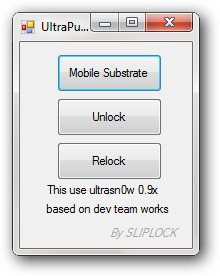
To unlock the iPhone Offline, follow the steps as below :
- Download, extract and run UltraPusher.
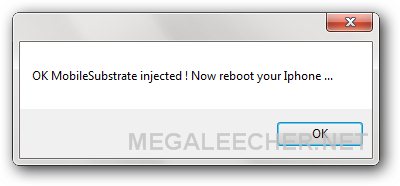
- Connect your iPhone to PC via USB cable and click 'Mobile Substrate' button to install it on your phone, reboot your phone when instructed.
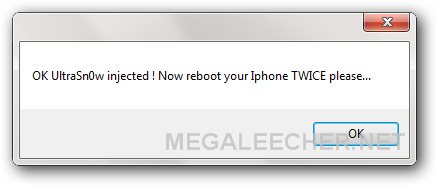
- Once rebooted click 'Unlock' button to install ultrasn0w on your phone, reboot your phone TWICE when instructed.
- Your phone should now be unlocked and you are free to use any carrier SIM.
Comments
Thanks alot
Very Helpful And Easy Thanks So Much
error
i tried to unlock my iphone 3gs 3.1.3 using this ultrapusher.but its not responding
its showing
iphuc.exe not responding
can u pls help wat shuold i do??
iphone stuck in safe mode
hey man had my iphone jailbroken but not unlocked i tried your software to unlock after i've reboot my phone as following the manual it is stuck in safe mode plz help me i even tried to try the re-lock but doesn't do anything i tried to rstart and reboot my phone and also trying to restart my springboard plz cud u help me with this.
Unlock without wifi
So, here's the way to unlock your iPhone with UltraSn0w 0.93 without an internet connection
Download the ultrasn0w 0.9.3 in zip format and extract it; in there are 2 *.deb files (ultrasn0w 0.9.3.zip)
Now, what you need, it's a jailbroken iPhone . Meaning the phone was jaibroken using redsn0w, snowbreeze or pwnagetool. If the phone was jailbroken with blackra1n or spirit, then you have to install afc2add via Cydia ... but you can't do that since you don't have wifi :-).
Anyway, if requirements above are meet, you need to transfer the *.deb files and put them in private/var/root/Media/Cydia/AutoInstall. If the Cydia/AutoInstall directory is not there, then you create one. You can do this using iPhoneBrowser or iFunBox
Once it's placed there, you need to restart your phone couple times, the 1st for Cydia to install the packages and the second to Ultrasn0w start to work. May have to reboot a 3rd time. I can verify it works on 3g 3.1.3 with 5.12
thank you man
thank you man
heyyy thanq u so much kirasam
heyyy thanq u so much kirasam .. it worked perfectly for me.
Verified working on the new
Verified working on the new 4.2.1 JB using the IPAD Firmware. MUST USE THE 1.2 Yellow snow zip!!!! Thank for this, AWESOME WORK!!!
thank you so much, worked
thank you so much, worked very well!
after
after 5 hours maybe 6
its 5:14 am now
i managed to unlock it
my cydia keeps freezing on loading the packages or something
so now im even installing installous manually using the same method
BTW it worked
JESUS F*** CHRIST
no offense
thank you
you save my ar$e
it was my bosses phone, hihi
Thank you kirasam. Its worked
Thank you kirasam. Its worked for the poor built and inspection quality iPhone 3G (wifi is being funny all the time, not working at all).
LOVE YOU !iPhone / 3G 3.1.3 /
LOVE YOU !iPhone / 3G 3.1.3 / 05.13.04 unlock no wifi workd perfect
Continuos Reboots
Hi I did what you have instructed. My iPhone 3G running on iOS 4.2.1 is currently continuously rebooting. Please help me. Hope you will be notified of this reply to your post
takes long to reboot
is it normal for the iPhone's 3 third reboot to be very long??
how long
yea those it take long?
how long
yea how long doh?...
Iphone hangs up when resarts second time
hi all
as you can understand by subject that my iphone 3g is hanging when restarts. it hangs on...
Helpp pleaseee
how long, etc
I DISCOVERED IT DOES NOT WORK ON WINDOWS 7 (64) .Maybe it'll work on earlier versions.
To avoid continuous booting, make sure you use the original sim network it was locked to and do not disconnect from pc. I think it has to retrieve some files form the zip during booting.
thanks for sharing i will try
thanks for sharing i will try it
It works properly - Thank you so much :)
My 3G Iphone has wifi broken and could not unlock after jailbreak...after fail in using Ultra Pusher to unlock the phone, I tried Kirasam's instruction to unlock and it works...Greatly appreciated your instruction Kirasam :)
Thanks kirasam
@kirasam - You are the man....thanks a ton!! worked like a charm
iphuc.exe stopped working
I tried this but I got following messagebox
"iphuc.exe stopped working"
though it says that it unlocked the phone which it didnt.
tried on Win Vista OS and ran Ultrapusher.exe under compatibility mode...
any idea what could be wrong.
I have jailed break with Spirit
Firmware: 3.1.3
BaseBande: 5.12.01
Iphone 3G
thanx kirasam it really
thanx kirasam it really worked at last
No network after jailbreck
hi,
not able to get network in 3gs 4.2.1 using ultra pusher pls help me
not working
i hv done as mentioned thru copying 2 files of ultrasn0w and mobilesubstrate to the cydia autoinstall directory. but now what happens is that my iphone accept only one sim connection i'e cellone. it is not accepting other sim connections like airtel, vodafone, docomo or idea.
i am using iphone 3g 8 gb with version 3.1.2 and firmware 06.15.00
Please help, thanks in advance
Can some one pls upload the
Can some one pls upload the file to another hostin website that china isnt blocking pls i need this prg rly badly
stuck
I did copy the file using iphone browser, but I am stuck on second restart! help!
just see the apple logo forever!
CydiaAuto install path not found
I jailbreak iphone 3gs 3.1.3 using spirit.There is no that file path (private/var/root/Media/Cydia/AutoInstal). Any solution?
greating
thanks for the solution we need mor
doesnt work...it gives the
doesnt work...it gives the msgs even without device connected. worse yet wit my device in, it generates error "the procedure entry point CFCopyDescription could not be located in the dynamic link library qtmclient" but gives the above message boxes...thats really weird!
Thanks!!!!!!
Thank you So Much Brother It Help Me It's 100% Work Again i have to say Thank you May God Bless you Good Work Keep it Up :)
Thanks!!!!!!
Thank you So Much Brother It Help Me It's 100% Work Again i have to say Thank you May God Bless you Good Work Keep it Up :)
Thanks a lot.
It works like a charm. Thanks again..
question
how should i install phone substrate & ultrasn0w on my phone???
I'm Having a hard time in
I'm Having a hard time in installing my ultrasn0w in Cydia. Because i don't have wifi connection. Please help me in this kind of Problem
Sorry for bad english
ultrapusher work to baseband
ultrapusher work to baseband 06.15?
unlocked iphone
Thanks my iphone is unlocked.
Will it remove IMEI number?
Will it remove IMEI number?
No..
No, it wont !
Stuck
Stuck apple logo second restart, what'd i do? pls help
me 2
I have the same problem, please someone help!
Stuck apple logo after second restart : /
Download not available
Download not available:
The Public Traffic of the file's owner is exhausted.
PLEASE SOMEONE UPLOAD IT TO ANOTHER HOSTING SITE>>>>>>>I NEED IT BADLYYYY>>>>>PLEASE
This is old...
Get the updated instructions and files at - http://www.megaleecher.net/installing_ultrasnow_without_wifi
I will help you..
I will help you..
Is this gonna work in iphone
Is this gonna work in iphone 6s.....
This is an old post and
This is an old post and should not work with iPhone 6s.
Add new comment