 Java (J2ME) is one of the most popular game development platform across all brands of mobile devices, you can play most of the java games (.jar files) interchangeably on all mobile devices supporting Java, while java games can be played on all devices supporting Java different screen resolution becomes a problem, for example a game developed for Nokia N73 will display fine on mobile-devices having screen resolution 240 x 320 (QVGA) but will display small on a bigger screen resolution like Nokia N80 (352*416), to fix mobile game resolution optimal to your cellphone display size free utility "S60 Jar Resize" comes to the rescue, the handy little utility lets you manipulate the hardcoded screen-resolution inside the Java game file (.Jar file) for optimal display on your mobile device.
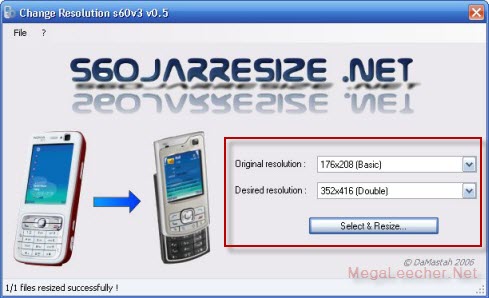
Using S60 Jar Resize is pretty simple, just select the source and destination resolution and point the application to the .Jar game file.
Comments
s40
can u post a similar software for s40 series....plz..
Java Games on S40
Although there is very little chances but you can try the software above to change the resolution, theoretically the only problem I can see is limited hardware capabilities of the S40 device.
FREE JAVA GAMES
Waw..!thx u so much for the information. It will be very useful for my blog visitors. Since I have a blog focused on sharing java games and sometimes the resolution is limited only for popular size only (i.e 240x320, 176x208). They can try to use this apps to manipulate the screen size to match their unique phone. My blog located on www.chndrworld.blogspot.com
Java is great programming
Java is great programming language for the development of enterprise grade applications. This programming Language is evolved from a language named Oak. Oak was developed in the early nineties at Sun Microsystems as a platform-independent language aimed at allowing entertainment appliances such as video game consoles and VCRs to communicate .
the zip archive is corrupt
the zip archive is corrupt
Add new comment