Social-networking websites like Orkut disable browser's right-click menu to block users from saving images in order to maintain other users privacy, However, if you have found something really interesting in Orkut Albums and want to save it you can bypass the block easily using the following tricks.
If you are using Firefox web-browser you can bypass this kind of annoyance once-for-all by simply following our guide posted earlier, and if you are using any web-browser other then Firefox you simply need to left click the displayed image and drag-n-drop it on the browser's address bar as shown below.
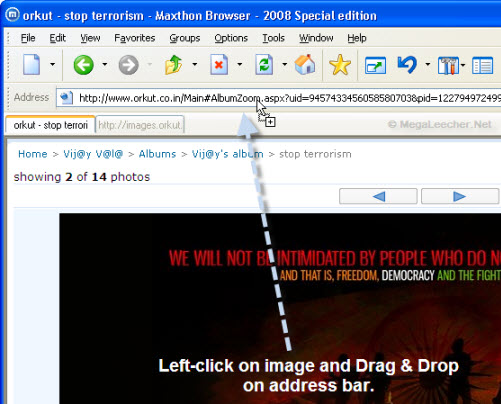
Now, you will be able right-click and save the image without any problem, add to that you can also use the image url displayed in address-bar to share that image on websites, blogs, forums or with friends without the need to log-in.
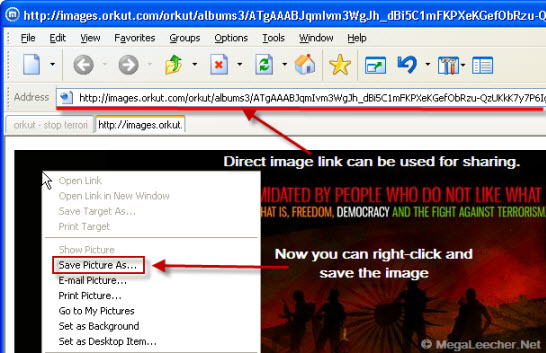
This trick should work with any website as all of them use javascript based right-click menu blocking, which can be easily bypassed as described above.
Comments
You can use power.com
You can use power.com to login to orkut, facebook, myspace and you can download any blocked image.
----------------------------
Technology & Gadgets
here's a trick, works with both IE and FF
Just drag the image to the desktop or any desired folder Directly..
Thanks...
Nice, never thought of it.
it does not work
any body can share any new tricks.
no download
thanks
Add new comment