Submitted by Deepesh Agarwal on Fri, 11/07/2008 - 14:11
If you are having troubles uninstalling Kaspersky products using the standard uninstall method or want to completely uninstall Kaspersky from your computer without leaving traces, Kaspersky Labs provide KAvRemover - A simple to use free utility for complete removal of all Kaspersky Labs products safely.
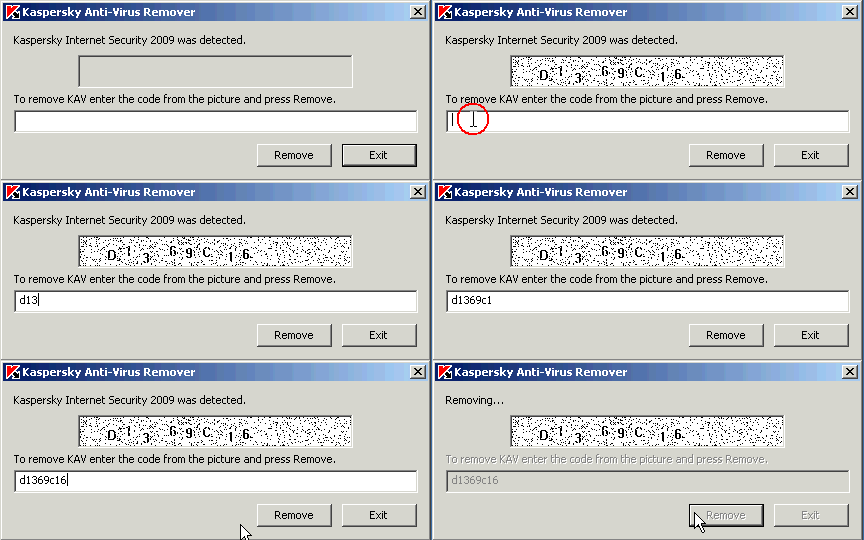
KavRemover9 supports complete removal of following Kaspersky Products:
- Kaspersky Anti-Virus 6.0\7.0\2009
- Kaspersky Internet Security 6.0\7.0\2009
- Kaspersky Anti-Virus 6.0 for Windows Workstations
- Kaspersky Anti-Virus 6.0 for Windows Servers
To use:
- Download KAVremover9 >>
- Unzip the zip-achieve, and Launch KAVremover9.exe.
- Enter the image code from the picture.
- Click Remove button to start the process.
Comments
REMOVAL OF REMAINING FILES OF KASP
IT IS REALLY DIFFICULT FOR REMOVING THE PROGRAM. I FEEL THAT THE UNINSTALL SETUP MIGHT HAVE BEEN CORRUPTED.
Thanks
Thank you very much!
THANKS
THANKS FOR THE TOOLS...
thx
thank you verry much, kapersky was slowing my vista and refused to leave me alone
Still can't remove Kaspersky
Trying to install McAfee; won't install because incompatible with Kaspersky 6.0, but nothing will remove it; not even the KAV remover. Kav remover says that it is not detected, and indeed, I can't find it, but some pieces are still there.
traying to uninstall
trying to uninstall Kaspersky anti-virus because hawing problems with my comp it is becoming slow and shutting down some application with what is possible to uninstall the program
无法安装卡巴
我在服务器中首次安装卡巴在快结束时提示恢复操作安装错误。在注册表中有这样一项kaspersky Lab Boot Guard driver且无法删除,用此工具也不能删除,请指教……
Chinese to English translation
I first installed the server Kabbah at the end of recovery operations prompted to install an error. In the registry of such a kaspersky Lab Boot Guard driver and can not be deleted, can not be removed with this tool, please advise ... ...
Add new comment