Submitted by Deepesh Agarwal on Tue, 10/20/2009 - 11:50
 If you managed to forgot your Apple iPod screen-lock passcode combination here is a nifty little hack which allows you to reset the old password saving you from trouble of restoring iPod to factory defaults loosing everything stored in it.
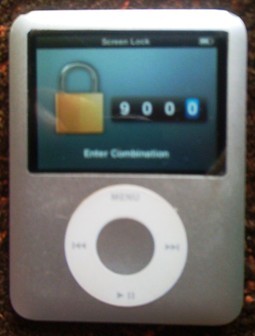
Similar to the iPod Volume Lock PIN reset hack we will need to open iPod file-system and change the file where the device stores its lock settings as shown below:
- Connect your iPod to your computer.
- Make sure you have enabled viewing of Hidden files and folders in Windows Explorer, if not Open Windows Explorer -> Tools (Menu) -> Folder Options -> View -> Show hidden files and folders.
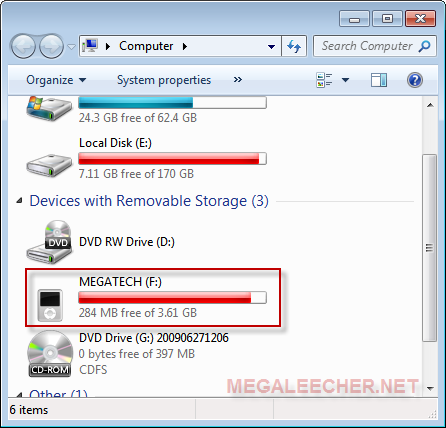
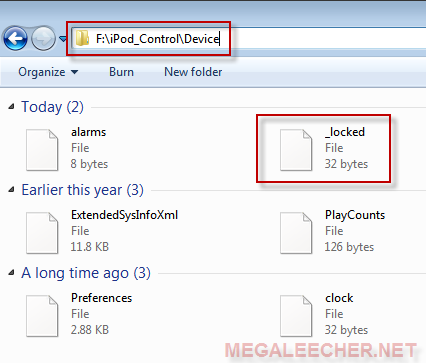
- Open "My Computer" and then double-click your iPod device icon to open its file-system, now navigate to folder "iPod_Control" -> "Device" folder.
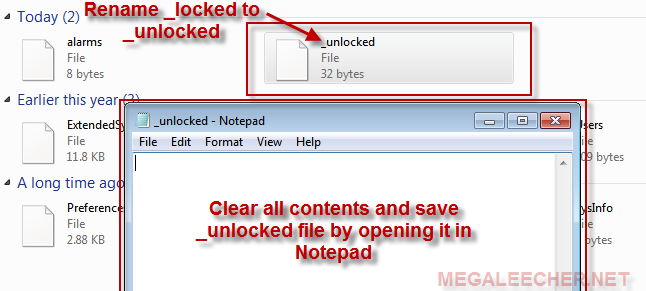
- You will see a file named _locked rename this to _unlocked, now to reset the password open the file in notepad and delete all contents in it and save.
- Now, Eject the iPod and reset it.
- Your iPod Screenlock is now disabled.
Related : Unlocking Forgotten iPod Volume Lock
Comments
Wow!
Amazing, and quite simple.
Thanks a lot.
WOW LOVE U GUYS
WOW LOVE U GUYS
OMG IT WORKED! You must be cool... thoght so :)
woo hoo it works
i have forgot my screen pin code
hei, i have forgot my iphones pin code,(not sim kart pin code) but the code when we want to go to the menu og iphone, i have forgot it is there any way to hack it or open it? i have connect my iphone on to my computer but i dont se any iphone icon on my computer i have done all the things wich u have wright above, but steel i have problem. plz help me
My apple code
Please help me
FANTASTIC
I bought iPod off an old friend and was messing about with it and managed to lock it, this works, its brilliant and easy! Thanks for your help!!
The picture of screen lock is old.
Does the hack still work for a second generation nano? The picture is of a first generation nano.
WICKED!:)
i was playing around with my ipod and managed to lock it... i thought i'd broken it! Thanxx:)
OMG! YOU ROCK!
THANK YOU SOOOOOOOOOOOOOOO MUCH! i was trying to keep my cousin off, locked it, and realized i must have changed the code! i thought i'd have to reset it and loose my music!
But I can only see my pictures and videos as my files
I can only seem to be able to access just the pictures and videos on my ipod, and not the files that contain the ipod control
go and download iexplorer and
go and download iexplorer and it will work
u are a life saver!!! god
u are a life saver!!!
god bless ur soul!!!
love u muahZzzz....
thanx
u r reaaly a life safer.thank you so so so so so so so very much.....................
thank you very very much
thank you very very much !!!!!!!!!!!!!!!!!!!!!
you are freaking amazing.
you are freaking amazing. Spent two days totally screwed up about this - iTunes was wiped and I have no back-up, and I found this. Much love, guys.
Thankyou So Much!!! Saved me
Thankyou So Much!!! Saved me so much trouble!!! :D Thankyou! I owe my music to you lolz! :D
thanks
but how do you do it in windows 7
well that is very hard to
well that is very hard to tell... although the pictures of it are in windows 7
same for iphone?
same for iphone?
soo the ipod won't come up in
soo the ipod won't come up in my computer. my iphone will, but this is not my ipod so is it impossible if youve never connected the ipod to the computer you are trying to do this on?
Thanks
It really worked
all i did was initially i plugged the ipod to the computer .. and selected to use is as mass storage disk from itunes making it visible form the explorer and followed ur instruction and boy it works thanks and million zillion
regards
padfoot
Didn't work for my ipod. Whe
Didn't work for my ipod. Whe I plug it in, it does not show any files on the ipod; even with "Show hidden files" enabled. Any suggestions?
re iphone
hi i lent my son my iphone whilst i was away and he has put a password on it and has forgotten it the sim isnt locked but the iphone handset is due to him putting a password on it ..aarrrggghhhh very frustrating..
does it work for iTouch?
The computer doesnt detect the device(itouch) so I cant do the above. What else do i do so i can avoid restoring?
You Just saved my live!!
You Just saved my live!! Thanks bro!! Xxx huggg
Basically to prevent
Basically to prevent unauthorized access device by using Apple iPod screen-lock passcode is an efficient way .Forgetting password is a common problem so here is a good suggestions for resetting passwords to recover forgotten passwords that i would love to follow.
OMG!
Thank youuuuu !!! big time !!!! (:
Unlock ipod with imac
Is it possible to do this fix with an imac? I tried on a works laptop but it did not detect the ipod at all and therefore it was not possible to see the file that needed to be changed.
Thanks.
You are awesome...this is
You are awesome...this is gr8!! \m/
Icon don't come up
So I can't get the iPod icon to show up now what help please
forgot password but dnt own a computer :(
I for got my password to un lock my ipod but I don't own a computer is there another way I can reset or unlock my ipad please me :(
I have forgotten my email and
I have forgotten my email and security passcode to my sons ipad...i do not have a computer but i really need to get this figured out bc this ipad like i stated is my sons and he uses it for a learning tool and to speak to us bc he has down syndrome...please help
i am not getting the removable disk on my computer
i didnt get any disk drive of the ipod on my computer..so i cant move to further process as u shown above...pls help
forgot password
Thank you sooooo much for the help.
It solved my problem.
Can I permanently get rid of this password option?
I am not able to turn it off since i have forgotten the password.
Thanks
Thanks
Thanks you
I solved my problem with Ur help
so what exactly is windows
so what exactly is windows explorer?
THANK YOU
this is awesome man this is great got it thank you so much so much
does'nt work
Didn't work for my ipod. Whe I plug it in, it does not show any files on the ipod; even with "Show hidden files" enabled. Any suggestions?
Read more: Resetting Apple iPod's Forgotten PassCode http://www.megaleecher.net/Unlocking_iPod_Password_Code#ixzz2Z6wT8dYp
Thanks a lot, you have no
Thanks a lot, you have no idea how much u helped!
Thanks:)
U r a life saver i let my cousin play with my ipod and he locked it so it has been locked for 2 years and now i finaly got it thank h
Its not working plzzz help
It is not showing any files in ipod neither the ipod control folder and plz tel how do i navigate from that folder to device folder...plz m in need of my ipod urgently
How do you do this on windows
How do you do this on windows 8? I connect my ipod to my new computer and it shows up in portable devices but when I click to open further in the files there is nothing there. And yes I have all hidden files shown. Restoring my ipod is not an option. Please help me.
Thanks alot it worked so well
Thanks alot it worked so well
QUESTION
Does the same trick work for ipod touch?
OMG I's really working THANK
OMG I's really working THANK YOU SO MUCH THANK YOU SO MUCH THANK YOU SO MUCH THANK YOU SO MUCH!!!!!!
Worked for me and very simple
Worked for me and very simple taking into consideration that I'm not technical at all...thank you
Thanks a lot for the guide!
Thanks a lot for the guide!
apple ipode 16gb
When iconnect with my pc showing please unlock amdinistration passcode. how to can i connect. ipode cannot open,display not open, what to do?
Ipod data recovery
It works for iPod mini, iPod nano, iPod shuffle and iPod classic, apart from iPod and iPod touch.s iPod Data Recovery software for unlimited access here from our site at reasonable price.
Brilliant... Hats Off
We try so many complicated things but always forget the simple solutions...
Thanx a lot guyz
Thanx a lot guyz
if it doent show up
go to itunes click your device then check thebox to use it for storage. now do a sync (press apply)
Lifesaver !!!
I own an old Ipod classic which I bought back in 2008. I mistakenly locked the screen and could not remember the password. I was ready to give up and reset to factory settings--until I stumbled on your post. I'm glad I still have an old Windows computer so I followed your instructions and it worked !!! You just saved me a lot of hard work by not having to re-build my playlists built over the past 10 years containing close to 2,000 songs !!! God Bless You !!!
Add new comment