Submitted by Deepesh Agarwal on Fri, 03/06/2009 - 04:27
 Apple iPod allows setting maximum volume limit with support for PIN code locking to prevent unauthorized changes, However, if you forgot your volume limit unlock code here is a little trick you can use to remove the lock without restoring your iPod.
Steps to unlock iPod Volume Lock :
- Connect your iPod to your computer.
- Make sure you have enabled viewing of Hidden files and folders in Windows Explorer, if not Open Windows Explorer -> Tools (Menu)-> Folder Options -> View -> Show hidden files and folders.
- Open "My Computer" and navigate to folder "iPod_Control" and then go to "Device" folder.
- Delete the file _volumelocked located inside "Device" folder (See image below).
- Now, Eject your iPod and restart it using the instructions provided here.
- You can now change the iPod Volume limit without unlock code by navigating to Settings -> Volume Limit on your device.
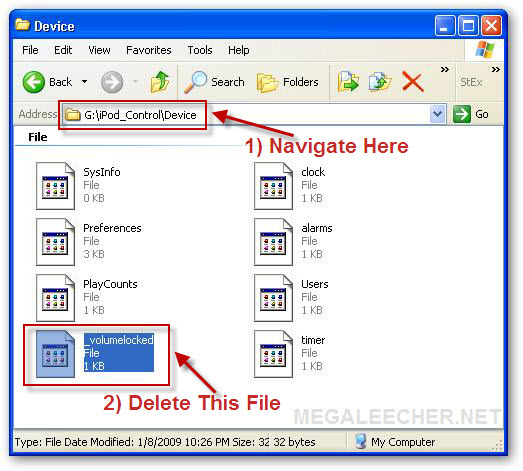
Note : As mentioned in the comments, you need to enable "show hidden files" option in Windows explorer to see the folder.
Comments
this is awwessoommmeee
this is the best! thanks! so glad i can get it out without restoring my ipod. that would have sucked
thanks again!
really is awesome...thanks
really is awesome...thanks man
Genius!
my sister locked the volume limit and I couldn't hear anything! Her not remembering the passcode didn't help either. I couldn't restore my ipod because I don't have the original computer which I have all my songs on. I was basically screwed! Until I tried this! It worked =D, Thank you so much!
I did that to my lil brother
I did that to my lil brother's iPod I'm going to try this.
I have the same problem but
I have the same problem but the only difference is that when I try to go to the control from the computer it doesn't have it so im screwed.
nup
didn't help
The simplicity is the brilliancy
Thank you very much for this awesome and brilliant solution.
folder
where is the iPod_Control file ? I don't have it !!!
mac
i have a mac... i can't find the device folder where i can alter the settings...
help?
0000 password for volume limit control (iPod) doesn't work...
0000 password for volume limit control (iPod) doesn't work (Mac)
Volume limit code for my iPod nano
I just got it yesterday and trying to get the volume working on it but never had to do a volume code before does any one know what it would be??
hay was up
hay was up
Thanks
wow , u helped me!! after 7 months locked volume!! u escaped me of listing music with the low voice!!! hooooora
-.-
this only works with windows xp
MINES DIDNT WORK IT SAID I
MINES DIDNT WORK IT SAID I STILL NEED THE LOCK CODE ..
BUMMER..??
OMG!! WHOEVER NOTED THE
OMG!! WHOEVER NOTED THE STEPS TO DELETE THE SECURITY CODE IS AMAZING! IT WORKS! THANKS!!
I cannot play apple ipod calls for code number do not know what
do not know what the code was? How can i reset or change code to play my apple ipod
really simple thx u were a
really simple thx u were a big help
Hey - I spent 45 minutes
Hey - I spent 45 minutes looking for that file and finally I realized that I needed to go to my computer settings and go to Tools / Folder Options / View and then click "show hidden files" - only then could I see the file and delete it.
deleting the volume-locked file to restore volume limiter
sweeeeeet! You guys have to do a soft reset by siultaneously holding down the menu & center button untillthe apple logoappears then when it comes to its sences its allset! i had a classic 30 gig...has to sellit a few months back & was bummed...purchased a practically new 80 gig classicoff craigslist for a whopping $50USD its almost new! imrocking again!!! music in all forms kicks so much ass! Thanks guys !!!
Can't find it HELP ME
I can't find it I did all that and it did nothing someone help me!! Please
Awesome!
It worked!!!
What a Technique it is ?!!!
Really an awesome technique given for control the volume. But can we put this file back in the same folder?
WoW
this awesome idea. Goodbye Forgotten Code. Well thanks anyway!!!
Can't find Ipod control folder!
Hi, I've got a Windows Vista and when I go to look for the Ipod folder in My Computer, the only folder I can find is one called "bin". Am I in the wrong place? Any help, would be appreciated! Thanks.
If you go to control panel
If you go to control panel first then click on folder options den click on the tab view then click on show hidden folders. Then it should come up! Then after that go to my computer and click on your ipod and do the rest of the info as shown
Vista Screen Locked reset
Reset Screen and Volume Lock for Windows Vista
First you need to click on My Computer with your iPod connected.
The click on the iPod, click organized, select folder and search options, now click View the click to show hidden files and folders then click apply.
You should now see a folder named iPod_Control, click into this, then click device, now delete the file named: _locked to reset the screen lock. then delete the file named _volumelock.
Hope this helps
YAYYYY!!
Thank you so much. This worked for me =)
Did not work
I followed every step, reset, and NOTHING. Someone help, please?!
Simple PC software for removing screen and volume Lock. FREE
If you Use a PC then you can try this little too I wrote.
www.hiddenvision.co.uk/ipod
Hope it helps..
Hv.
great result - thank you
My older son deliberately locked my younger out of his IPod but thanks to you I have re-set it without the code and peace and harmony reigns...for at least an hour! Thanks for an easy step-by-step 'get out of jail free' card; much appreciated.
Browsing Lock
I bought an ipod for my daughter a few years back and put a security code on her browser, now she is a little older and I want to remove it and have forgotten the code. Is there a way to remove the browser security code on this? Please email me at armyeng1@hotmail.com, thanks
I USE A MAC! HOW DO I DO THIS ON A MAC!?
If anyone knows how to reset the volume limit passcode on a mac, please reply! Okay?
resetting volume advice
Thanks very much for your tech advice. At first I didnt think itd worked but then I reset it and yeah it worked. Thank you!!!!!!!!!!!!!!!!!!!!!!!!!!!!!!!!!!!!!!!!!!!!!!!!!!!!!!!!!!!!!!!!!!!!!!!!!!!!!!!!!!!!!!!!!!!!!!!!!! :D xx
thank youuuuuuuuuuuu!!!
thank youuuuuuuuuuuu!!!
HELP!!!
It won't work, I went and changed the folder settings and nothing happened.I have vista so can someone guide me through doing it on windows vista?
thnanks
heyy..thanks a ton man..just tried it on my ipod it workd..gr8
this hepls so much thanks
this hepls so much thanks so much it is nice tht i found this or else i would have to restore it and but like all my contacts again
I can't find "_volumelock"
please help
I have iPod classic 160GB 7th gen., windows vista and I tried the procedure by Jamie Brown but there is no files "_volumelock" and "_locked to reset the screen lock" in the folder device. Where should I look for these files? Is there some other way to remove the volume limit from my new iPod?
thanks for any idea
Unlock volume limit on iPod
Help can anyone guide me through unlocking my ipod volume limit using my Mac. I have been into Get Info and tried to do it there but not joy.The lock remains.
Thanks alot
It really worked out..thanks a million times...
This is just awesome>
thnns for ths its working in ma ipod.
thanks mate it finally worked
thanks mate it finally worked you have to reset the ipod after deleting the files mentioned thanx again for the useful tip
Thanks really thanks I
Thanks really thanks I research how delete the sound password since two hours thanks !!!
THANKS!!
My 11 yr old was messing around and found this feature and put in a code and of course like everything else she forgot it and was locked out of her ipod I was so upset that I would have to reset it because she would lose all her songs but I found this web site and it worked thanks soooooooo much!!!!!!!!!
cant find folder
-------------^
THANKS ALOT ,GOD BLESS THIS PAGE
I WAS GETTING CRAZY I WAS SO MAD CAUSE MY SON WAS PLAYING WITH MY IPOD NANO AND I DONT KNOW HOW HE LOCK THE IPOD WITH NUMBERS I ALMOST BROKE THE IPOD I THROW IT TO THE FLOOR THANK GOD I GOT CARPETS LOL I WAS GETTING CRAZY MY EX BOYFRIEND GIVE TO ME AND WE BROKE UP AND IM ADICTED TO MY IPOD I AM ALWAYS LISTEN MUSIC THANK GOD 4 THIS PAGE AND I ALMOST DELECT ALL I WAS GONNA RESTORE THE IPOD IN ITUNES BUT I FOUND THIS PAGE IT TOOK ME ABOUT 15 MINUTES CAUSE I DIDNT UNDERSTAND ABOUT THE FOLDERS BUT FINALY IT WORKS READ CAREFULLY AND MAKE IT STEP BY STEP AND YOU WILL SEE IT REALLY WORKS THANKS ALOT FOR THIS PAGE IM SO HAPPY LOL
drive undetected
I followede the instruction but there is no drive available.ipod control drive is not present..
Try this...
Try this suggestion - http://www.megaleecher.net/Unlock_iPod_Volume_Limit_Code#comment-16609
this is toooo gud......thnks
this is toooo gud......thnks 4 da 1 who put tis
Sound as a pound
You absolute legend, I'm about to go travelling in Vietnam where it's noisy as fuck and was gutted about the shiteness of the volume, Problemo Solvedo!!
thnx
thnx mate... time to rock my ears.
YES!!!
I don't know why I even had a volume control setting. But I did..and did not know the password. I too have spent MONTHS with a low volume setting. Thank you SO much. this was alot easier
than other tips I have seen.
Read Carefully - It Just Works
I used an iMac running Snow Leopard. I opened the terminal window, did a "cd /Volumes" and repeated the "cd" command for each directory in the path - first, the iPod by name, then iPod Control, then Devices. When I got where I needed to be, I did an "rm _vol*" (without the quotes) and removed the file. After I ejected the iPod, I did the soft reset mentioned above, holding the top and center button on the selection disk. Once the iPod was soft reset, the PIN was gone and I could adjust the volume limit again. This should work on any computer operating system if you know the change directory command and the remove command. (I did use iTunes to set "Enable Disk Access" but I'm not sure that was required.
Mac instructions
Yes, like ZZyzx said: open Applications --> Utilities --> Terminal, type:
cd /Volumes/
ls
cd YOURIPODNAME
ls
cd iPod_Control
ls
cd YOURUSERNAME
ls
rm _volumelocked
exit
eject ipod
reset by holding Menu and center button
I have window 7 can someone
I have window 7 can someone give me step by step instructions on it. I'd really appreciate it.
did you get to work if so can
did you get to work if so can you show me
??Help Me??
Is there a passcode that unlocks it automatically?? plz reply!! thanks
how do you hack kit if you
how do you hack kit if you have a mac
thanks amillion was thinking
thanks amillion was thinking how this lock can be unlock
Can you put the file back?
It works thanks a lot to whoever invited this!! But can you put the file back into the iPod if you want to do this again?
HELP PLZ
When i open my computer and go to my iphone, i see a folder called DCIM. i click on that and its full of empty folders. Also, on my other computer, it just shows pictures. The first problem with DCIM is on windows 7 and the picture problem is on windows xp. I followed the instructions carefully and not working. Plz someone help! :(
issue
I did this and it did fix my problem - I had forgotten what code I had set, but now I have a new issue... when I click on the volume limit control, it allows to me to change it, and says to press play to lock it, but it doesn't lock, it keeps dropping back down to about half way.... I restored the Ipod, and it still does this... how can I change my volume now and keep it at what I set it at? Thanks
Menu issue
I tried this solution, but my Ipod Classic Gen 4 ( Model M9829LL, SN JG5204V4SAY ) does not have the /Device subfolder in the Ipod folder.
When selected, the G:\Ipod folder displays only:
\Calendars
\Contacts
\Ipod_Control
\Notes
G:\Ipod\Ipod_Control contains only:
\Artwork
\Device
\ITunes
\Music
G:\Ipod\Ipod_Control\Device contains only
2 files "Preferences" and "Sysinfo" ( neither of which will open on my WinXP computer)
Nowhere in any of the menus does the "_volumelocked" file appear.
Can you help ?
Thank You! It's really works
Thank You! It's really works for me. PERFECT!
Yahoo!!awesomeeeee!!..
it really helps a lot!!!.thanks you very much!!Perfect!!
Thank you for the tech help.
Thank you for the tech help. I can now set it to my number and then the kids will not have the upper hand. I win !!!!
I just deleted it without
I just deleted it without opening the file (or something like that.) So I opened it, and the file was gone. And now I can't delete the file, beacuse it is gone. What do I do??? Hope someone understands what I mean :)
about volume limit control
it's your solution is not working yaaar...........
plz giv me some other solution
Worked Perfectly Thanks!
Worked Perfectly Thanks!
computer doesnt show the ipod
computer doesnt show the ipod and or any files even with the hidden files shown....
tried reseting the ipod back to factory reset from the ipod itself and the computer with no luck?
It Worked
You are indeed a legend, after a year of Ipod low volumn misery, finally sorted! Thank You
ITS WORKING
thanks so much for this tip!
its working for me!
have an ipod that i forgot the volume lock code please help..
How can I get to unlock it? Do I need the internet to.... ? Please help..
hey this thing really
hey this thing really worked....... i deleted the file but didnt know to reset till i read it here
thanks to all you guys...........
HELP PLEASE !
I bought a using IPOD CLASSIC 8th. gen. 160Gb .
How can I unlock volume ? , couse when I want to find that " _lockvolume" in Device there isn't.
I Use Windows XP .
I'll send a photos of that.
Please help :( .
http://imageshack.us/photo/my-images/94/ipod1j.jpg/
http://imageshack.us/photo/my-images/824/ipod2w.jpg/
http://imageshack.us/photo/my-images/196/ipod3o.jpg/
http://imageshack.us/photo/my-images/651/ipod4.jpg/
It's very important , and thanks alot for a help .
hidden folder...
You must follow the second step and make sure "hidden file and folders" are made visible by windows :
"Make sure you have enabled viewing of Hidden files and folders in Windows Explorer, if not Open Windows Explorer -> Tools (Menu)-> Folder Options -> View -> Show hidden files and folders."
Its really an useful
Its really an useful information which help me to unlock my iPod Volume Limit.and guess what i did it by using these steps.thanks for this.I have also something useful to tell.
Am yoana
I need help unlock my iPod tuoch volume limit please
It works!
Thank you. It took a while, but I make it work. Wonderful.
i love u uploader......<3
i love u uploader......<3
Great Fix
Worked like a charm. If it didnt work you might have forgot to restart your device.
worked like charm You just
worked like charm
You just hav to restart ur pod.
Volume lock
This is super stuff.. thanks a ton and keep up the knowledge sharing....
Cheers
iPod not in My Computer
I felt like adding to this, it might help a few who don't see the iPod at all in "My Computer".
I recently had this issue. With the iPod Classic connected to the computer, it is not displayed in My Computer at all; however, I noticed when the iPod is first connected to the computer it is displayed very quickly then disappears again.
I disconnected the iPod, reconnected it and noted the drive letter it was given (in my case it was E: this can be different depending on your computer) then I wrote a quick batch file to delete the file (replace E: with whatever drive letter is displayed for your iPod)
del E:\iPod_Control\Device\_volumelocked /f /q
Then I disconnected and reconnected the iPod, ran the batch file during the brief time it was displayed, and then disconnected it, restarted the iPod using the top button, center button and Menu button held in for 10 sec.
There is a possibility Computer Management still had the iPod listed as E: (didn't check), but the batch file was the first thing that popped into my head. Also to create the batch file place the line of code above into a blank text file and save it as a .bat not .txt and double click it to run. Hope this helps.
not in my computer
HI ... I have spent way to much time trying to fix this and hope you can help ... The only place i can locate my sons ipod is in scanners and cameras - even after showing hidden files etc where do you place this batch file you listed above Many thanks
OMG Thank you SOoooooooooo
OMG Thank you SOoooooooooo MUCH!!!!!!!
thanks a lod...
hey it worked for me too ,though i kinda struggled with the reset ..yaayyy ur the best mate thanks
NO _VolumeUnlock file
hey. Iv'e followed all the steps and feel like im really getting somewhere! But i can't find the _Volumeunock file? It's not there in ipod_control, please someone help!
Iv'e just purchased a brand new 160gb classic and im devastated about the eu limit! Please somebody help!
unlocking sound and pin number
excellent thanks
Incredibly useful!!! Thank
Incredibly useful!!! Thank YOU!
It worked, thank you so much!
It worked, thank you so much! Glad we there are people like you!
help didn't work!!
help I did what it says and I still have my volume limit locked I have an ipod nano 7th gen. please help!!
Unlock Ipod Volume limit without PIN Code
G'day, thank you so much it worked first time.
Cheers
Paul.
volume lock
I did it!. deleated volume lock! looks a little different with windows 7. took me a while to figure what to do. Thanks for the information.
Dont have a window
i dont have a window
Add new comment