Submitted by Deepesh Agarwal on Tue, 04/15/2008 - 16:40
UPDATE : This post has been updated by better YouTube MP4 and HD Downloader.
Few days ago YouTube started serving videos in two resolutions Normal and High, the higher resolution version is encoded in MP4 format and therefore can be used directly onto devices supporting MP4 video format like newer iPod's, iPhone's and mobile devices without any video format conversion.
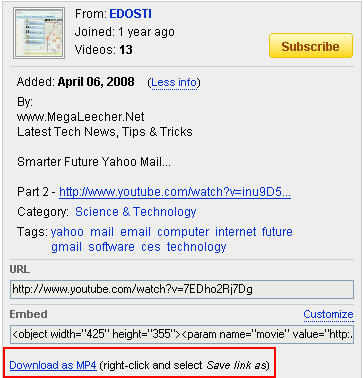
Downloading videos is very easy, just install this Greasemonkey script and you should see a link as shown below for the download, you will need to manually add the .MP4 file-extension.
Comments
thank
thank
help!
how do i install the .js file in IE7 ?
Greasemonkey alternative for IE7
This might be helpful - www.ie7pro.com and www.iescripts.org , Demo : www.ie7pro.com/user-script.html
Thanks
ya i d/w n installed it for ie7..
thanks a lot..
THANKS
THANKS
S
S
YouTubeRobot today
YouTube Robot today announces YouTube Robot 2.0, a tool that enables you to download video from YouTube.com onto your PC, convert it to various formats to watch it when you are on the road on mobile devices like mobile phone, iPod, iPhone, Pocket PC, PSP, or Zune.
YouTube Robot allows you to search for videos using keywords or browse video by category, author, channel, language, tags, etc. When you find something noteworthy, you can preview the video right in YouTube Robot and then download it onto the hard disk drive. The speed, at which you will be downloading, is very high: up to 5 times faster than other software when you download a single file and up to 4 times faster when you download multiple files at a time.
Manual download is not the only option with YouTube Robot. You may as well schedule the download and conversion tasks to be executed automatically, even when you are not around. Downloading is followed by conversion to the format of your choice and uploading videos to a mobile device (if needed). For example, you can plug in iPod, select the video, go to bed, and when you wake up next morning, your iPod will be ready to play new YouTube videos.
EDITED:
SPAM Removed, there are plenty of FREE software's to achieve the same, no need to waste your money on this SPAMMER product.
Don't download that stuff
Why download program probably full of spy ware when you can watch any streaming video in internet explorer and the save it when it is fully finished loading.
Every video IE saves into temporary internet files once the video is completely downloaded, then all you have to do is get a good FLV player like FLVPlayer4Free which has no spy ware and you can not only download any streaming video from any site (tested it with Veoh TV and saves to same folder too)
but you can also watch it while it is downloading.
hey..
i installed the add on.. but it says 0 bytes.. and it just shows up: as an htm file i changed the extentsion to .flv and its still 0 bytes. i have the latest firefoxversion3 as of april 3.. whats wrong?
MP4 download youtube
Hi
I use www.vid2pc.com, very good HQ.
Regards
hi,, how can i install this
hi,,
how can i install this script using google chrome???
Add new comment