Like This Post, Get Updates By Email:

Enter your email address:

Delivered by : FeedBurner

XP

How To Disable Balloon Tips in Windows XP?

Windows XP Yellow Popup TipsHere are two simple methods to get rid of annoying Windows XP balloon popup's :

  • Registry Hack Method
    1. Press Windows Key + R
    2. Type regedit.exe and press enter.
    3. Navigate to key - HKEY_CURRENT_USER\Software\Microsoft\Windows\CurrentVersion\Explorer\Advanced
    4. right-Click and create a new DWORD value called EnableBalloonTips
    5. Give it a decimal value of 0 (zero)
    6. OK and Exit, Restart system and balloon tips should be gone.


  • Group Policy Editor Method
    1. Press Windows Key + R
    2. Type GPEDIT.MSC and press enter.
    3. Navigate to User Configuration -> Administrative Templates -> Start Menu & Taskbar
    4. Double-click "Remove Balloon Tips on Start Menu Items" and choose Enabled.
    5. OK and close GPEDIT.
    6. Restart system and balloon tips should be gone.

Hack To Download Windows XP SP3 RC1 Through Windows Update

First it was the leaked Windows XP SP3 Download and now there is a registry hack floating on internet which allows you to download Windows XP SP3 RC1 (Release Candidate 1)directly from the Windows update website, here is a quick and dirty little application to enable the registry hack on your computer. The third service pack (SP3) for the Windows XP Operating system is said to have 113 security updates and 958 hotfixes.
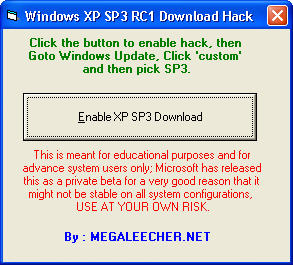

Windows XP SP3 Download Hack


Pls. keep in mind that this is meant for advance users and educational purpose only, this is not the final version of Windows XP SP3, it is release candidate 1, Use at your own risk.


Click Read More to download the Hack >>
Syndicate content

This is just one of the many helpful tips we have posted, You can find more stories here,
Do subscribe to updates using your favorite RSS feed reader or using the secure FeedBurner email update form on top of this post.
