 Computer system snapshot based backups can be a life-saver if you have important data on your computer, we had shared quite a few free alternatives to the most well-known commercial software utility for the task "Norton Ghost" and now another promising utility has been released by well-known computer-security software maker Comodo - suitably named Comodo Time Machine the free utility worls on almost all flavors of Windows allowing users to do a complete system rollback enabling restoring of computers to an earlier point in time with ease.
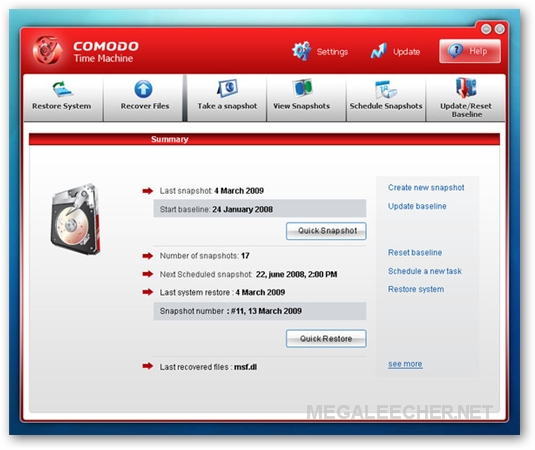
Comodo Time Machine allows users to take manual snapshots or schedule automatic snapshots backups to be taken at regular intervals, the 'snapshots' are a complete record of their entire system including the registry, critical operating system files and user-created documents, when disaster strikes the utility let users roll-back their computers to the last known working state.
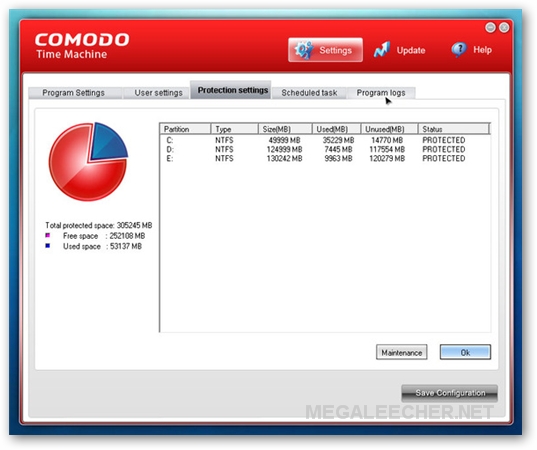
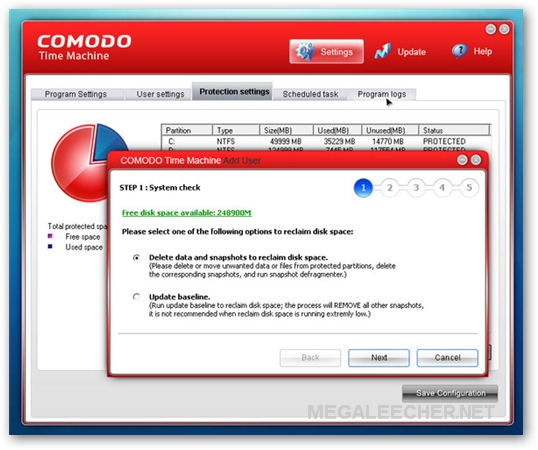
Image Credits : m3651048 at 23hq
Comodo Time Machine Salient Features :
* Easy to use - even beginners can quickly create system snapshots with a few mouse clicks
* Provides instant and comprehensive system recovery after virus or spyware infections
* Instantly reclaim your machine after devastating system crashes
* Rollback the changes to ALL your documents - not just changes to system files and the registry
* Boot-up console allows you to rollback even when your system will not boot to Windows
* Test new software and network configurations in the knowledge that you can quickly switch back if problems develop
* Completely remove unwanted software installations without the need to uninstall or clean the registry
* Flexible restore options allow you to mount and browse snapshots to recover individual files or folders
* Right click on any file or folder to synchronize it with a snapshot version
* Schedule regular system snapshots to ensure highly relevant restore points
* Network administrators have another way to quickly fix user or software problems
* Libraries, Internet cafes and other publicly shared networks can schedule a total system restore at the end of each session.
Comodo Time Machine is 100% free to use supporting Windows 7, Windows Vista, Windows XP SP3, Windows 2000 SP2 and Windows Server 2003 and can be downloaded from here.
Comments
How large will one snapshot
How large will one snapshot be? Could it be up to a few gig in space or more?
On an installation with 10.8
On an installation with 10.8 GB HDD space used, the snapshot appears to be Less than 500 MB.
pure sh.....
this f... program blew up my computer, impossible to start again by any mean restore ghost etc... i had to reinstall win7 64bits twice before i could finally resore an image and i dont even know if the system is stable now.TOTAL : 6 HOURS LOST AND MORE TO LOOSE TO REINSTALL ALL PROGRAMS.
So BEWARE WHEN YOU INSTALL THIS SHIT.
Why CMT is similar to
Why CMT is similar to AyRecovery, the OEM of AyRecovery?
does not works
has never worked
"install trouble, please reinstall"
game over.
I installed on Vista Home
I installed on Vista Home Preamium 32 bitit corrupted system restore and norton anti virus had to end up reinstlling Vista and programs THINK TWICE ABOUT DOWNLOADING THIS
Comodo Time Machine
XP SP3 NEW Installation, Comodo Installs perfectly.
Restore works awesome, i test deleted my office installation and restored. It recovered my programs, if it can do this, file recovery should be cake.
Great feature to restore after each reboot.
I am currently the Network admin/tech support guy for Chinook regional library,
I have been using windows STEADY STATE. I HATE HATE HATE that program, and it does not work with windows 7. WTF.
This program has been an answer to many prayers.
Thanks a million,
Jesse
BEWARE CTM and uninstalling CTM
See the CTM forum. Beware uninstalling it. Just disable it. and get your full clone (esaeus. ultimate boot cd-- free)
It has a very bad habit of misreading hte amt of space. Forum says old version used to allow 30-60 and more snapshots. I can tell you-- after a few, it tells you there is no more room. no way to re-allocate more space to the snapshot.
begins to corrupt windows, as other people have commented.
I had 50 gb each avail on C and D.
Worse-- IT DOES NOT protect your external drives! and it will go in there and corrupt the data. the manual is skimpy. there is no in depth coverage of what is best to do. If i leave my backup Tb drive out of the loop-- sleep the machine and then do a restart: I'm stuck with CTm having wiped my backup C files (even tho the top level folder was renamed!
Stay away from this program. It is incompetent.
EVen on the CTm forum-- the techs stay away. It may be an orphan.
Backup really important files onto a CD before you work to get rid of this program.
I'm doing this now. grief. wish me luck. and good luck to you
Check it out
Hey, if you try Rolback Rx you will find all the solutions that have hinted in your mind while restoring the system through Comodo Time Machine
Add new comment