Submitted by Deepesh Agarwal on Sun, 11/02/2008 - 13:02
If you are looking for a free, fast and easy folder hiding and locking utility for Windows 2000, XP, 2003 and Vista - My LockBox would be the perfect solution, the single-click folder locking and unlocking utility efficiently hides folder of your choice instantly.
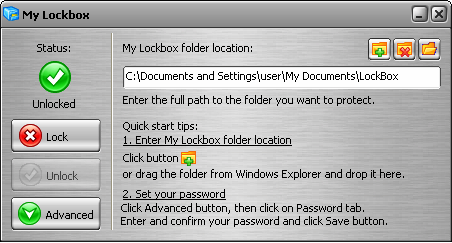
Once locked, the folder can only be made visible by entering correct password using the hotkey enabled control-panel.
My LockBox Features:
- Folder remains secured even in Windows Safe-Mode.
- The protection is almost instant as no file-encryption or moving takes place.
- Supports Windows 2000, XP, 2003, Vista including 64 bit support.
- Easy to use interface with skin support.
If you are still using Windows 95/98/Me and want to hide folders, try free version of Hide Folders developed by the same company.

Comments
This is a good software.
This is a good software. However, I used to experience countless BSoDs in Vista. Therefore, please be careful when using this.
This is a good software.
This is a good software.
Test
Is the folder lock in this software still hidden If I make my hard disk as a slave!?
Lock and unlock New Floder not Zip Floder
I am sure this software locking new floder in the install PC but I send this floder to my office or home that floder open without password.
Dear All,
I want to give a password to new floder without software in windows XP or other windows when I want if its possible send me a software like this when i send the floder any place its want a password.
this is my email send the training of password: shams_afghan@hotmail.co.uk
Add new comment