 We have written about methods on how to update Kaspersky products offline, one of the discussed method made use of a pretty unknown official Kaspersky updater utility, the free command-line utility is now in public beta and allows downloading of all Home and corporate Kaspersky Lab's product updates to a folder of your choice for offline update, the good thing is that the new version now supports a GUI to control the CLI Universal updater utility.
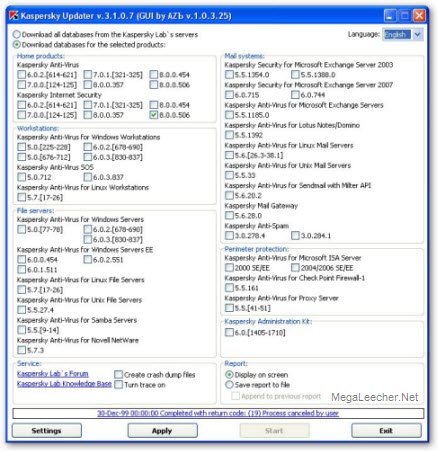
Using Kaspersky Universal Updater is pretty straightforward, all you need to do is to download the utility and GUI companion from here, extract both the programs in a single folder, configure options using the GUI and click start which will launch the CLI downloader, The Kaspersky Universal Updater is also smart and only downloads differential updates on subsequent runs, so once the initial updates are downloaded subsequent runs will only download few KB's.
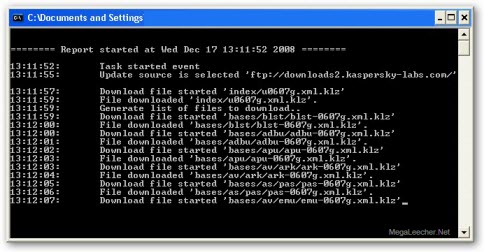
Once all updates are downloaded to your folder of choice you can follow the update method described earlier here to update your Kaspersky products offline.
Comments
thanks
Thank's for give me link
delete the threat
THIS IS THE BEST AUNTIVIRUS TO DELETE AUNTI VIRUS.
kaspersky universal updater
please send me about kaspersky universal updater how to download it.
Update Rescue CD/USB stick
Ok i've tried this today, seems to work.
Download updater and GUI from here:
http://support.kaspersky.com/updater?level=2
Unzip both in a folder of your choice, let's say it is called "KAV UPDATE"
Run the GUI, select Home Products - Kaspersky AntiVirus - 8.0.0.357, apply then start.
When is finished you'll have a folder called "Updates" in your "KAV UPDATE"
In "KAV UPDATE" create a subfolder called "bases" , and in that a subfolder called "Stat" (since kav rescue is based on gentoo linux, it will probably be case-sensitive, keep in mind)
1. Copy \KAV UPDATE\Updates\bases\av\kdb\kdbi386.sst
to \KAV UPDATE\bases\Stat
rename it to kdb.sst
2. Copy \KAV UPDATE\Updates\bases\av\kdb\kdb-0607g.xml
and \KAV UPDATE\Updates\bases\av\kdb\verdicts.ini
to \KAV UPDATE\bases\
3. Go in \KAV UPDATE\Updates\bases\av\kdb\i386\
select all files except the "win" folder, and
copy them to:
\KAV UPDATE\bases\
4. Copy \KAV UPDATE\Updates\bases\blst\*.*
to \KAV UPDATE\bases\
5. Copy \KAV UPDATE\Updates\bases\info\*.*
to \KAV UPDATE\bases\
6. Copy \KAV UPDATE\Updates\bases\rt\rt-0607g.xml
to \KAV UPDATE\bases\
7. Copy \KAV UPDATE\Updates\bases\upd\upd-0607g.xml
to \KAV UPDATE\bases\
8. Copy \KAV UPDATE\Updates\AutoPatches\kav8exec\kav8exec-0607g.xml
to \KAV UPDATE\bases\
9. Open up your iso/usb stick and remove/rename the folder "bases"
10. Copy your \KAV UPDATE\bases\ folder to your iso/usb stick.
Done.Hope this helps.
Stefano
Worked for me - thanks!
Just wanted you to know that the above instructions worked 100%.
I followed them to the letter and all is working fine.
Thanks for posting that, very helpful.
wK
Question?
In the manual update tutorial above, what does *.* mean? Everthing in that folder or that folder itself?
Kaspersky 2010
tnx for your program.
i used this utility everyday for kaspersky 506 .
but today i update my kaspersky to 2010 9.0.0.463.
but this utility dose not work for this version.plz help. tnx
kaspersky 2010
plz, help about kaspersky 2010
9.0.0.463
Update Rescue CD/USB stick
Works Great!!! two file extentions were typed wrong in the instructions .sst should be .stt but most of you trying this were probably able to figure it out. I am scanning my infected computer and it has already found 1 infection that the original virus dat could not find. :)
kaspersky 2010
please send me the link to download the universal updater, updating my antivirus is proving to be a big problem,taking over 2hours to update, il realy appriciate your help. iam thanking you in anticipation.
Add new comment