 If you own a printer I am pretty much confident that you must have encountered the dreaded issue of a stuck printer job, getting rid of a stuck print job is not as straight forward as it sounds and the worst part is that subsequent print or fax jobs sent to the queue will not print until the first job (which is unfortunately stuck) is cleared from the spooler queue this is also known as printer spooler restoration.
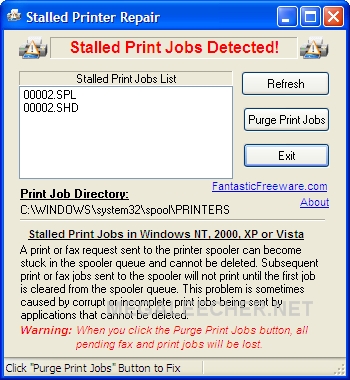
There could be various reasons for a print request to get stuck in the printer spooler queue which cannot be deleted, most of the time this is caused by a corrupt or incomplete print job sent by applications or any other reason which interrupts the print job in middle of the printing. I have been using a hand-coded dos-batch script to tackle this issue which simply stops the spooler service, deletes the queue content and re-starts the spooler service, now I have found a better alternative as free portable utility for Windows - Stalled Printer Repair.
Stalled Printer Repair detects existence of stalled print jobs and provides functions to purge all stalled print jobs on the Printer with ease, compatible with Windows NT, 2000, XP, and Vista the utility can be downloaded from the direct links provided below.
Download Links :
- Stalled Printer Repair [656 KB]
- Dos Batch File [249 Bytes] does the same job without the user-interface.
Comments
Thanks a lot..
this is definetly a life-saver :)
life saver briliant
life saver briliant
Wow this is really a useful
Wow this is really a useful software application! Really shocked by hearing the features of portable Stalled Printer Repair program! The procedure for troubleshooting printer issues using this tool is well explained here so that you can perform the task yourself!
Fix Brother Printer Offline Status Errors
Hello, I have the Photosmart Premium 309a and I am trying to install it on my HP Pavilion p-7 computer. I keep getting a message that the printer spooler is not running and I cannot start it. Any suggestions?
Add new comment