Submitted by Deepesh Agarwal on Sun, 02/15/2009 - 09:41
If you are receiving "The iPod [iPod Name Here] Cannot Be Synced. The Required File Is Locked" error while trying to sync your Apple iPod using iTunes as shown below the fix could be pretty simple.
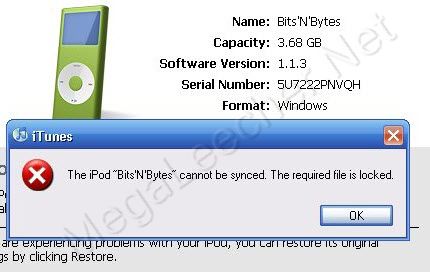
All the error means is that iTunes is unable to read/write to the database file inside your device, their could be several possible reasons for the error which might be recoverable depending on the cause of the error.
There are two common reasons for this error, first being database corruption due to syncing error or physical media corruption and second being library getting locked out for writing due to read-only attribute.
In most cases this error can be solved as follows:
- Open My Computer and navigate to your iPod disk, now Right-Click the iPod_Control folder and remove the read-only attribute if on.
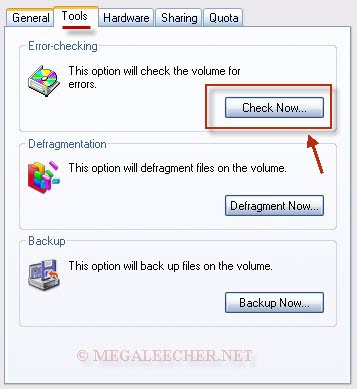
- Now, Open My Computer, Right-click your iPod disk drive and click Properties.
- Goto Tools and click Check Now button from "Error-checking section".
- Check "Automatically fix file system error" and Click Start.
- Let the scan complete, eject your iPod and reconnect.
- If you still receive the error, try restoring your iPod from iTunes.

Comments
Unable to sync iPod due to locked required file
Finally, after weeks of not being able to sync my iPod and spending hours researching the reason and trying every suggestion(I hadn't locked any files)I found this site. After following the steps shown here my iPod is syncing as I write this. I had added new music and pictures to my pc and was unable to add them to my iPod. Thank you for this solution.
what do you mean by that?
I don't get what you mean when you say navigate to your iPod disk, now Right-Click the iPod_Control folder... what if it doesn't show that when you click on my computer... and i'm not good with computers so i don't really know what to do... but my ipod touch won't sync on my iTunes it says error and shows numbers... so how do i fix it?
Reply to Anonymous
Dear Anonymous,
Ipod_Control is a hidden folder that contains the songs and movies that you put on your iPod. For it to show, you may do this: select "Search", click on "All files and folders", type "iPod Control" on the text box marked "All or part of the file name", click on "More advanced options", check "Search hidden files and folders", click "Search" and you're all set!
When the iPod_Control folder appears, right click that folder and select "Properties". Uncheck the "Read-only" check box and then follow all the other steps above.
To the author of the thread above, thanks a lot! You're a really big help!
xoxo,
Nadine
IPOD Nano synch issues
I right clicked the IPOD control and tried to unclick the the read only option. I click but it tells me I can't write to the volume. Help!
To Nadine, many, many thanks
To Nadine, many, many thanks - i've been hassling for over a week now and your post was the one!! again thank you. ben
Ipod Control Search
When I did the search for the iPod Control, it came back with no results to display, any other suggestions on how i can find this?
SAME ERROR WHILE SYNCING MY IPHONE
CAN U TELL ME HOW TO RESOLVE THE SAME ISSUE WID MY IPHONE....I TRIED THE ABOVE STEP BUT COULD'NT FIND THE IPHONE DISK IN MY COMPUTER.....SO I WASNT ABLE TO PERFORM ANY FURTHER STEPS.....LETMME TELL U MY PHONE IS GETTING DETECTED AS I CAN SEE THE CHARGING SIGN ON MY PHONE AND ALSO WHEN I OPEN ITUNE......IT IS ABLE TO DETECT......SO CAN U PLS TELL ME HOW 2 FI THIS?
ERROR: "THE IPHONE CANNOT BE SYNCED THE REQUIRED FILE IS LOCKED"
my i phone dont sync with itunes
ya I have same problem. When i try to sync my phone the itune show a message 'the required file is locked ' dont understand what to do......
<33
I friggin love you. It worked! :D
amen.
oh my goodness, so my iPod havn't been able to sync in about 3 months and i've been looking for help since. Today i desided to try one last time and found this website. THANK YOU SO MUCH! :) you made my week.
ip
convert your music to m4a format. and drag to itunes after. and sync. surely it sync.
HELP US
please help us .. how do we do it in iphone.. we can't find the error fixing when we right click on it.. i can't sync my photos .. and i'm so frustrated, i wanna sync my photos
Read more: http://www.megaleecher.net/iPod_Cannot_Be_Synced#ixzz0gcEzMOjM
iPhone Cannot be Synced reqired file is locked
I need syncing my iphone. I receive the message 'required file is locked'
Thanks. The error check
Thanks. The error check process resolved the issue for me.
Won't work, please help!
I can't get my ipod to appear in th sources list in itunes, i says file cannot be found, and then freezes. I can't put music on my ipod. I can't even restore it.
Ipod can't synichronize , required file is locked.
HOW TO DO, I EVEN DID READ ONLY FOR IPROD CONTROL FILE. BUT STILL ISN'T OK FOR ME. ITUNES CAN'T SYNICHORNIZE .. PSL HELP ME
If restore is now work?
if i restore ipod from itunes, and it still same , ( the required is locked)_ what to do?
Help please.
I can't find the iPod Control on my computer.
Am basically getting pissed right now, its been a month since the exact same thing happened.
please do help. :[
my ipod dont sync
hi there,my ipod dont sync it say unknow error occured,ipod cannot be sync a duplicate filename exist?what does it mean and how can i fix it.need help pls.
IPOD Nano synch issues - help!
Clicking on IPOD Control and unchecking read-only atrribute isn't working. It still says it is write protected.
You just totally saved my life.
I freaking love you.
Thank you so, SO much!
<3
thank you for posting your
thank you for posting your tips! it was a big help and saved me a lotttt of time!
txn
thanxs a lot men
Thank you soooo much
I was trying for the longest time to fix my old ipod shuffle, and i kept on getting this error! Thank you soooo much!!!!!!!!!!!!!!!
Thanks - Error check
Cheers buddy - worked a dream !!!
Walt
Problem solved, thanks so much!!!
You solution worked very well!
Thank you for posting this.
Thanks a million
I have an old iPod that I use in my car since the battery won't hold a charge anymore. This solution worked great for me. Thanks again
Thanks a WHOLE lot
recently had trouble with my ipod (2nd gen 2gb nano) and found this site. i tried this (after soft modding it with a 3rd party software, as an experiment) got the error when i connected it to my friends iTunes to put an album onto it, when i checked the files again (on the 3rd party software) i realized my check-sum was incorrect. I told it to fix check-sum. and re-synced it to itunes and that worked. I was worried i would have to repair the software via itunes and i would lose my songs. But this process worked for me.
oh hullah
Wow. I was getting "cannot find folder" messages whenever I tried syncing my 80gb iPOD. I tried wiping my ipod clean, reinstalling itunes, and even moving my entire mp3 library to another computer. I never would have thought to try this and it actually worked!
Thanks!
OH HULLAH
FAKE IPOD unable to connect~
i tried everything~ but i cant find this ipod control thing...
Thank You, Thank You, Thank You!!!
I haven't got anywhere with this issue in 4 months and in 5 minutes with your help it works again!!!
iPod cannot find all songs in the list.
First iPod owned. hooked it up to computer and sync set to take a list of 6 podcasts. iPod could only find 3 of the 6 which are downloaded to my iTunes library on my computer. Why is that. All 6 downloaded to computer this evening and 3 in sync with no problem.
Errors when sync musics
Hi. I'm getting very frustated with this problem:
I own an ipod classic (160gb), and when i try to sync my library i get one of this errors - -53, -50, -60 - associated with some track. Then, after lots of minutes, I eject the ipod, and when i go check it out only a few musics (600 +/-) are present. On the my information menu it says 4GB of "music" and 30GB of "others".
I've already tried deleting the indicated music files, but it always appear a new one giving the error.
i would be very gratefull for your help
tnx..it can help my
tnx..it can help my problems....tnx a lot.....
Do you know how to do this repair on Mac OS X Yosemite?
It looks like you have this down for Windows systems. How about the Mac to iPod fix for the same error?
Thanks.
Fixing iTunes Error - "The iPod Cannot Be Synced. The Required F
I cannot thank you enough, i had to shift to android phone to listen to music because my nano 7th gen stopped syncing.
I tried each and every blog up til now and done everything i could have to my ipod.
I dont understand one thing how come this folder became hidden/read only?
Thankyou so much for turning my junk nano to awesome again.
Try chkdsk /F command on the
Try chkdsk /F command on the ipod drive. it resolve the issue
try chkdsk /f command on your
try chkdsk /f command on your ipod drive. it resolve the issue
Add new comment