Submitted by Deepesh Agarwal on Sat, 03/22/2008 - 05:25
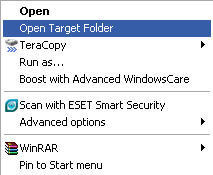
At times we need to open the target folder location of a shortcut, in Windows Vista you just need to right-click and choose "Open file location", but in-case of windows XP you need to - right-click the shortcut -> select Properties and then click "Find Target", However, to achieve the Vista type context menu option in Windows XP, simple install this handy OpenTarget shell extension (52.4 KB).
Comments
Thank You M8
If you didn't post it I would make one hehehe it's a must thank you :)
...
I seriously do not understand how to install this :p I've tried to change the OpenTarget installation directory to desktop but it didn't work, the only reason why I've tried this is because
C:\Program Files\OpenTarget directory did not work..I seriously need help.
Open Target
Simple Download the above file, unzip it and run the OpenTarget.exe file, You must unzip the zip before launching it.
Very timely
I was thinking about writing this exact tool this coming weekend. Thanks for saving me a few hours. Very cool!
Windows 95 Powertoys version
Windows 95 Powertoys had this and I still use that version today with WinXP. It's always worked perfectly and adds a sub-menu to your shortcut right-click menu which allows you to find/manipulate the target of the shortcut.
Very nice, thank you!
Very nice, thank you!
Done
I created this via a simple registry merge almost one year ago, nice that it's now available on a larger scale, not sure what it has to be an exe though.
Done
ThankU
Thanks Dude
even i was planning to write the same types of code to save my life .
i was desperately looking for this utility
Thanks,
Manish Bansal
Frackin Awesome
Thanks for this! A big time saver especially for corporate networks!
Alex.
nice one
thanm u for this nice utility
MOSTAPHA
????? ?? ?????? ???? ???thank you!
MOSTAPHA
Very nice, thank you, for utiliti
THANKSSSSSSSSSSS A LOT
THANKSSSSSSSSSSS A LOT
link dead... :(
link dead... :(
no comment
no comment
Try this VBScript instead...
'OpenFileLocation.vbs by Bonnie West

'Put this in your WINDOWS folder

Option Explicit

Const OFL = "OpenFileLocation"

Const sKEY = "HKCU\Software\Classes\lnkfile\shell\OpenFileLocation\"

Const sVALUE = "Open &file location"

Const sCMD = "wscript.exe %WINDIR%\OpenFileLocation.vbs ""%1"""

Dim WshShell
Set WshShell = WScript.CreateObject("WScript.Shell")
If WScript.Arguments.Count Then
OpenFileLocation
Else
InstallUninstallOFL
End If
Set WshShell = Nothing
Sub OpenFileLocation
Dim FSO, sTarget
sTarget = WshShell.CreateShortcut(WScript.Arguments(0)).TargetPath
Set FSO = WScript.CreateObject("Scripting.FileSystemObject")
If FSO.FileExists(sTarget) Or FSO.FolderExists(sTarget) Then
WshShell.Run "explorer.exe /select,""" & sTarget & """"
Else
MsgBox "Could not find:" & vbCrLf & vbCrLf & _
"""" & sTarget & """", vbExclamation, OFL
End If
Set FSO = Nothing
End Sub
Sub InstallUninstallOFL
Dim sPrompt, iButtons
sPrompt = "Do you want to add the ""Open file location"" context menu " & _
"option to shortcut files?" & vbCrLf & "(Select NO to remove)"
iButtons = vbYesNoCancel + vbQuestion + vbDefaultButton3
iButtons = MsgBox(sPrompt, iButtons, "Install " & OFL & ".vbs")
On Error Resume Next
Select Case iButtons
Case vbYes
WshShell.RegWrite sKEY, sVALUE, "REG_SZ"
WshShell.RegWrite sKEY & "command\", sCMD, "REG_EXPAND_SZ"
Case vbNo
WshShell.RegDelete sKEY & "command\"
WshShell.RegDelete sKEY
End Select
If Err Then
MsgBox Err.Description, vbCritical, Err.Source
Else
Select Case iButtons
Case vbYes: MsgBox "Installed successfully!", vbInformation, OFL
Case vbNo: MsgBox "Uninstalled successfully!", vbInformation, OFL
End Select
End If
End Sub
Add new comment