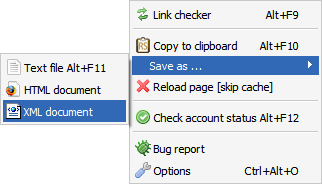
 Firefox extensions like RSFind makes copying Rapidshare links from webpages fast and simple, but it lacks the essential feature to check Rapidshare link validity, but no worries as the new extension named Unofficial RapidShare Tool takes care of small annoyances related to copying and validation of Rapidshare links automatically, apart from copying Rapidshare links to Clipboard, Text File, HTML and XML formats the free Firefox addon can also check validity of the links automatically with fully customizable color coding options to distinguish working and non-working Rapidshare links on a webpage.
Rapidshare Link Copy Options
Automatic Link Checker With Customizable Color Codes

The addon can be configured to check link validity manually or automatically, the addon is also smart enough to check coded links like h**p, hxxp, hyyp and redirected links within frames and textareas.
The addon is still under developmental stages and can be downloaded from the links provided below.
Download Unofficial RapidShare Tool/strong>
- Official Site - UnOfficial.rs/
- Direct Download Link unofficial_rapidshare_tool-0.2.3.1-fx.xpi - [35.7 KB]
- Extension homepage at Mozilla (requires free Mozilla account to download)
Comments
Awesome..
This works pretty good, thanks for sharing.
Nice, me likely
Nice, me likely
How long have you been using
How long have you been using Rapidshare ? its a must to have third party tool programs to do this
This doesn't seem to work - maybe it's even a fraud :(
I have downloaded and installed the utility in Firefox 3.5.8.
the only effect is has is to show a bar in the browser saying: Premium Account detected (recommended: Store data to external device", and then showing 2 buttons in the top right: Store data...and....do not show again.
Other than that, it doesn't display itself in the right click menu, and it has not been added under Functions, i.e. there is no way I can access the alleged functions of the add-on.
Nowhere on this page have I seen a link to a user manual, or just an explanation of how it actually works within Firefox.
If anyone has gotten this program to work, please let me know how. To the developer: If this works, it's a good programme, but you need to write a short manual of how to get it to work.
And finally: Given that the program doesn't work, but does detect I have a Rapidshare Premium account, it lies very close to assume it's a actually a script written to steal people's premium account codes - that's not really cool.
Late response
@jensrosk
Thank You for Your constructive review.
Version 0.2.3.1 is not compatible with Fx 3.5.8.
You can download 0.3.5.1 from official site.
AMO reviewers would delete this extension if Your allegations were true, but this is Your opinion, and You have the right to say whatever You want. As this is open source project feel free to read complete source, and then make these kind of allegations.
BTW. If I ever get free time, a newer version will come out, I can not make any promises, this is non profit project so have patient ...
Add new comment