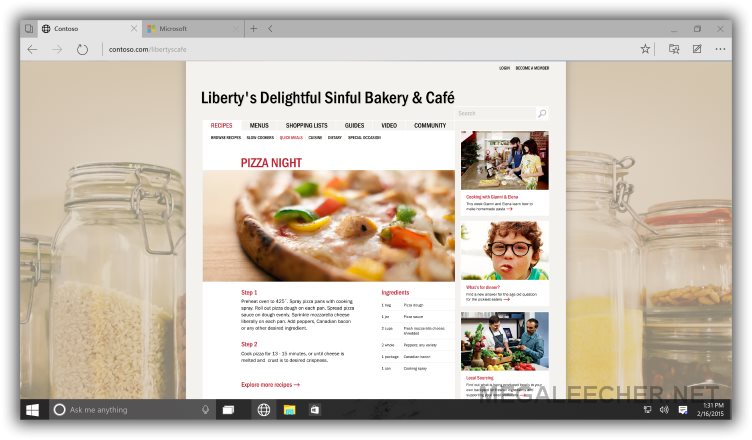
Microsoft has announced the Internet Explorer killer, company's Windows 10 will ship with a brand new browser, codenamed “Project Spartan.” Designed for Windows 10, Spartan is a single browser developed for the entire Windows 10 device family - from keyboard and mouse on the Windows 10 desktop to touch, gestures, voice, controllers and sensors on other devices. The new web-browser from Microsoft is designed to offer a more interoperable, reliable, and discoverable experience with advanced features including the ability to annotate on web pages, a distraction-free reading experience, and integration of Cortana for finding and doing things online faster.
Powered by a new rendering engine, Spartan is designed for the modern web with greater emphasis on performance, security and support for modern web-technologies across Windows 10 devices. The new rendering engine will be the default engine for Windows 10, Spartan will also allow loading of IE11 engine for legacy enterprise web sites and applications using older technologies designed only for Internet Explorer, such as custom ActiveX controls and Browser Helper Objects.
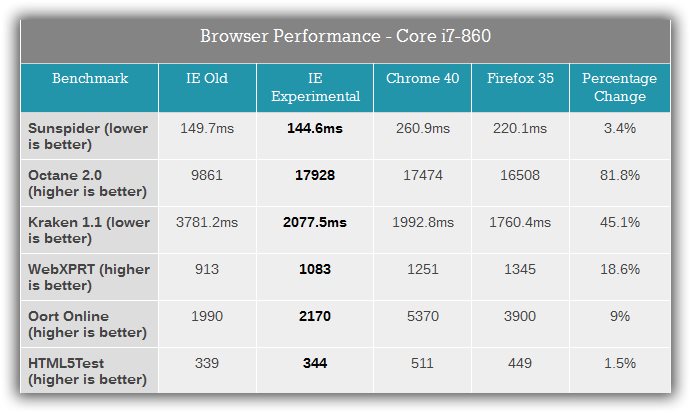
Microsoft Spartan (Internal Test Builds) Vs Google Chrome Vs Mozilla Firefox Benchmark



 Microsoft has released the Internet Explorer 10 Release Preview upgrade for Windows 7 users, with this announcement of