Like This Post, Get Updates By Email:

Enter your email address:

Delivered by : FeedBurner

Microsoft Windows 7

Test Drive And Learn Windows 7 Features From Your Web-Browser

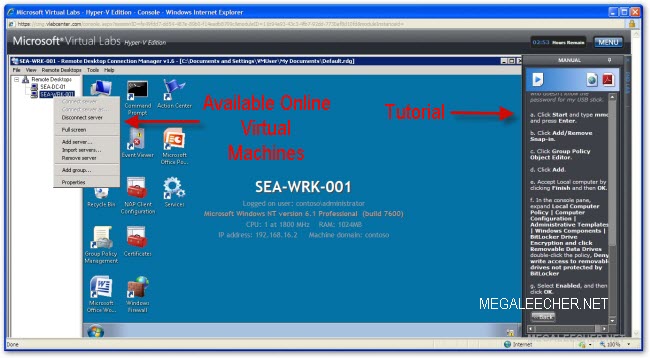
Windows 7 Test DriveMicrosoft Windows 7 is getting some good sale figures and if you also planning to get switched on the new operating-system now you can test and learn the new features online right from your web-browsers - thanks to newly introduced Windows 7 Test Drive service from Microsoft which allows users and developers to experience Windows 7 running live on Microsoft servers in an safe virtual test-drive environment accompanied with supporting step-by-step walkthrough videos of it's features.

Try Windows 7 Online In A Virtual Machine

The free test-drive resource requires no special software installation and runs inside your web-browser (Internet Explorer) and needs a single Active-X installation to get started.

Upgrading Windows 7 From Pre-Release To Final Version

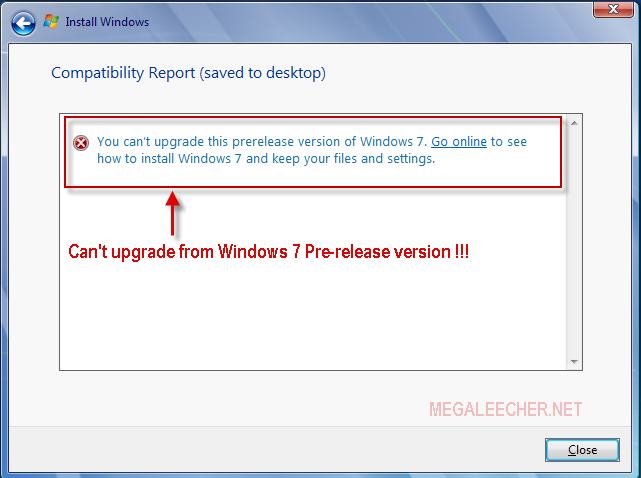
Windows 7 LogoIf you jumped onto Microsoft Windows 7 pre-release version (Beta or RC) you can't upgrade to the final RTM version and need to do an clean install loosing all your settings and installed application as Windows 7 setup won't let you upgrade from a pre-release version to final build displaying error as below.

Windows 7 Upgrade Error

Luckily there is a simple config-file hack which allows you to do an in-place upgrade from Windows 7 pre-release to final version keeping your files, settings and applications intact.

Download Seven Transformation Pack And Transform Windows XP To Windows 7

Microsoft Windows 7 RC1 is out now and users are appreciating the interface and features of the new operating system, We have shared Windows 7 Themes and Transformation Packs to make your existing operating-system look and behave like Windows 7, all new Seven Transformation Pack is now available to provide Windows XP users with an experience closest to Windows 7 without upgrading to the new operating system.

Windows 7 Transformation For XP

Windows 7 Build 7106 Leaked And Available For Download

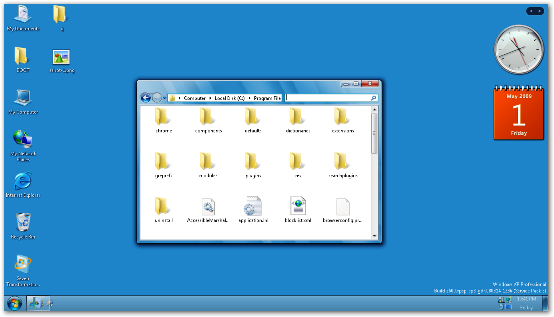
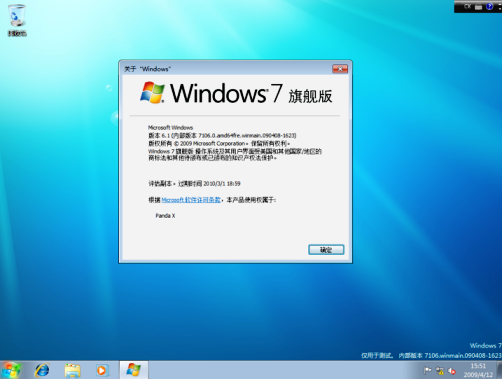
Windows 7 Build 7106Here is yet another probable Windows 7 RC build leaked onto torrent portals, the latest Windows 7 copy to leak has a build tag 7106.0.090408-1623 but it is still to be verified as an genuine leak and not somebody faking the build tags, the screenshot below shows a Chinese version but English versions of the leak are also reported to be available and should soon spread like fire, the following English version build strings are reported to have been leaked and seen in wild :
7106.0.090408-1623_x86fre_client_en-us_Retail_Ultimate-GRC1CULFRER_EN_DVD.iso
7106.0.090408-1623_x64fre_client_en-us_Retail_Ultimate-GRC1CULXFRER_EN_DVD.iso

Microsoft Windows 7 Build 7106

Try Windows 7 Beta Safely Using Virtual Install Method

Windows 7Microsoft Windows 7 is still in preview stages but has already gained quite a substantial amount of users trying its first beta, if you are willing to try the new beta without taking any risk with your existing computer configuration, installing it on a virtual machine is the best option, the whole process is very safe and takes around 40 minutes to get completed on a decently powered P4 computer.

A virtual machine installation lets you try Windows 7 inside your existing OS as a guest operating-system, Both Microsoft Virtual PC 2007 and Sun VirtualBox can be used for this purpose, I will be using Sun VirtualBox for this demonstration.

  1. Download and install Sun VirtualBox if not already done.
  2. Download and obtain a license key for Microsoft Windows 7 Beta using instructions provided in the earlier post here.
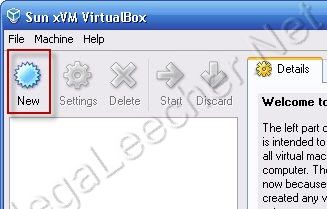
  3. Now launch VirtualBox and click the New button to start setting up our Windows 7 virtual machine.
  4. VirtualBox

Windows 7 - Microsoft's Upcoming OS Milestone 1 Delivered To Key Partners

Windows 7 Vienna Logo Artistic IllustrationTGDaily has reported with reference from several key industry partners about Microsoft's next OS offering codenamed "Windows 7" being shipped to its key partners as “Milestone 1” (M1) code drop for validation purposes.

Sources claim from a recently distributed roadmap for Windows 7 release to manufacturing in H2 2009. However, Microsoft declined to comment on this date.

The new OS “Milestone 1” (M1) version is said to be supporting heterogeneous graphics system consisting of multiple graphics cards even from different vendors, a new revamped version of media center is also included with basic audio support for now, the most sought after feature of the new OS is MinWin a small OS kernel using only 40 MB of memory.

A NeoWin forum user claimed to have tried the Windows 7 Milestone 1 and posted this:

Over the weekend I finally managed to play with the build…. but disappointed.

One my primary machine, it asked for my SATA driver (never happened when installing Vista, as my drives were set as IDE in BIOS). After adding the driver from my USB thumb drive it would finally install. It didn’t boot after first restart, however.

On my laptop it installed perfectly, but with no driver support for the video card. After numerous tries I gave up in the end, so Aero is now left in the dark.

Oh well, so there’s nothing to show.

The build is 6.1.6519.

The GUI, as much of you have guessed, is very much like Vista. I don’t know if once the right video card driver is in place whether there will be flashy stuffs to surprise me. The system is very responsive, using barely 480MB of memory after boot.

Gadgets are now integrated into explorer. You can right click on desktop and select “Add Gadget” or “Hide Gadget”. There is a new gadget called “Windows Media Center” that displays now playing information from the WMC. On the same menu, “Display” is added above “Personalization” which gives you direct access to display DPI settings. The page is much more polished than the one in Vista.

The start menu features a pin besides each item. Clicking on it toggles pinning/unpinning the item. Search in explorer is now states where you search within (usually being within the folder, as in Vista). You can now, however, adjust the size of the search box.

XAML fonts, called the “Composite Fonts” are now added to the font folder. Perhaps WPF will be much more prominent in this release. It’s disappointing that I don’t have Aero running, or otherwise there might be some interesting stuffs to see.

A new application is added, dubbed the “XPS Viewer”, no surprises, either.

Then finally, something interesting came up: the feedback tool. The feedback tool lists the “pillars” of Win 7. You can see that Microsoft is aiming to fine tune this release as the case in XP rather than technological advancement as in 2K. highlights include”network aware”, with improved connection tools and detections. It will have the ability to detect which network you’re in and switch your settings and devices accordingly; With Live account, you can carry your IE settings and favorites with you; Gadget data caching; New Calculator, Paint, and Wordpad using WPF; install to desktop in 10 mins with only 1 reboot; instant streaming; better battery mileage, etc. All descriptions are scenario-based, so what will actually turn up is still yet to know.

Oh.. how could I miss this. A new boot screen does show up, finally. A full screen Vista-logon screen like boot screen with a beam scrolling across the whole screen near the bottom. Looks nice but reminds me of Win9x (well since XP we’ve been in the “dark”, so surprised to see such a bright boot screen)!

Syndicate content
This is just one of the many helpful tips we have posted, You can find more stories here,
Do subscribe to updates using your favorite RSS feed reader or using the secure FeedBurner email update form on top of this post.