Like This Post, Get Updates By Email:
iPod Touch
Blackra1n Screenshots Released; Better One Click Jailbreaking Utility appuloha1l Launching Today
Submitted by admin on Sun, 10/11/2009 - 05:18.
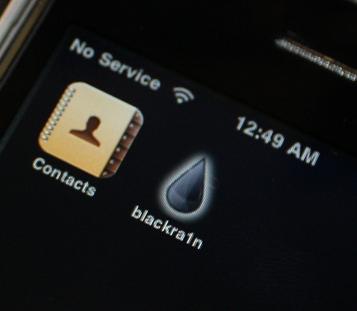
GeoHot's much awaited one tool to rule them all Blackra1n seems to be releasing soon is now released (see full post for Blackra1n direct download links) hours after GeoHot made GUI and icon screenshot's public on twitter, however, things are getting quite exciting as a better more advanced one-click jailbreaking utility for all versions and generations of iPhone/iPod Touch is coming our way today dubbed appuloha1l, the author's claim appuloha1l to be more advanced then blackra1n as its capable of jailbreaking untethered iPod Touch 3rd generation and is seven seconds faster then blackra1n for jailbreaking (blackra1n takes 30 seconds to jailbreak, while appuloha1l takes 23 seconds to jailbreak).

- 2 comments
- Read more
- 3399 reads
iPhone Trojan And Viruses Are Here !
Submitted by admin on Tue, 04/07/2009 - 05:11.
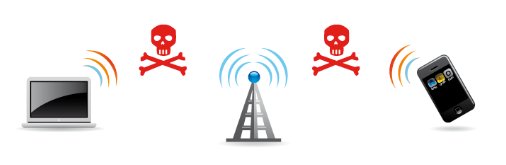
You may soon need an anti-virus solution for your Apple iPhone and iPod Touch devices as there seem to be an increasing number of reports claiming virus and trojan outbreaks on jail-broken iPhones, almost an year ago iPhone Trojan named '113 prep' created quite a buzz being the first virus/Trojan for iPhone appearing onto the radar, now iPhone users are reporting strange message popups on there devices.
Despite this being suggested as an iPhone Virus or Trojan by some forum members I am very much sure that it is nothing more then a prank, but considering the current scenario of increasing number of jail-broken iPhones having ability to install unverified cracked applications this can soon lead to make malware creators target these devices.
- 3 comments
- Read more
- 2346 reads
Simple Guide To Jailbreak iPod Touch 2G
Submitted by admin on Tue, 03/24/2009 - 04:45.
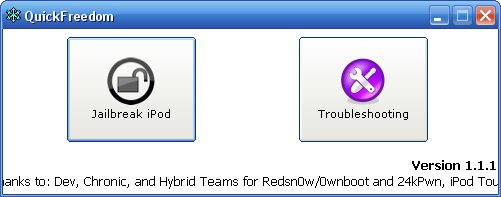
Unlike iPod Touch First Generation jailbreaking the newer iPod Touch Second Generation requires a different approach as QuickPWN currently does not support iPod Touch 2G, luckily iPod 2G is now jailbreakable and QuickFreedom is a new utility which can get the job done pretty easily via a simple to use wizard styled user interface, QuickFreedom works on Windows XP and Vista allowing users to jailbreak and install Cydia and Installer with options to change the boot logo.
QuickFreedom supports jailbreaking the latest iPod Touch 2G with 2.2.1 firmware, the 5-step jailbreaking process is quite simple and can be done easily as described next.
- 26 comments
- Read more
- 11947 reads
Simple Guide To Jailbreak Apple iPod Touch 1G Using QuickPWN
Submitted by admin on Tue, 03/17/2009 - 08:14.Jail-breaking your Apple iPod Touch allows you to enjoy hundreds of themes, games, applications and hacks which are not supported by Apple, although jailbreaking can be done pretty easily using free wizard styled application QuickPwn if not done properly it can render your device inoperable requiring a restore via iTunes.
Jailbreaking your device requires basic computer knowledge and should take roughly 15-25 minutes to complete on a decently powered PC/Mac computer.
- 99 comments
- Read more
- 56213 reads
iTunes 8.0 And A New Cheaper And Sleeker iPod Version
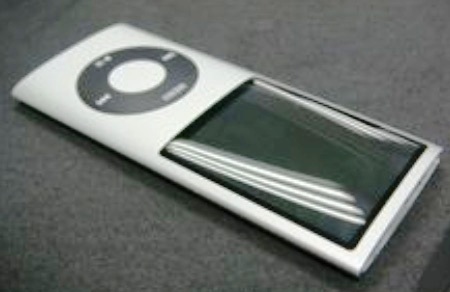
Submitted by admin on Sun, 08/24/2008 - 06:48.Kevin Rose - founder of Digg is claiming to have knowledge of upcoming revamped iPod models and iTunes 8.0 software with lots of new features, in a blog post Kevin also posted pictures of rumored new version of iPod Nano.
Kevin is claiming to have knowledge of following rumors:
- Add new comment
- Read more
- 5521 reads
How To Downgrade iPhone Firmware v 2.0 To Earlier Versions
Submitted by admin on Sun, 07/20/2008 - 09:32.
If you upgraded to the latest iPhone firmware version 2.0 by mistake and bricked your iPhone or don't like the new upgrade here are simple to follow step by step instructions to restore iPhone or iPod Touch to an earlier firmware of your choice.
- Uninstall iTunes 7.7 and Install iTunes 7.5.
- Connect your phone to computer via USB.
- Turn off the phone.
- Place your phone in DFU mode (Device Firmware Upgrade) as described below:
- Push and hold Home and Power buttons on your phone simultaneously for 10 seconds.
- Release the Power button but keep holding Home until the computers beeps recognizing the USB device.
- You should be in DFU mode now.
- Download and save your desired iPhone and iPod Firmware Version Files.
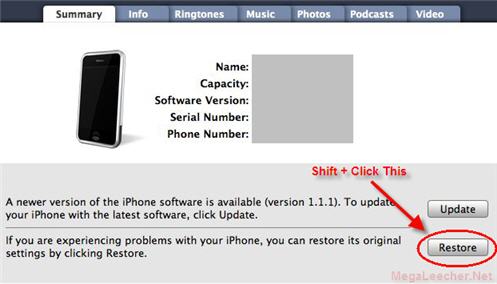
- Now go ahead with the restore to your desired iPhone firmware using iTunes 7.5, to do so simply Hold down Shift key and press the Restore button in iTunes.
- Select your iPhone restore file to continue.
- Once restored you can Jailbreak and Unlock your iPhone using various other methods.
Here are the video instructions for the steps above.
- 6 comments
- Read more
- 19831 reads
Using iPhone And iPod Touch As Removal Disk Drive
Submitted by admin on Tue, 07/15/2008 - 06:12.Apple iPhone and iPod Touch offer lots of storage space which can be utilized for storing files, backups or as an external disk drive, but unfortunately Apple removed the ability to use the device as an external storage, However as always software's have been developed to bypass this restriction.
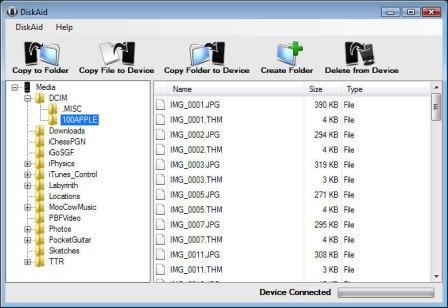
DiskAid is one such free software for Windows and Mac enabling owners to use their iPhone or iPod touch as an external disk drive, With DiskAid you can transfer files and folders between your iPhone or iPod Touch and your Computer with ease, DiskAid auto-detects any plugged in supported device and offers an easy to use Files & Folders Browser with drag and drop support for fast and easy operations.
You don't need to jailbreak iPhone or iPod and the softwares works well with all the firmware versions including the latest iPhone Software Update 2.0.
- 2 comments
- Read more
- 9700 reads
New 32GB iPod Touch Launched By Apple
Submitted by admin on Wed, 02/06/2008 - 03:18.Just in time for Valentine's day Apple has announced 32GB version of iPod Touch, with this latest offering iPod Touch is now available in 8, 16 & 32 GB variants.
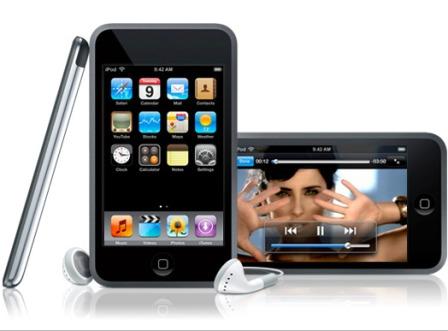
The iPod Touch (iTouch) series of iPod is similar to iPhone minus the phone capabilities, having Multi-Touch interface, 3.5-inch widescreen full color display, Wi-Fi connectivity and pre-installed applications for services like web-browsing, YouTube, Mail, Stocks, Weather, Notes, iTunes Wi-Fi Music Store, Maps etc. iTouch is the gadget to go for this year.
Bookmark site
Bookmark page
Make homepage