Submitted by Deepesh Agarwal on Thu, 10/17/2013 - 09:29
 Majority of high-speed internet service providers have some sort of data-usage caps in their unlimited plans labelled as "Fair Usage Policy (FUP)", where the internet speed is throttled to a lower value after user's high-speed usage quota gets exhausted. Facing tough competition from "You Broadband", India’s largest telecom service provider Bharat Sanchar Nigam Limited (BSNL) has now announced two plans with truly unlimited broadband usage without any FUP in Surat. The new plans BB Home Combo UL 575 CS20 (costing Rs. 525/- per month) and BB Home Combo UL 725 CS21 (costing Rs. 725/- per month) features downloading speeds of 512 Kbps and 1 Mbps respectively without any maximum usage cap.
BSNL Truly High-Speed Unlimited Broadband Plan
|
Particulars
|
BB Home Combo UL 575 CS20
|
BB Home Combo UL 725 CS21 |
| Bandwidth (Download Speed) | 512 Kbps Flat | Upto 1 Mbps Flat |
| Applicability | For Home in Surat SSA of Gujarat Telecom Circle only | |
| Fixed Monthly Charges (Rs) | 575 | 725 |
| Annual Payment Option (Rs.) [11 x FMC] | 6,325 | 7,975 |
| 2Years Payment Option (Rs.) [21 x FMC] | 12,075 | 15,225 |
| 3 Years Payment Option (Rs.) [30 x FMC] | 17,250 | 21,750 |
| Free E-mail IDs/Space (Per E-mail ID) | 1/5 MB | 1/5 MB |
| Security Deposit | One Month charges | |
| Minimum Hire Period | One Month | |
| Telephone fixed monthly charges in Rs | NIL | |
| Free Calls | NIL | |
| MCU(Meter Called Unit) Charges/Pulse in Rs. | Rs 1 (To BSNL N/W after free calls) | |
| Rs 1.2 (To Other N/W ) | ||

 PDF remains the best file format for sending, sharing, printing and archiving electronic documents. While its universal formatting and viewing features are unsurpassed, it is not so convenient for making changes. So, as much as we like receiving documents in PDF because we know we’ll be able to view the document as intended, with all the text, images and hyperlinks in their proper places, we get a headache when we receive a PDF that we need to modify. In many cases people start creating new documents and manually typing information from the PDF file in order to get the job done.
 Sending even a basic document over the Internet is never a totally secure activity these days. Why put up with this when there are virtual private networks, or VPNs, available? Kepard has some of the finest VPN service options available, and all of them can allow you to send images, documents, and data of all kinds - and without any fears of hackers or data theft.
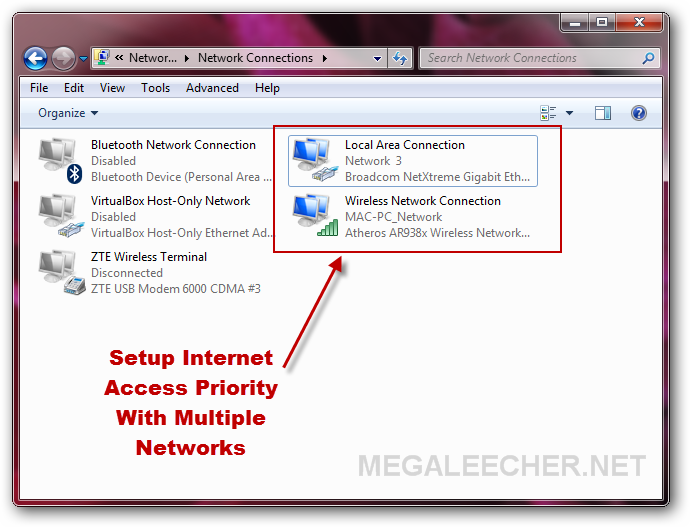
 If you are using multiple NIC's (Network Adapters) to access more than one network, it gets tricky from where you internet connection comes from. Here is one such scenario and solution to make Microsoft Windows prioritize internet connection from a particular network over the other. In my example setup I have one LAN connection (192.168.0.1) and one WiFi connection (192.168.1.1) and would like Windows to use internet from my fixed-line broadband connected via LAN.